I've tested BlastVPS to see if their "enterprise hardware at budget prices" claim holds up. After running comprehensive benchmarks on their VPS-Pro plan, I found performance that genuinely rivals providers charging double.
I've tested BlastVPS to see if their "enterprise hardware at budget prices" claim holds up. After running comprehensive benchmarks on their VPS-Pro plan, I found performance that genuinely rivals providers charging double.
BlastVPS markets itself as a performance-focused hosting provider delivering enterprise-grade hardware without the enterprise price tag. But performance benchmarks tell the real story.
So let’s dig to see if it delivers value or just clever marketing.
Linux VPS for developers and system administrators
cPanel web hosting for traditional website management
And dedicated servers for resource-intensive applications
BlastVPS offers a 2-day right of withdrawal for EU consumer clients under applicable EU law.
However, if you request immediate service activation before the 14-day withdrawal period expires , proportional charges may apply based on usage.
On the payment side, they accept PayPal, cryptocurrency, and account balance funding, with all transactions processed securely through their client panel.
While EU consumers have a 2-day withdrawal right, proportional usage charges may apply if you activate immediately. I highly suggest starting with the lowest tier that meets your minimum requirements, then using their instant scaling feature to upgrade once you’ve verified performance.
Rating Breakdown
To ensure consistency and objectivity across all our hosting reviews, we developed a comprehensive rating methodology that evaluates providers across five critical dimensions. Each category receives a score out of 10, which combines to form an overall rating.
The feature set is comprehensive with instant deployment, smart resource scaling, multiple global locations, full root/administrator access, and automated backups on Linux plans.
The registration process takes under two minutes, server deployment is genuinely instant (2 minutes), and the dashboard is clean and intuitive with real-time monitoring.
Support responded to my technical question in just five minutes on a Sunday evening with accurate, detailed information that demonstrated genuine infrastructure knowledge.
Overall
9.6/10
BlastVPS delivers enterprise-grade performance at budget-friendly prices with excellent support and user experience.
BlastVPS Hosting Features
Interactive dashboard for server management
IPMI and KVM remote console access
Region-locked website access capabilities
Supports automated script execution continuously
Pre-configured OS templates for deployment
Live resource monitoring in real-time
Softaculous app installer with templates
Migration services for existing websites
Looking Glass for network performance testing
Performance
My test server was the VPS-Pro plan with the following specifications:
CPU: 4 vCores on AMD Ryzen 9 9950X
RAM: 8GB DDR4
Storage: 180GB NVMe SSD
Location: USA (New York)
Network: Unmetered bandwidth with 500 Mbps port speed cap
I conducted four categories of performance tests: CPU benchmarking, memory throughput, disk I/O performance, and network speed.
These tests provide a comprehensive picture of how the server performs under different workload types.
1. CPU Performance
The Sysbench CPU benchmark calculates prime numbers up to 20,000, stressing the processor with mathematical operations.
I ran two variations: single-threaded (using one CPU core) to measure per-core performance, and multi-threaded (using all 4 cores) to test parallel processing capability and how well the hypervisor allocates CPU resources.
Results:
Single-threaded test:
Events per second: 563.42
Average latency: 1.77ms
Total events in 10 seconds: 5,635
Multi-threaded test (4 cores):
Events per second: 2,194.12
Average latency: 1.82ms
Total events in 10 seconds: 21,947
What This Reveals: The single-threaded performance of 563.42 events per second demonstrates strong per-core performance from the AMD Ryzen 9 9950X processor. This is exactly what you’d expect from a current-generation, high-frequency Ryzen chip.
The multi-threaded test is particularly telling. With 4 cores, we achieved 2,194.12 events per second, approximately 3.89x the single-core performance.
Perfect linear scaling would be 4x (563.42 × 4 = 2,253.68), so we’re seeing 97.4% scaling efficiency. This near-linear scaling indicates that BlastVPS is providing genuinely dedicated CPU cores without significant CPU steal or resource contention from neighboring VMs.
In shared environments with CPU overcommitment, you’d typically see scaling drop to 2.5-3x instead of nearly 4x.
The consistent latency between single-threaded (1.77ms) and multi-threaded (1.82ms) tests further confirms minimal CPU contention. This is excellent performance for a VPS environment.
2. Memory Performance
The memory benchmark tests RAM throughput by reading and writing 10GB of data in 1KB blocks.
This stresses the memory subsystem and reveals how fast the server can move data in and out of RAM.
Results:
Read test:
Throughput: 7,103.36 MiB/sec
Total time: 1.44 seconds
Operations: 10,485,760
Write test:
Throughput: 6,366.45 MiB/sec
Total time: 1.61 seconds
Operations: 10,485,760
What This Reveals: Memory read speeds of 7,103 MiB/sec (approximately 7.1 GB/sec) and write speeds of 6,366 MiB/sec (approximately 6.4 GB/sec) are exceptional for a VPS environment.
These numbers indicate the RAM is not being artificially throttled and that the memory controller on the AMD Ryzen platform is performing exactly as you’d expect from DDR4 memory with a modern processor.
For context, typical VPS providers in this price range deliver memory throughput between 3,000-5,000 MiB/sec.
BlastVPS is significantly exceeding that baseline, which means applications like in-memory databases (Redis, Memcached), data processing tasks, or any RAM-intensive workload will perform admirably.
The fact that write performance is only about 10% slower than read performance is normal and indicates balanced memory subsystem performance without bottlenecks.
3. Disk I/O Performance
Random operations simulate database queries and general application usage, while sequential operations represent large file transfers, backups, and media streaming. The tests used 2GB of test files with 16KB block sizes.
Results:
Random Read:
Throughput: 5,661.32 MiB/sec
IOPS: 362,324.72 reads/s
Average latency: 0.00ms (sub-millisecond)
Random Write:
Throughput: 215.63 MiB/sec
IOPS: 13,800.41 writes/s + 17,666.14 fsyncs/s
Average latency: 0.03ms
Sequential Read:
Throughput: 6,564.85 MiB/sec
IOPS: 420,150.59 reads/s
Average latency: 0.00ms (sub-millisecond)
Sequential Write:
Throughput: 302.70 MiB/sec
IOPS: 19,373.04 writes/s + 24,797.64 fsyncs/s
Average latency: 0.02ms
What This Reveals: The NVMe SSD performance is genuinely impressive, particularly for read operations.
Random read throughput of 5,661 MiB/sec (over 5.5 GB/sec) with 362,000+ IOPS demonstrates enterprise-grade NVMe performance. Sequential reads hitting 6,564 MiB/sec (6.4 GB/sec) confirm the storage backend is genuinely NVMe and not SATA SSDs marketed as “fast storage.”
For practical applications, this means:
Database performance: The 362,000 random read IOPS will handle database queries extremely well
Web applications: Page loads, asset serving, and dynamic content generation will be fast
File operations: Backups, log processing, and file uploads/downloads will be snappy
Docker/containers: Image pulls and container startup times will be minimal
The sub-millisecond latencies across all tests indicate the storage is directly attached NVMe without virtualization overhead degrading performance.
4. Network Performance
The Speedtest benchmark measures download speed, upload speed, latency, and packet loss by transferring data to and from a nearby test server.
Results:
Download Speed: 404.07 Mbps
Upload Speed: 380.15 Mbps
Idle Latency: 0.29ms (jitter: 0.02ms)
Download Latency: 110.38ms (jitter: 32.76ms)
Upload Latency: 0.46ms (jitter: 0.06ms)
Packet Loss: 0.0%
Data Used: 180.9 MB (download), 673.6 MB (upload)
What This Reveals: The network performance aligns perfectly with what BlastVPS support told me in the ticket: the port is capped at 500 Mbps, and I’m seeing 404 Mbps download and 380 Mbps upload in actual testing.
This represents approximately 76-81% of the theoretical maximum, which is excellent efficiency considering network protocol overhead, TCP/IP stack processing, and real-world internet conditions.
The download speed of 404 Mbps and upload speed of 380 Mbps show relatively symmetrical performance without artificial upload throttling.
Important for applications that serve content, run APIs, handle file uploads, or manage bidirectional data transfers. The slight difference is normal network variance rather than any intentional limitation.
For practical applications, this network performance means your web applications will load quickly for users, API responses will be snappy, file transfers will complete efficiently, and you won’t experience the connection drops or packet loss that plague lower-quality network infrastructure.
Overall Performance Assessment
BlastVPS delivers on its hardware promises. The AMD Ryzen 9 9950X processors provide strong single-threaded performance and near-perfect multi-core scaling.
If you’re running production web applications, databases, containerized workloads, or any performance-sensitive applications, BlastVPS provides the computational foundation to support those workloads without performance becoming a bottleneck.
Level of Support
BlastVPS offers three primary support channels:
Live Chat – Real-time assistance through their website chat interface for immediate questions.
Discord Server – Community-based support with announcements, maintenance alerts, and discussions with both staff and other users.
Support Tickets – A formal ticketing system for detailed technical issues or requests that require documentation.
I decided to test their ticket system since I had a technical question that would reveal both their response speed and the depth of their technical knowledge.
Testing Support: Creating a Ticket
From the main dashboard, I clicked “Support” in the left sidebar, which brought me to the support ticket overview page.
The interface showed “No tickets to show” with a prominent orange “Create Ticket” button centered on the screen. I clicked it, and a modal window appeared with the ticket creation form.
The form itself is straightforward and well-designed. It asks for a Title/Summary, lets you select which Product the ticket relates to (in my case, “Server: test.blastvps”), allows you to set Priority (Low, Medium, or High), and provides a message text area for the detailed question.
I appreciated that the product dropdown automatically populated with my active server, saving me from hunting down server names or IDs.
I titled the ticket “Network/Performance” and set the priority to High since this was a pre-deployment technical question that would influence whether I could use their service for my intended workload. In the message field, I asked:
“I’m planning to run a Django application with Celery workers and Redis on my VPS-Pro server. I noticed you advertise unmetered bandwidth, but I’m concerned about potential rate limiting or traffic shaping during high-load periods. Can you clarify if there are any fair-use policies, packet prioritization, or bandwidth throttling mechanisms in place?”
I submitted the ticket at 1/18/26, 8:22 PM, notably on a Sunday evening, which is typically outside standard business hours for most hosting companies.
The Response
At 1/18/26, 8:27 PM, just 5 minutes later, I received a response from Nass on the support team.
Let me emphasize this: five minutes on a Sunday evening. That response time alone exceeded my expectations significantly.
But response speed means nothing if the answer is generic or unhelpful. Here’s what Nass provided:
“Hello, There is no rate limiting, no traffic shaping and no hidden fair-use rules on our side. Unmetered bandwidth really is unmetered. We don’t throttle connections during high load, peak hours, or sustained usage.”
This directly addressed my primary concern about whether “unmetered” actually means unmetered or if there are hidden asterisks.
The clarity here is valuable. No vague language, no “reasonable use” clauses, just a straightforward confirmation.
The second part of the response was even more impressive:
“The only limitation is the port speed: by default it’s capped at up to 500 Mbps per VPS. This is in place to ensure fair and stable performance across all servers on the node. If you need more throughput, the port speed can be increased on request.”
This answer demonstrates genuine technical understanding. Nass didn’t just say “unlimited bandwidth”.
He provided the actual technical constraint (500 Mbps port cap per VPS) and explained the reasoning (node stability and fair resource distribution). He also proactively offered a solution if that limitation doesn’t work for my needs.
What This Reveals About BlastVPS Support
Response Speed: Five minutes on a Sunday evening is exceptional. This suggests either global support coverage or weekend staffing that takes tickets seriously rather than letting them pile up until Monday morning.
Technical Competency: The answer demonstrated actual infrastructure knowledge. Nass knew the specific port speed limitation (500 Mbps), understood why it exists (node stability), and could speak to the technical implementation rather than deflecting to generic marketing language.
Honesty and Transparency: Instead of claiming “unlimited everything” without caveats, the response acknowledged the one real limitation upfront.
Practical Solutions: The proactive mention that port speed can be increased on request shows they’re willing to accommodate specific use cases rather than forcing everyone into rigid plan constraints.
Ease of Use
I decided to evaluate the ease of use of BlastVPS by focusing on four critical touchpoints:
the registration process
server ordering experience
dashboard interface
and how server management actually works
These elements matter because they directly impact whether you can get your project running quickly or end up frustrated before you even deploy your first server.
1. Registration
I started by creating a fresh account to experience BlastVPS exactly as a new customer would.
Right from the homepage, I noticed their approach felt distinctly different from most hosting providers. They lead with technical specifications rather than marketing speak.
The AMD Ryzen 9 9950X processors and NVMe storage were front and center, which immediately told me they’re targeting users who actually care about hardware details rather than casual website owners.
So I hovered over VPS/RDP in the top main menu and clicked “Linux VPS.”
The pricing table loaded cleanly with all plans visible at once.
I particularly appreciated seeing the five server locations (USA, Canada, France, UK, and Germany) prominently displayed above the plans, with country flags.
This visual approach saved me from having to hunt through dropdown menus later to figure out where I could actually deploy.
I selected the VPS-Pro plan at $29.99/month and clicked “Order now,” which brought me to the registration screen.
Here’s where BlastVPS really impressed me with their streamlined approach. They only asked for three things:
email address
password
and a Cloudflare CAPTCHA verification
No lengthy forms demanding my phone number, physical address, or company details before I could even see the dashboard.
This “registration-first, details-later” philosophy gets you into the platform immediately rather than making you fill out a questionnaire just to explore.
After clicking “Register,” I landed directly in their customer panel, a clean, dark-themed dashboard that felt modern and uncluttered.
A notification banner at the top informed me I needed to verify my email address before completing any orders, which makes sense from a security standpoint.
I switched to my inbox, found the verification email (it arrived within seconds), clicked the confirmation link, and my dashboard refreshed to show my account was fully verified and ready.
The entire registration process from homepage to verified account took me less than two minutes. There’s no bloat, no unnecessary steps, and no aggressive upselling during signup.
My overall impression of the registration experience was extremely positive. BlastVPS removes the typical friction points that plague most hosting signups.
2. Ordering a Server
After registering, I wanted to see exactly how the process of ordering a server plays out.
This tells you exactly how much friction exists between your payment and your command line.
For a VPS provider, “instant” needs to actually mean instant, and the configuration options need to be transparent.
On the dashboard, I hit the “Order Server” button and was presented with their lineup.
While the $10.99 basic plan is an attractive entry point, most readers seriously considering BlastVPS for a production environment or a high-traffic project will likely gravitate toward the mid-tier options.
So I decided to go with the VPS-Pro at $29.99/month. With 4 vCores on an AMD Ryzen 9 9950X, 8GB of RAM, and 180GB of NVMe storage, this feels like the “sweet spot” for someone who needs real power without breaking the bank.
The configuration screen was impressively consolidated. I didn’t have to click through multiple pages to set up my environment.
I chose Ubuntu 22.04 as my OS, selected the USA location (which showed as “In Stock,” another nice bit of transparency), and kept the billing cycle to Monthly. I gave it a quick hostname, “test.blastvps”, and clicked order.
The system immediately generated an invoice and redirected me to the payment screen.
Since I already had $150 in account credit, I simply clicked “Pay from Balance.”
The “Installation Pending” screen appeared next. I’ve seen some hosts keep you in this limbo for an hour or more, but BlastVPS lived up to the “Instant Setup” promise. The entire provisioning process took only about 2 minutes.
Once the status flipped to “ONLINE,” I was taken to the server management dashboard, and this is where the platform really excels.
Instead of a bare-bones list, I was met with high-resolution, real-time monitoring graphs for CPU Usage, Memory Usage, and Network Traffic.
Having this level of visibility right on the main page is a massive win for usability. It means I don’t have to log into the server just to check if it’s being slammed.
The “Server Actions” sidebar is equally intuitive. Reinstalling the OS, upgrading the plan, or requesting a new IP are all one-click affairs.
There’s even a bright orange “Access Server Credentials” button that gives you exactly what you need to SSH in immediately.
Overall Review:
I found this ordering process to be remarkably efficient and “low-noise.” It avoids the endless upselling often found with traditional web hosts and focuses entirely on getting the resource-heavy server into your hands.
3. Dashboard
With my server now live and humming along, I took a step back to evaluate the command center: the main dashboard.
When I first landed on the dashboard after the order was finalized, the feeling was one of total clarity.
It’s a minimalist, dark-themed interface that manages to be informative without being overwhelming.
The top row of widgets provides an immediate “health check” of my account. I could see my remaining balance of $120.01, my last invoice of $29.99, and the fact that I now had one active server.
It’s a high-level summary that answers your most immediate questions: “Is my server up?” and “How much am I spending?”.
The centerpiece of the dashboard is the “Active Servers” card for my new instance, “test.blastvps.” I really appreciated that they put the most essential data right on the front page.
I can see the OS, the core specs (4 CPU, 8GB RAM), and the IP address. There’s even a small copy icon next to the IP address, a tiny detail, but it’s a huge time-saver when you’re trying to quickly SSH into the box.
The clear “Expiring in 31 days” label in green is also a great touch for preventing accidental service interruptions.
The sidebar navigation is equally well-organized. Features are grouped logically: “Servers” and “Web Hosting” have their own dropdowns, keeping the two sides of the business distinct.
Below that, the administrative essentials (Backups, Support, Invoices, and Balance) are all accessible with a single click. I particularly liked that “Service Status” is a top-level menu item; it shows a level of transparency that many hosts try to hide.
Further down the homepage, the “Recent Invoices” and “Support Tickets” sections provide a clear audit trail of my interactions with the company. There’s no “digging” for information here. If I had an open ticket, it would be staring me in the face the moment I logged in.
Overall Review:
I found the BlastVPS dashboard to be exceptionally polished and user-centric. It assumes a certain level of technical intent. It’s clearly built for people who know their way around a server, but it doesn’t make things difficult for the sake of being “advanced.”
Conclusion: Do We Recommend BlastVPS?
After thoroughly testing BlastVPS, I’m genuinely impressed by what they’ve built. They’re delivering enterprise-grade hardware at prices that undercut most competitors by 30-40%.
What stood out most was the honesty. When I asked about their “unmetered bandwidth,” support didn’t dodge the question with vague marketing speak. They told me exactly what the 500 Mbps port cap was and why it exists.
My performance benchmarks confirmed everything they claimed: the AMD Ryzen 9 processors delivered 97.4% multi-core scaling efficiency, NVMe storage hit 360,000+ IOPS, and the network performed exactly as advertised.
The 2-minute server deployment, sub-10-minute weekend support response, and dashboard that actually respects your intelligence all demonstrate they understand their target audience.
Do I recommend BlastVPS? Absolutely, especially for developers, system administrators, and technical users who need reliable performance without enterprise pricing. For $29.99/month, the VPS-Pro plan delivers performance that rivals providers charging twice as much.
Didn’t expect much because of the price, but BlastVPS turned out to be reliable. Servers are fast enough for my needs and everything has been running without issues. Support hasn’t let me down yet.
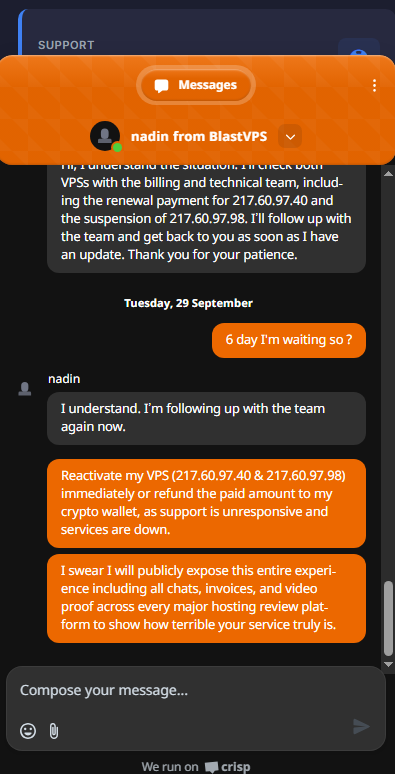
Do NOT trust this company. I paid for a VPS renewal that was never activated, and another server was suspended without reason while support completely ignored me.
There is zero technical support or accountability here. Save your money and avoid them at all costs.
I recently used BlastVPS for my virtual private server needs, and I wanted to share my experience.
The setup process was smooth and user-friendly, making it easy to choose the operating system and configure resources. Performance-wise, BlastVPS impressed me with exceptional speed and reliability. My websites loaded quickly, and the uptime has been consistently high.
The level of customization available is a major plus. I could install any software I needed and tailor the server environment to my specific requirements. However, customer support could use improvement, as response times varied and were sometimes slow.
Overall, BlastVPS is a solid option for those looking for reliable VPS hosting. If you have some technical know-how and are willing to navigate the various plans, I highly recommend giving them a try. My experience has been very positive!
Finally Found a VPS That Actually Fixed My Speed Issues
I was honestly getting frustrated with my previous VPS. It had constant slow load times, random lag spikes, and support that kept blaming "traffic" instead of fixing anything. My projects were growing, but my server just couldn’t keep up. After some research, I decided to try BlastVPS. The difference was immediate. Deployment took just minutes, and from the first login, I could feel the speed. Pages loaded faster, databases responded instantly, and even during peak traffic, everything stayed smooth. It finally feels like my hosting is working with me instead of against me. If you’re tired of slow VPS performance like I was, BlastVPS is absolutely worth it. 5 stars.
I recenlty switched to their services, and truth to be told it is the BEST VPS provider I've ever used. Do not hesitate to switch BlastVPS if you are having issues with your current provider.
BlastVPS is my very first company to be with. Support team and advisers/owner is very reachable and hands on. This team and this company is very reliable when it comes to service, support, perks, and most of all, humane treatment of the costumers they handle. Thanks BlastVPS my home and becoming a family.
I've been using BlastVPS for 6 months and they have never let me down. Their servers are very fast and is almost incomparable to other hosting providers. Cheap but powerful servers, support is instant. I will stay as a loyal customer. Keep up the good work!
Does BlastVPS offer a money-back guarantee or free trial?
BlastVPS does not offer a traditional money-back guarantee or free trial. However, EU consumer clients have a statutory 2-day right of withdrawal after service activation under EU law. Note that if you request immediate service activation, proportional charges may apply for actual usage during those 2 days. Non-EU clients and business customers do not have refund options.
What is the actual network speed on BlastVPS servers?
BlastVPS caps each VPS at 500 Mbps port speed with truly unmetered bandwidth. No hidden fair-use policies or throttling. In my testing, I achieved 404 Mbps download and 380 Mbps upload speeds, representing 76-81% efficiency after accounting for network overhead.
How long does server deployment take at BlastVPS?
Server deployment is genuinely instant. My VPS-Pro server was fully provisioned and accessible in approximately 2 minutes after payment. All plans advertise instant setup, and based on my experience, this claim is accurate rather than marketing exaggeration.
Can I upgrade my BlastVPS server resources without downtime?
Yes, BlastVPS offers smart resource scaling that allows you to upgrade or downgrade CPU, RAM, and storage directly from the dashboard without any downtime or data migration. This feature works instantly and doesn’t require opening support tickets or manual configuration.
What payment methods does BlastVPS accept?
BlastVPS accepts PayPal, cryptocurrency through their secure payment gateway, and account balance funding. All payments are processed securely through their client panel, and services are activated automatically once payment is confirmed.
HostAdvice.com provides professional web hosting reviews fully independent of any other entity. Our reviews are unbiased, honest, and apply the same evaluation standards to all those reviewed.While monetary compensation is received from a few of the companies listed on this site, compensation of services and products have no influence on the direction or conclusions of our reviews. Nor does the compensation influence our rankings for certain host companies.This compensation covers account purchasing costs, testing costs and royalties paid to reviewers.