


Biggest VPS discount from Ultahost you’ll find anywhere online


Biggest VPS discount from Ultahost you’ll find anywhere online
Up to 65% OFF Managed Windows VPS hosting services for a limited time!
50% off all web hosting plans + exclusive 15% discount
Get 65% OFF Managed Linux VPS services for a limited time!
Up to 30% OFF Dedicated Server Hosting + Exclusive 15% Discount
50% OFF Game Server Hosting + Exclusive 15% Discount
50% OFF Reseller Hosting + Exclusive 15% Discount
50% OFF WordPress Hosting + Exclusive 15% Discount
50% OFF Minecraft Server Hosting + Exclusive 15% Discount
50% OFF Node.js Hosting + Exclusive 15% Discount
50% Offshore Hosting + Exclusive 15% Discount
50% OFF PHP Hosting + Exclusive 15% Discount
Up to 40% OFF Ecommerce Hosting + Exclusive 15% Discount
Up to 65% OFF Small Business hosting services for a limited time!
Up to 65% OFF Website Builder hosting services for a limited time!
Deploy OpenClaw on high-performance managed servers with unmetered traffic and 99.99% uptime. Run agents on cloud infrastructure powered by NVMe SSD and DDR5 RAM.


| Description | Discount | Coupon Code | |
|---|---|---|---|
| 50% OFF All Web Hosting Plans + Exclusive 15% Discount | 65% OFF | hostadvice25 | Copy Code |
| 50% OFF WordPress Hosting + Exclusive 15% Discount | 65% OFF | hostadvice25 | Copy Code |
| 50% OFF VPS Services + Exclusive 15% Discount | 65% OFF | hostadvice25 | Copy Code |
| 30% OFF Dedicated Server Hosting + Exclusive 15% Discount | 45% OFF | hostadvice25 | Copy Code |
| 50% OFF Reseller Hosting + Exclusive 15% Discount | 65% OFF | hostadvice25 | Copy Code |
| Up to 40% OFF Ecommerce Hosting + Exclusive 15% Discount | 55% OFF | hostadvice25 | Copy Code |
| Up to 50% OFF on Website Builder Plans + Exclusive 15% Discount | 65% OFF | hostadvice25 | Copy Code |
To use and activate your UltaHost promo code, you first need to find a code that works for you.
Then, you need to go to the UltaHost website and choose the hosting type you want to buy.
You can choose shared, VPS, VDS, or dedicated hosting.
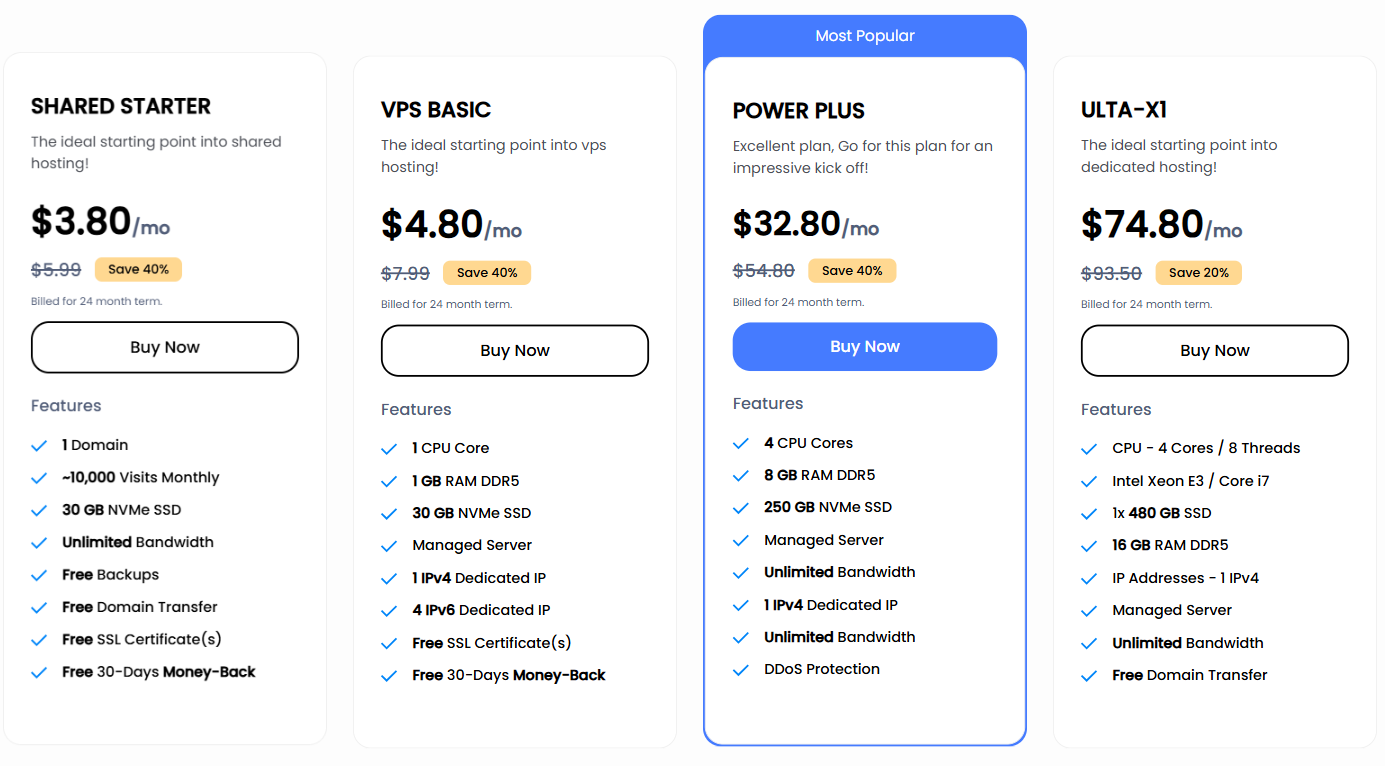
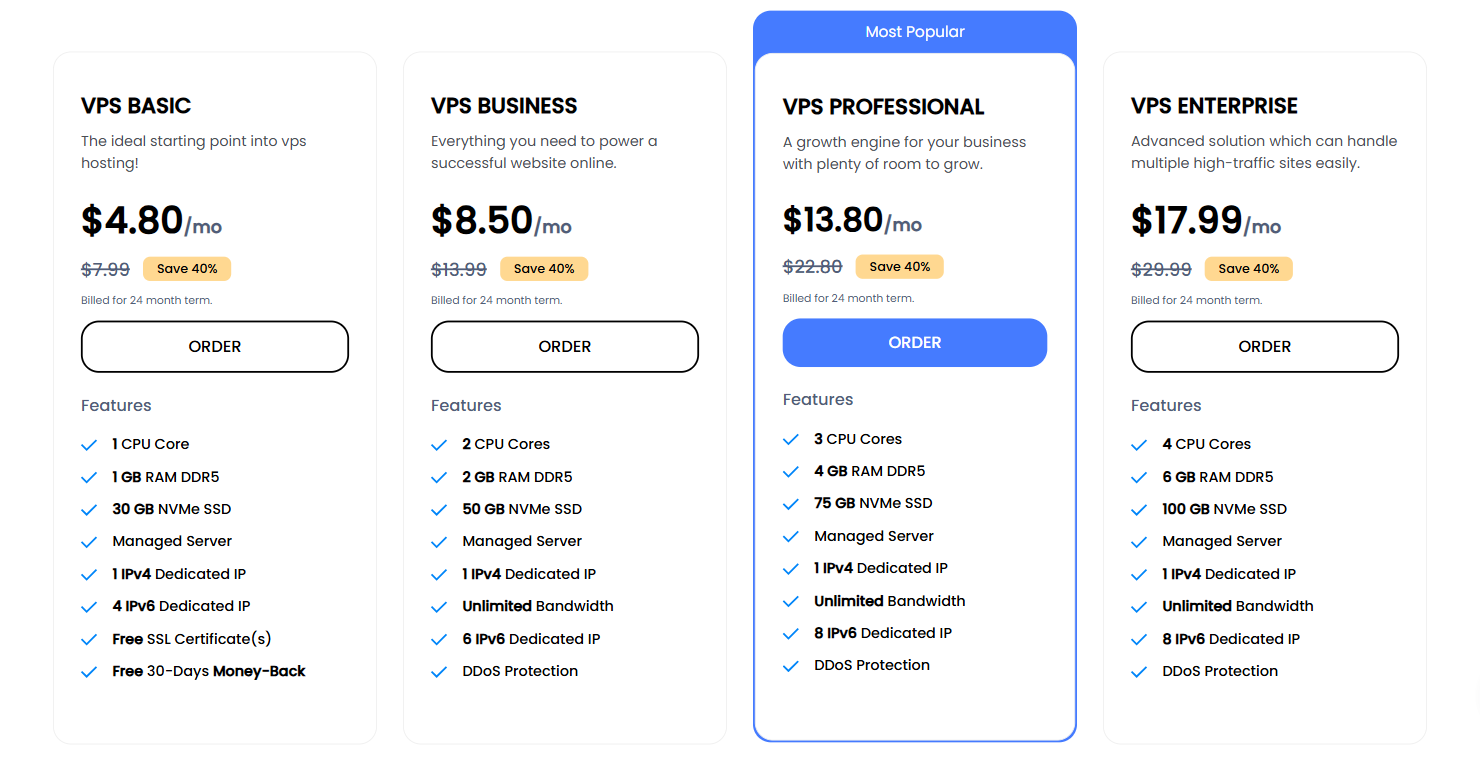
After you pick a hosting type, choose a plan, and click on the “Order” button to move on with your purchase.
After choosing a plan, you’ll land on the page where you need to register a new domain.
You can also transfer an existing domain from another registrar or use your existing domain to update your nameservers.
Once you register your domain, click “Add to Cart” and “Continue.”

Now, you’ll be taken to a web page that shows your order and the total cost. Here, you can choose your billing cycle, server location, and different add-ons if you want to.
If you choose the annual billing cycle, you’ll save 6% and get a free domain name.
After picking your billing cycle, server location, and add-ons, click “Continue.”

On the next page, you can add ID protection to your domain for an extra fee.
When you decide, click “Continue” to keep going with your purchase.

Then, you’ll be redirected to the “Review & Checkout” page on UltaHost’s website.
Here, you can review your order, add your UltaHost promo code, other services, your billing information and payment details, and join UltaHost’s mailing list.

To apply your promo code, type in or copy your code into the “Promotion” box under your order review. Then, click “Validate Code.”

If an UltaHost promo code isn’t working, try these steps:
If problems continue, contact UltaHost customer service or see if an alternative code is available.
No. You can only add one of your promo codes per purchase. If you have multiple promo codes for different services, you have to buy these services separately to use all your codes.
For example, if you’re buying VPS hosting, use your Ultahost VPS Hosting Coupons. But, if you want a different type of hosting, start a new purchase and use for example, Ultahost HTML Hosting Coupons or Ultahost VDS Hosting Coupons.
No, UltaHost does not offer any discounts or promo codes to existing customers. All UltaHost plans renew at regular, non-discounted prices after the term of the first subscription expires.
If you want to pay the initial discounted prices for a longer period, you can choose a longer billing cycle when you order your plan.
UltaHost offers special deals throughout the year, especially around major holidays and seasonal events. Here’s what you can expect:
Looking for ways to save with UltaHost? Here’s a quick overview of their current discounts, promotions, and how different customers can make the most of available deals.
Not all sources for UltaHost promo codes are reliable. Some of them list expired or fake codes that don’t work.
HostAdvice offers verified, up-to-date coupons, including exclusive deals on WordPress and dedicated hosting plans.
They also show which codes work best for different hosting types, making it easier to pick the right one.
Plus, UltaHost won HostAdvice’s Top WordPress Hosting award, so you’re saving with a trusted provider.
UltaHost offers affordable, reliable hosting and great deals on new orders. If you’re not fully satisfied, you’ll also get a 30-day money-back guarantee.
Want the whole picture? Check out our expert Ultahost review.
Yes! You can still add your promo code even if UltaHost automatically applies its own discount. That allows you to save even more money and get everything you need for even lower prices.
Yes, it does. In addition to its Black Friday and Cyber Monday sales, UltaHost offers other deals throughout the year and discounts for new users almost monthly.
To stay informed about UltaHost’s future sales and promotions, sign up for their newsletter, follow them on social media platforms, and regularly visit their official website.
UltaHost often uses these channels to announce upcoming deals and special offers.
UltaHost promo codes only work on annual plans and first-time purchases.
Some codes might have expiration dates or can’t be used with other offers, so be sure to check the details.
No, you can’t add a promo code after you’ve placed your order. You need to enter it during checkout before you pay.
If you forgot, you can try reaching out to UltaHost’s support to see if they can help.
