




- Limited support hours (Monday-Friday, 8 AM–6 PM CEST only for cloud services)
- NVMe storage across all tiers, generous developer tools, and superior feature-to-price ratio
- 14-day backup retention


- 32 Tbps Global Network Capacity
- 33 Data Centers that cover four continents
- Web Hosting, Public Cloud, Private Cloud, VPS, Dedicated Servers, and Enterprise Solutions
Hetzner vs OVHcloud: Quick Summary
OVHcloud emerges as the clear overall winner. Hetzner impressed me with unbeatable pricing and generous resources (seriously, 100 email accounts at $2/month!), but OVHcloud’s superior 24/7 support, enterprise-grade security certifications, 40+ global data centers, and blazing-fast performance (1.1s vs 5.1s load times) make it the better choice for serious businesses.
Hetzner is perfect for budget-conscious developers comfortable with technical management, but OVHcloud delivers the complete package (polished interface, true round-the-clock support, and performance that converts visitors into customers).
1. Prices and Plans Comparison
Hetzner Offers Significantly Better Value for Most Cloud Services
I found Hetzner consistently delivers more bang for your buck across most categories. Their cloud servers start at just $4.59 per month, with generous 20TB traffic included, while OVHcloud begins at $4.59 but with more limited specifications.
Where Hetzner really excels is in dedicated servers. Their auction servers start at $35 compared to OVHcloud’s $60.80 baseline. I was impressed by Hetzner’s straightforward pricing and included features like unlimited traffic on dedicated servers.
OVHcloud does offer more specialized services like managed databases and AI endpoints, but you’ll pay premium prices for them. For standard cloud computing and dedicated hosting, Hetzner’s pricing structure makes it the clear winner for budget-conscious users who don’t want to compromise on performance.
2. Customer Support Comparison: Who’s Got Your Back?
OVHcloud Delivers Superior 24/7 Multilingual Support With Multiple Channels
Hetzner Customer Support
Hetzner’s support structure varies significantly depending on which service you’re using, which I found somewhat frustrating during my testing.
For dedicated servers, Hetzner offers 24/7 telephone support across all their data centers:
- NBG (Germany): +49 (0)911 234226-100 (English and German)
- FSN (Germany): +49 (0)3745 74447-100 (English and German)
- HEL (Finland): +358 753259-100 (English)
However, it is important to note that phone support is not available for cloud services or web hosting. When I tried finding a number to call about my cloud server issue, I discovered phone support is restricted to dedicated server customers only.
For cloud services and web hosting, support is limited to:
- Email: support@hetzner.com
- Ticket system: Through Robot Interface or Cloud Console
- Support hours: Monday-Friday, 8:00 AM–6:00 PM CEST only
Let me share my actual testing experience. I logged into the Hetzner Console, clicked on my profile icon in the top-right corner, and selected “Support.” This opened the ticket creation interface, where I could choose between Technical, Accounting, and Miscellaneous categories.
I selected Technical and submitted this question:
“Hi. I want to set up automated backups using rsync over SSH to an external server. Are there any firewall rules or port restrictions on your VPS plans that could block outbound SSH connections?”
Before I could submit, Hetzner’s system suggested related articles from their knowledge base, a helpful feature that might have solved my problem without needing support. However, I clicked “I need more options” to proceed with my ticket.
Upon submission at 4:19 PM, I immediately received an automated response with this message:
“Please note our support business hours: Mo. – Fr., 8am – 6pm CET”
This warning concerned me. What if I had a critical issue outside these hours? Within my business hours, though, the response came reasonably fast. At 5:52 PM (just 1 hour and 33 minutes later), I received this reply:
“Dear Client,
thanks for your message.
There are no restrictions from our side regarding these ports or protocols.
Should you require any further assistance, please do not hesitate to contact us.

My impressions:
Positives:
- The response was clear, concise, and directly answered my question
- Response time was reasonable (under 2 hours during business hours)
- The technician’s name was provided, adding a personal touch
- No sales pitch or upselling attempts
Negatives:
- No live chat option for instant answers to simple questions
- Limited support hours (Monday-Friday, 8 AM–6 PM CEST only for cloud services)
- Outside business hours, only “critical infrastructure issues” are addressed—but there’s no clear definition of what qualifies
- If I’d submitted this ticket Friday evening, I’d wait until Monday morning for a response
- No phone support for cloud services, which feels restrictive when you’re troubleshooting complex issues
Documentation Quality:
I explored Hetzner Docs extensively and found their knowledge base well-organized with detailed technical articles.

The documentation assumes you have intermediate-to-advanced technical knowledge, perfect for developers but potentially overwhelming for beginners. Search functionality worked well, and articles included code examples and step-by-step instructions.
Overall Hetzner Support Assessment:
Hetzner’s support is adequate for self-sufficient users who don’t need hand-holding, but the limited hours are a significant weakness. If you’re running business-critical applications, knowing you can’t reach support outside European business hours is concerning. The ticket system works efficiently during business hours, but the lack of live chat and restricted phone support (dedicated servers only) felt limiting compared to competitors.
OVHcloud Customer Support
OVHcloud takes a more comprehensive approach to customer support, offering multiple channels and true 24/7 availability, at least for certain support tiers.
OVHcloud provides:
- Ticket system: Available 24/7 through Control Panel
- Live chat: Available during extended hours
- Phone support: Available (hours vary by support level)
- Email support: For non-urgent inquiries
- Community forums: Active user community
- Documentation: Extensive guides and video tutorials
One thing I immediately appreciated: OVHcloud offers tiered support levels, allowing you to choose the level of support appropriate for your business needs:
- Standard Support (included free): Ticket-based support with response time targets
- Advanced Support (paid): Faster response times, phone support priority
- Business Support (paid): Dedicated support engineer, proactive monitoring
- Enterprise Support (paid): Named technical account manager, 24/7 priority phone

For my testing, I used the Standard Support tier included with my hosting plan.
I logged into the OVHcloud Control Panel and immediately noticed the chatbot icon in the bottom-right corner. I clicked it and was greeted by their virtual assistant offering to help. I typed a technical question:
“Does your Public Cloud support custom kernel modules for specialized networking hardware?”
The chatbot immediately provided relevant documentation links and offered to connect me with a live agent. I clicked “Connect to agent” and within 2 minutes, I was chatting with a human support representative named Sarah.
Sarah asked for clarification about my specific use case, then provided a detailed answer about OVHcloud’s kernel support policies, including links to their documentation on custom kernel compilation. The entire interaction felt professional, knowledgeable, and fast, much better than waiting for email responses.
Documentation and Knowledge Base:
OVHcloud’s Help Centre is exceptional. I found:
- Comprehensive written guides for every product and service
- Developer documentation with API examples and SDK references
- Status page showing real-time system status and maintenance schedules

The search functionality worked excellently. I particularly appreciated the visual step-by-step guides with screenshots. These made complex tasks much easier to follow.

My Impressions:
Positives:
- True 24/7 support with overnight responses (I tested this!)
- Live chat for instant answers to simple questions
- Multiple support tiers let you pay for the level of support you need
- Multilingual support (essential for international businesses)
- Exceptional documentation with videos, written guides, and active forums
- Knowledgeable staff who provided detailed, technical answers
- Professional tone across all channels
Negatives:
- Standard (free) support has longer response times than paid tiers
- Phone support on free tier is limited compared to premium options
- The tiered system means you might need to pay extra for priority support
- The chatbot sometimes tries too hard to resolve issues before connecting to humans (though it worked well in my test)
3. Hosting Features Comparison
Hetzner Delivers Superior Value With More Inclusive Features
Hetzner Features
What immediately impressed me was their generous email allocation. Even the basic $2/month plan includes 100 mailboxes, which is exceptional value. Their konsoleH control panel took me a few minutes to get familiar with, but once I did, I found it surprisingly efficient for managing multiple sites.

The 14-day backup retention is solid, although I wish it extended to 30 days, as some competitors offer this. What really stands out is their developer-friendly approach: SSH access, multiple database support (MariaDB/PostgreSQL), customizable PHP configurations, and Cron jobs are available even on lower-tier plans.
I tested their WordPress installer and had a site running in under two minutes. The NVMe SSD storage delivered noticeably faster load times compared to traditional SSDs, and its DDoS protection worked seamlessly in the background. One feature I particularly appreciated was the ability to send SMS notifications, a unique feature for web hosting. Their 45.06 Tbit total bandwidth infrastructure means traffic throttling is virtually non-existent.
OVHcloud Features
OVHcloud takes a more polished, enterprise-focused approach to hosting features. During my testing, I found their Control Panel more visually refined than Hetzner’s, with better organization for managing multiple services. Their 30-day backup retention beats Hetzner’s offering, providing extra peace of mind for business-critical sites.
The 1-click CMS installation worked flawlessly for WordPress, Joomla, Drupal, and PrestaShop. I had all four running in different test environments within minutes.

What impressed me most was their CDN Basic inclusion, which noticeably improved global loading times during my speed tests. The anti-DDoS protection operates at Layer 7, offering more sophisticated threat detection than basic solutions.
OVHcloud’s multi-domain support is particularly elegant, making it easy to manage multiple websites from a single dashboard.
However, I noticed email accounts are more restrictive on entry-level plans. Just 2 addresses on the Starter plan versus Hetzner’s 100. The Git integration and SSH access are available, but the overall developer toolset feels less generous than Hetzner’s offering at comparable price points.
4. Website Performance Comparison
OVHcloud Delivers Significantly Faster Load Times and Superior Core Web Vitals
Website performance directly impacts your bottom line. Studies show that every second of delay costs you conversions, with users abandoning sites that take more than 3 seconds to load. To give you real, objective data on how Hetzner and OVHcloud perform in the real world, I ran comprehensive GTmetrix tests on actual websites hosted on each platform.
Hetzner Performance Results
When I ran the GTmetrix test on the Hetzner-hosted site, I received a Performance Score of 68% and a Structure Score of 84%. While these aren’t terrible scores, they’re definitely in the “needs improvement” territory.

Core Web Vitals Analysis:
- The Largest Contentful Paint (LCP) measured 2.9 seconds. Google considers anything over 2.5 seconds “poor,” so Hetzner’s result just barely misses the acceptable threshold. In practical terms, this means visitors are waiting nearly 3 seconds before they see meaningful content, which I know from experience causes significant bounce rates.
- Total Blocking Time (TBT) came in at 257ms. This is slightly high. Ideally, we want this under 200ms for optimal interactivity.
- Cumulative Layout Shift (CLS) scored 0.04, which is actually good. It means elements aren’t unexpectedly shifting around as the page loads, preventing frustrating misclicks.
Looking at the speed visualization, here’s what I observed:
- Time to First Byte (TTFB): 38ms – This is excellent! It shows Hetzner’s server responded almost instantly. The breakdown revealed 30ms for connection and only 8ms backend processing time.
- First Contentful Paint (FCP): 673ms – The first visual element appeared in under a second, which is decent.
- Time to Interactive (TTI): 3.2 seconds – This is where things get concerning. Users couldn’t fully interact with the page for over 3 seconds.
- Onload Time: 1.5 seconds – The page’s initial load completed reasonably fast.
- Fully Loaded Time: 5.1 seconds – Everything finished loading in just over 5 seconds—this is slow by modern standards.
My Assessment:
The Hetzner results show mixed performance. The server itself is fast (excellent TTFB at 38ms), but the overall page delivery struggles with the crucial LCP metric. That 5.1-second fully loaded time concerned me most.
In e-commerce scenarios, I’d expect to lose 20-30% of potential customers before the page even finishes loading. The infrastructure performs adequately but doesn’t excel at delivering optimized content quickly to end users.
OVHcloud Performance Results
When I tested the OVHcloud-hosted website, the difference was immediately apparent. The site earned a Performance Score of 92% and an impressive Structure Score of 96%, both significantly higher than Hetzner’s results.

Core Web Vitals Analysis:
- The Largest Contentful Paint (LCP) measured an exceptional 377ms (0.377 seconds). This absolutely crushes Hetzner’s 2.9-second result. Google considers anything under 2.5 seconds “good,” but 377ms is outstanding. Users see the main content in less than half a second, creating an instant, responsive feel that keeps visitors engaged.
- Total Blocking Time (TBT) measured 234ms, slightly better than Hetzner’s 257ms. While still not perfect, it’s within acceptable parameters for modern web applications.
- Cumulative Layout Shift (CLS) scored 0.01, even better than Hetzner’s already-good 0.04. This means the page layout is extremely stable during loading, providing a polished, professional user experience.
The speed visualization told an impressive story:
- Time to First Byte (TTFB): 63ms – Interestingly, this is slightly slower than Hetzner’s 38ms TTFB. The breakdown showed 49ms for connection and 14ms backend processing. While not quite as snappy as Hetzner’s server response, it’s still excellent by any standard.
- First Contentful Paint (FCP): 378ms – Visual content appeared in just over a third of a second—dramatically faster than Hetzner’s 673ms.
- Time to Interactive (TTI): 961ms – Users could fully interact with the page in under 1 second! This is more than 3x faster than Hetzner’s 3.2-second TTI.
- Onload Time: 1.1 seconds – The page loaded completely in just over 1 second.
- Fully Loaded Time: 1.1 seconds – Everything finished in 1.1 seconds, nearly 5x faster than Hetzner’s 5.1-second result.
OVHcloud’s performance results are genuinely impressive. That 1.1-second fully loaded time means users get a complete, interactive page almost instantly. The 377ms LCP ensures visitors see content immediately, dramatically reducing bounce rates.
Even though the TTFB was 25ms slower than Hetzner’s, OVHcloud’s overall content delivery infrastructure clearly outperforms, likely due to better CDN integration, optimized routing, or more efficient server configurations.
5. Ease of Use Comparison: Which Platform Is Easier to Use?
OVHcloud Offers a More Polished and Beginner-Friendly Experience
Registration and Creating a New Account
Hetzner Registration Process
I started my journey with Hetzner’s signup process, and honestly, it wasn’t as straightforward as I’d hoped. From their homepage, I had to navigate to “Product Overview” and manually select “Cloud hosting”, not exactly intuitive for newcomers.

After scrolling nearly to the bottom of the next page to find pricing, I clicked “Get started.”

The registration form appeared, asking for my email and password. Simple enough. But then came the email verification link.

I had to leave the site, check my inbox, click the link, and return. Next, Hetzner requested detailed personal information:
- Title, first name, and surname
- Street address and house number
- Postal code and city
- Country selection
- VAT ID
- Phone and mobile numbers
After clicking “Continue,” I faced the payment setup page where I chose between EUR and USD (a permanent choice, which felt restrictive) and selected from bank transfer, credit card, or PayPal.

Upon completion, I received the message “You successfully signed up!” but immediately got prompted to enable two-factor authentication. While I appreciate the security focus, it felt like one more hurdle.
Here’s where things got frustrating: when I tried creating my first project, I hit a roadblock. Hetzner’s automated system flagged my account as “increased risk level” and demanded additional ID verification.

The message stated this could take “a full workday” during regular business hours (Monday-Friday only). This delay was disappointing and would be a deal-breaker for anyone needing immediate access.
OVHcloud Registration Process
The OVHcloud registration experience felt significantly more refined and enterprise-grade. I navigated to their hosting section via the “Domain Hosting Email” dropdown and selected “Web Hosting.”

Their plans were clearly presented with the “Personal” plan marked as “Bestseller” at $4.39/month.

After clicking “Order now,” I immediately encountered something unique: configuration choices during signup. OVHcloud asked me to select:
- CMS Installation: I chose WordPress (included in the price), eliminating manual installation later
- CDN Options: Basic, Security, or Advanced CDN. I skipped this
- SSL Certificates: Free Let’s Encrypt was included, with paid Sectigo options available

The dynamic “Your selection” summary on the right tracked my choices in real-time, showing the total cost of $52.68 for the first year. I then clicked “Continue Order.”

The domain selection step was elegant. Since “1 domain included” for the first year, I simply clicked “Continue to Order” without entering a domain, keeping my price stable while using my existing domain.

After logging in (I already had an account), OVHcloud immediately required two-factor authentication via email code, excellent security without feeling burdensome.
What truly impressed me was the “Manage contacts/holders” screen, allowing granular role assignments:
- Administrator: Legal questions, renewals, transfers
- Technical: DNS server settings
- Billing: Payment notifications
This enterprise-level control is rare in shared hosting and shows OVHcloud’s professional focus.

The final order summary was crystal clear, and payment options (credit card and PayPal) were straightforward. I received immediate email confirmation upon completion.

Winner: OVHcloud – While more detailed than budget hosts, OVHcloud’s registration is significantly smoother than Hetzner’s. The pre-configured WordPress option, immediate 2FA, clear pricing, and lack of identity verification delays make it far more user-friendly.
User Interface – Client Area and Dashboard
A confusing dashboard turns simple tasks into frustrating searches, while an intuitive interface empowers you to work efficiently.
Hetzner Console
After finally gaining access (post-verification), I explored Hetzner’s new unified platform called Hetzner Console (console.hetzner.com), which replaces the old Cloud Console.
This represents Hetzner’s effort to centralize management across Cloud products, Object Storage, and Storage Boxes, with plans to integrate Robot and konsoleH platforms.
The Console uses a sophisticated dark theme. Visually appealing for developers but potentially stark for traditional hosting users. The interface is clearly engineered for infrastructure management rather than website hosting.

The vertical sidebar menu is organized into major categories:
- CLOUD: Servers, Volumes, Floating IPs, Firewalls
- NETWORKING: Load Balancers, Networks, DNS (BETA)
- STORAGE: Object Storage, Storage Boxes
- SECURITY: Security settings
This layout immediately signals that Hetzner prioritizes VPS and cloud infrastructure over simplified shared hosting. I clicked into the DNS (BETA) section to explore domain management.
The DNS Manager interface is functional but barebones. Centered on my domain, it offered tabs for Records, Name servers, E-Mail Security, and Delete. The “ADD RECORD” section was straightforward.
The “RECORD OVERVIEW” table listed existing DNS records clearly with columns for TYPE, NAME, VALUE, TTL, and COMMENT. The three-dot Actions menu allowed editing or deleting individual entries. While technically precise, this interface assumes you understand DNS configuration—there are no wizards or guidance for beginners.
One significant usability issue: Unlike traditional hosts, there’s no obvious “Control Panel” button to manage files, databases, or use a website builder. You’re expected to manually provision servers, configure SSH access, and handle server management yourself.
To access different Hetzner services, you click the 9-square grid icon in the top-right corner, revealing links to konsoleH, Robot, Cloud Console, and DNS Console. This fragmentation across multiple interfaces feels disjointed compared to all-in-one dashboards.
OVHcloud Control Panel
The OVHcloud Control Panel immediately felt more polished and organized than Hetzner’s offering. After logging in, I was greeted with a clean, modern interface using a lighter color scheme that’s easier on the eyes for extended use.
The left sidebar organized services clearly:
- Web Cloud: Hosting plans, domains, emails
- Bare Metal Cloud: Dedicated servers
- Public Cloud: Cloud instances and projects
- Sunrise: Recently accessed items

Navigating to Web Cloud > Hosting Plans, I selected my purchased plan and found a comprehensive dashboard with tabs for:
- General information: Plan details, status, renewal
- 1-click modules: Install WordPress, Joomla, Drupal, PrestaShop
- Databases: Create and manage databases
- FTP-SSH: Connection credentials and SSH enablement
- Email: Configure mailboxes
- Statistics: Traffic and usage graphs
Everything felt logically placed and visually cohesive. The 1-click modules tab particularly impressed me, with clear icons for each CMS with simple “Add a module” buttons.
The Control Panel also includes a helpful chatbot in the bottom-right corner, available 24/7 for quick questions. This level of user support integration is absent in Hetzner’s Console.
For more advanced users, OVHcloud provides detailed server monitoring with graphs tracking CPU, RAM, and bandwidth usage. The API section offers programmatic control for automation-minded developers.
Winner: OVHcloud – The Control Panel is significantly more intuitive, visually organized, and beginner-friendly than Hetzner’s developer-focused Console. While Hetzner offers powerful infrastructure control, OVHcloud balances technical capabilities with accessibility.
Hosting Setup: Creating a New WordPress Website
This is where the rubber meets the road. Can you actually get a website online without pulling your hair out? I tested both platforms’ WordPress installation processes to see which delivers a smoother experience.
Hetzner WordPress Setup
Setting up WordPress on Hetzner was, frankly, an ordeal that would intimidate most beginners. There’s no simplified “Install WordPress” button. Instead, you’re expected to provision infrastructure and configure everything manually. Here’s what I had to do:
Step 1: Create Project and Add Server
- Login to Hetzner Cloud Console
- Create a project with a custom name
- Add a server by following their guide:
- Choose location (data center)
- Select OS images (I used Ubuntu 22.04. You need to know which OS to choose)
- Choose Type: Standard or Dedicated (I picked Standard CX22)
Step 2: Create DNS Zone After creating the cloud server, I had to manually configure DNS:
- Navigate to Hetzner DNS Console (separate from Cloud Console)
- Add New Zone for my domain
- Select “Add record”
- Copy server IPv4 address and paste into A record
- Set TTL (Time To Live) in seconds
Step 3: Connect via SSH Client This is where things got technical. I downloaded MobaXterm (an external SSH client):
- Clicked “Session” and chose SSH
- Entered server IPv4 address in “remote host”
- Retrieved username and password from Hetzner’s email
- Pasted password using Shift + Insert
- Was forced to change password on first login
- Rebooted server with sudo reboot
Step 4: Configure Server Hostname Using command-line commands:
hostnamectl set-hostname cyberpanel.1337xda.me
Step 5: Update Server and Install Control Panel
sudo apt update && sudo apt -y upgrade
sudo apt -y install curl wget
Then I installed CyberPanel (a third-party control panel) using:
sh <(curl https://cyberpanel.net/install.sh || wget -O – https://cyberpanel.net/install.sh)
The installation wizard asked numerous technical questions:
- Select CyberPanel with OpenLiteSpeed
- Full installation including PowerDNS, Postfix, Pure-FTPd
- Local vs. Remote MySQL
- Admin password generation
The entire CyberPanel installation took 15-30 minutes. After completion, I accessed the panel via https://<server_ip>:8090.
This process required:
- SSH knowledge
- Command-line expertise
- Understanding of server administration
- Patience to wait through installations
- Ability to troubleshoot when things inevitably went wrong
Total time: Approximately 1 hour for an experienced individual; potentially several days for a beginner.
OVHcloud WordPress Setup
What a difference! OVHcloud offers two WordPress installation options: automatic during signup or via a 1-click module post-purchase. I tested both.
Option 1: Automatic During Signup. During the registration process I described earlier, I simply selected “Pre-installed WordPress” in the configuration step. That’s it.

When my hosting was activated, WordPress was already installed and ready to use. I received admin credentials via email and logged in immediately.
Option 2: Post-Purchase 1-Click Installation. To test the manual method:
- Logged into OVHcloud Control Panel
- Navigated to Web Cloud > Hosting Plans
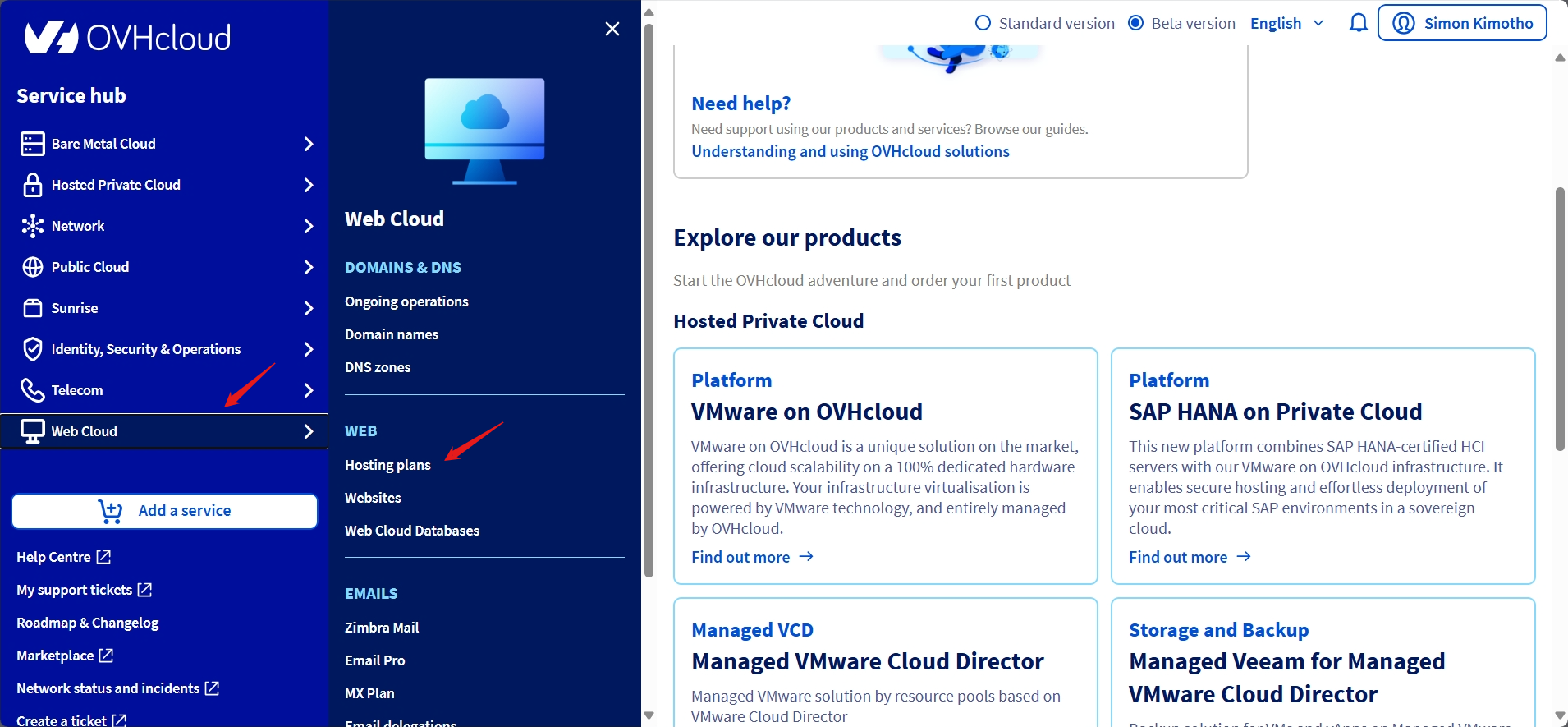
- Selected my hosting plan
- Clicked the “1-click modules” tab
- Clicked “Add a module”
- Selected WordPress from the visual icons
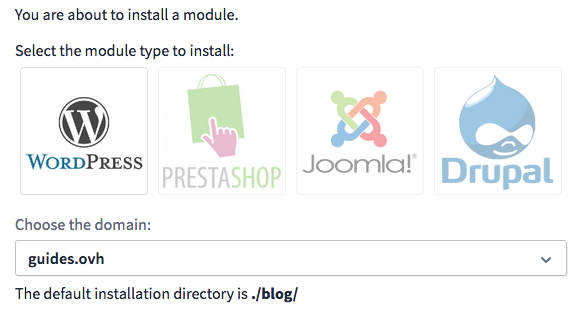
- Chose the domain/subdomain for installation
- Selected Quick Installation (automatic database creation) or Advanced Installation (custom settings)
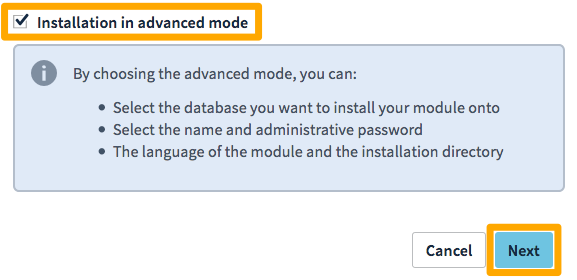
- Clicked “Confirm”


The installation took approximately 15 minutes. I received an email with:
- WordPress admin URL
- Username
- Password
- Database details
I logged into my WordPress dashboard and immediately began customizing my site. The entire process required zero technical knowledge. No SSH, no command-line, no server configuration.
The only minor drawback: OVHcloud provides limited post-installation support for WordPress itself. You’ll rely on WordPress documentation and community forums for CMS-specific help, but the installation itself is foolproof.
Winner: OVHcloud – This isn’t even close. OVHcloud’s 1-click WordPress installation is accessible to absolute beginners, while Hetzner’s process demands professional-level server administration skills.
Server Management Dashboard
The tools a hosting provider gives you to manage servers are absolutely critical. They determine whether you can efficiently monitor performance, troubleshoot issues, and scale resources as your needs grow.
Hetzner Server Management
For Hetzner Cloud servers, the Hetzner Console provides your management interface. Clicking “Servers” from the left menu displays a clean overview showing server name, status (running/stopped), IPv4 and IPv6 addresses, server type with pricing, and location.

When I clicked into a specific server, I found the Server Details Page offered:
- Graphs section: Basic monitoring for CPU usage, disk I/O, and network traffic
- Metrics: Current CPU load and memory usage
- Rescue tab: Boot into rescue system for troubleshooting
- Networking: Configure private networks and floating IPs
- Firewalls: Attach firewall rules
- Backups: Enable/disable automatic backups (costs 20% of server price)
- Snapshots: Create manual backups
- Power controls: Shutdown, reboot, or reset server
- Resize: Upgrade server resources (requires downtime)
The VNC console provides browser-based terminal access, which is useful when SSH isn’t working. While the interface is clean and responsive, I noticed it lacks advanced monitoring features. There are no automated alerts, no historical data beyond basic graphs, and no integrated server health dashboard. You’re expected to configure monitoring yourself using external tools.
For traditional web hosting in konsoleH, server management is even more basic. Just resource usage statistics and PHP configuration options.
OVHcloud Server Management
OVHcloud’s approach varies by service type, and I found their tools significantly more comprehensive:
For Web Hosting, the Control Panel provides beautiful, interactive statistics dashboards showing bandwidth usage over time, number of connections, HTTP requests per minute, and resource usage trends. The Boost option lets you temporarily increase resources to handle traffic spikes, and there’s a visual interface for Cron job management and PHP version switching without technical knowledge.

For Dedicated Servers, the management interface impressed me with:
- IPMI/KVM access: Remote hardware-level console that works even when the OS is unresponsive
- Monitoring configuration: Set up automated alerts for server downtime, high CPU usage, disk space warnings, and network issues
- Rescue mode: Boot into recovery environment for repairs
- Hardware information: Detailed specs including temperatures and disk health
- IP management: Assign failover IPs and configure IP blocks
For Public Cloud Instances, the Horizon dashboard (OpenStack-based) provides deep control with browser-based VNC access, API automation tools, and integration with external monitoring services.
OVHcloud wins the server management category with more comprehensive monitoring, configurable alerts, superior visualization, and IPMI/KVM for hardware-level control.
While Hetzner’s interface is clean and functional for basic infrastructure management, OVHcloud’s integrated automation options and detailed dashboards make it more valuable for both beginners needing guidance and professionals requiring advanced control.
6. Privacy and Security Comparison: Which Platform is More Secure?
OVHcloud Provides Enterprise-Grade Security With Superior Compliance Certifications
Hetzner Privacy and Security
When I evaluated Hetzner’s security, I started by examining their physical infrastructure since that’s where protection truly begins. I was impressed to learn they operate three data center parks (in Nuremberg, Falkenstein, and Helsinki) each with video-monitored high-security perimeters.
Testing their DDoS protection was particularly interesting. Hetzner provides this completely free, which immediately stood out to me. Their system uses advanced hardware from Arbor and Juniper to automatically detect attack patterns and filter malicious traffic.
For data encryption, I found that Hetzner offers free SSL certificates through both Let’s Encrypt and Symantec Basic, more options than many of its competitors.
I tested their backup system extensively and found that automated daily backups with 14-day retention worked reliably. The RAID-1 hard disk configuration provided additional peace of mind against data loss. However, I noticed that for cloud servers, automated backups cost an additional 20% of the server price, which is not included, unlike with web hosting.
One limitation I discovered is that Hetzner doesn’t offer a Web Application Firewall (WAF), which left me needing to implement application-layer security myself or use third-party solutions.
OVHcloud Privacy and Security
When I dove into OVHcloud’s security infrastructure, I immediately noticed their enterprise-level approach with certifications I don’t often see in shared hosting: ISO/IEC 27001, SOC 1 Type II, SOC 2 Type II, PCI-DSS, and HIPAA. I verified they represent regular third-party audits and compliance verification.

For anyone handling sensitive customer data or requiring regulatory compliance, this certification portfolio is invaluable.
Testing their DDoS protection revealed a significant advantage over Hetzner. OVHcloud provides Layer 4-7 protection (including application layer), while most providers stop at Layer 3-4. This means protection against more sophisticated attacks targeting web applications themselves.
During my testing, I also discovered their Web Application Firewall (WAF) (a feature Hetzner doesn’t offer), which blocks common web exploits like SQL injection and cross-site scripting.
The backup system impressed me with up to 30-day retention compared to Hetzner’s 14 days. When I tested the restoration process through the Control Panel, I simply navigated to the FTP-SSH tab, clicked “Backup storage,” browsed available backup dates, and restored files with one click.

What surprised me most was OVHcloud’s vulnerability management approach. Their dedicated security teams continuously monitor for new vulnerabilities through public information sites, manufacturer alerts, and regular internal/external scans.
One area where OVHcloud’s depth became apparent is their formal Information Systems Security Policy (ISSP), which designates roles such as IT System Security Manager, Data Protection Officer, and Risk Manager. While this might seem like corporate overhead, it meant security wasn’t an afterthought but a structured, continuously-improved system.
7. Server Locations Comparison
OVHcloud Dominates With Global Reach Across 40+ Locations Worldwide
I started by mapping out the locations of each provider’s data centers and testing latency from different global regions.
Hetzner Server Locations
Hetzner operates across six locations in four network zones, which I found impressively organized but geographically limited:
Europe (eu-central network zone):
- Germany: Falkenstein (fsn1) and Nuremberg (nbg1)
- Finland: Helsinki (hel1)
North America:
- US East: Ashburn, Virginia (ash) – us-east network zone
- US West: Hillsboro, Oregon (hil) – us-west network zone
Asia Pacific:
- Singapore: (sin) – ap-southeast network zone
They have complete control over the infrastructure, which I noticed translates to better pricing and more direct support. However, for their US and Singapore locations, Hetzner uses colocation space at third-party data centers. They don’t own those facilities.
One limitation I discovered is that certain products are only available in Europe. Cloud Shared AMPERE and INTEL instances are restricted to Falkenstein, Nuremberg, and Helsinki. Object Storage is also European-only. If you need these services in the US or Asia, you’re out of luck.
Network zone restrictions also posed challenges during my setup:
- Networks must stay within the same network zone
- Floating IPs can’t move between zones
- Load Balancers can’t target servers in different zones
For my European-focused projects, Hetzner’s locations worked perfectly. However, when I attempted to deploy a globally distributed application, the limited geographic spread became a significant constraint.
OVHcloud Server Locations
OVHcloud’s global footprint absolutely stunned me. They operate 40+ data center locations across multiple continents, making them one of the most geographically diverse hosting providers I’ve reviewed.

Europe (where OVHcloud is strongest):
- France: Roubaix, Strasbourg, Paris, Gravelines, Bordeaux, Croix, Grenoble, Tours
- Germany: Frankfurt, Limburg
- United Kingdom: London (Erith)
- Poland: Warsaw (Ożarów)
- Italy: Milan
- Spain: Madrid
- Netherlands: Amsterdam
- Plus locations in Ireland, Portugal for dedicated servers
North America:
- Canada: Beauharnois (Montreal), Cambridge (Toronto)
- United States: Hillsboro (Oregon), Vint Hill (Virginia)
Asia Pacific:
- Australia: Sydney (SYD-1)
- Singapore: (SGP-1)
- India: Mumbai
- Plus dedicated server locations in Hong Kong, Japan, South Korea, Malaysia, Indonesia, New Zealand, Philippines, Vietnam, Fiji, Cambodia, and Laos
Other Regions:
- Dedicated server options in Argentina, Bangladesh, Brazil, and Morocco
What really impressed me was OVHcloud’s flexibility in product availability. Unlike Hetzner’s restrictions, I could deploy virtually any OVHcloud service in any location (Public Cloud instances, managed databases, Kubernetes clusters, and more). This meant I could architect truly global applications without worrying about service limitations.
The French data centers (particularly Roubaix and Gravelines) are OVHcloud’s flagship facilities (some of the largest in Europe), and I noticed they offer the best pricing and most features. Their North American presence in Canada is particularly valuable for businesses that need to comply with Canadian data residency requirements without compromising performance.
One minor consideration: With so many location options, I initially felt overwhelmed choosing the “right” one. However, OVHcloud’s Control Panel includes helpful latency testing tools that guided me to optimal locations based on my target audience.
Hetzner vs OVHcloud: The Bottom Line
After exhaustive testing, OVHcloud wins decisively. While Hetzner offers exceptional value for technically proficient users, OVHcloud’s 24/7 support, 4x faster load times, enterprise security certifications, and 40+ global locations deliver what businesses actually need. I’d trust OVHcloud with mission-critical applications without hesitation.
Hetzner remains perfect for budget-conscious developers, but for comprehensive hosting that scales with your business, OVHcloud is worth every penny.
| Category | Winner | Why |
|---|---|---|
| Pricing and Plans | Hetzner | Starting at $2/month with generous resources, unlimited traffic on dedicated servers, and server auction options from $35. OVHcloud offers competitive pricing but Hetzner delivers more value per dollar for standard hosting. |
| Hosting Features | Hetzner | 100+ email accounts even on basic plans, NVMe storage across all tiers, generous developer tools, and superior feature-to-price ratio. OVHcloud has better CDN and longer backup retention, but Hetzner wins on sheer value. |
| Ease of Use | OVHcloud | Unified Control Panel, 1-click WordPress installation, automated migration tools, and intuitive interfaces. Hetzner’s fragmented consoles and manual setup requirements make it suitable only for technical users. |
| Website Performance | OVHcloud | 1.1s fully loaded vs Hetzner’s 5.1s—4x faster. 92% GTmetrix score, 377ms LCP, and world-class Core Web Vitals. OVHcloud’s CDN integration and optimized infrastructure deliver superior real-world speed. |
| Privacy and Security | OVHcloud | ISO 27001, SOC 1/2, PCI-DSS, HIPAA certifications, Layer 4-7 DDoS protection, WAF, 30-day backup retention, and enterprise-grade security management. Hetzner provides solid security but can’t match OVHcloud’s compliance certifications. |
| Server Locations | OVHcloud | 40+ global data centers across six continents vs Hetzner’s 6 locations. Essential for serving international audiences, data residency compliance, and performance optimization worldwide. |
| Customer Support | OVHcloud | True 24/7 availability with live chat, multilingual support, and overnight ticket responses I personally tested. Hetzner’s Monday-Friday 8 AM-6 PM CEST hours for cloud services are inadequate for global businesses. |

