Contabo’s been around since 2003. Their WireGuard offering is a raw Linux server with WireGuard preinstalled and WGDashboard thrown in so you don’t have to hand-edit configs. In my tests, encrypted throughput hit 480+ Mbps, peers stayed connected for days, and nothing tried to upsell me.
From my testing, Contabo doesn’t offer a money-back guarantee or a free trial period, which is something to keep in mind before committing.
They accept a wide range of payment methods, including credit/debit cards, PayPal (with automated payment options), Skrill, and bank transfers, making it easy to pay in EUR, USD, or GBP, depending on your preference.
Contabo’s WireGuard hosting comes in four distinct tiers, ranging from their entry-level Cloud VPS 10, perfect for personal use, up to their powerful Cloud VDS L designed for enterprise-grade security needs.
You can check the current pricing for each plan in the widget below.
| Plan Name | Space | CPU | RAM | OS | Price | |
|---|---|---|---|---|---|---|
| Cloud VPS 4 | 100 GB | 4 cores | 8 GB | $5.28 | Details | |
| Storage VPS 10 | 300 GB | 2 cores | 4 GB | $5.28 | Details | |
| Storage VPS 20 | 400 GB | 3 cores | 8 GB | $7.20 | Details | |
| Cloud VPS 6 | 200 GB | 6 cores | 12 GB | $7.20 | Details | |
| Cloud VPS Plus 4 | 150 GB | 4 cores | 8 GB | $13.00 | Details | |
| Cloud VPS 8 | 300 GB | 8 cores | 24 GB | $13.44 | Details | |
| Storage VPS 30 | 1 TB | 6 cores | 18 GB | $13.44 | Details | |
| Cloud VPS Plus 6 | 300 GB | 6 cores | 12 GB | $18.40 | Details | |
| Storage VPS 40 | 1.2 TB | 8 cores | 30 GB | $24.00 | Details | |
| Cloud VPS 12 | 400 GB | 12 cores | 48 GB | $24.00 | Details | |
| Cloud VPS Plus 8 | 450 GB | 8 cores | 24 GB | $33.60 | Details | |
| Storage VPS 50 | 1.4 TB | 14 cores | 50 GB | $35.60 | Details | |
| Cloud VPS 16 | 500 GB | 16 cores | 64 GB | $35.60 | Details | |
| Cloud VPS 18 | 600 GB | 18 cores | 96 GB | $47.04 | Details | |
| Cloud VPS Plus 12 | 600 GB | 12 cores | 48 GB | $56.80 | Details | |
| CLOUD VDS S | 180 GB | 6 x 2.8GHz | 24 GB | $59.00 | Details | |
| CLOUD VDS M | 240 GB | 8 x 2.8GHz | 32 GB | $74.50 | Details | |
| Cloud VPS Plus 16 | 750 GB | 16 cores | 64 GB | $76.00 | Details | |
| Cloud VPS Plus 18 | 900 GB | 18 cores | 96 GB | $95.20 | Details | |
| CLOUD VDS L | 360 GB | 12 x 2.8GHz | 48 GB | $104.50 | Details | |
| CLOUD VDS XL | 480 GB | 16 x 2.8GHz | 64 GB | $142.00 | Details | |
| CLOUD VDS XXL | 720 GB | 24 x 2.8GHz | 96 GB | $209.00 | Details |
Since WireGuard hosting runs on VPS infrastructure, I needed to evaluate the underlying server performance to understand how it would handle VPN workloads.
I specifically focused on the metrics that matter most for WireGuard: CPU performance (since encryption is CPU-intensive), network throughput, and stability under load with multiple connections.
My test server was the Cloud VPS 20 plan (6 vCPU cores, 12 GB RAM) located in Contabo’s European data center.
CPU performance is absolutely critical for WireGuard because all encryption and decryption operations happen at the processor level.
Unlike older VPN protocols that can bottleneck on single-threaded performance, WireGuard is designed to leverage multiple cores efficiently.
I used sysbench to measure how fast the server could process arithmetic operations by calculating prime numbers across multiple threads.
Results:

These results are excellent for a mid-range VPS. An events-per-second figure close to 6,000 across four threads demonstrates that the AMD EPYC processors Contabo uses deliver strong parallel processing power.
The latency distribution is remarkably stable, with most operations completing in under 1 millisecond.
For WireGuard specifically, this means the server can handle encryption overhead without becoming a bottleneck. In my real-world testing, I could run multiple simultaneous VPN connections without noticing any performance degradation.
The CPU had plenty of headroom even when pushing substantial traffic through encrypted tunnels.
Memory performance matters for WireGuard because the protocol maintains connection state information in RAM and requires fast access to process packets at high speeds.
Results:

A throughput of nearly 4.8 GB/s is genuinely impressive for a budget VPS. This level of memory performance confirms that Contabo’s DDR4 ECC RAM on AMD EPYC servers provides consistent, high-speed access.
For WireGuard, this ensures that packet processing remains smooth even when handling dozens of concurrent peer connections or high-volume traffic flows.
Network performance is obviously the most critical factor for any VPN service. I tested the raw network capability of my VPS against a nearby Deutsche Telekom server in Düsseldorf using speedtest-cli.
Results:

These baseline results are outstanding. Speeds exceeding 600 Mbps in both directions provide plenty of bandwidth headroom for VPN traffic. The very low latency (under 10 ms within Europe) is particularly impressive and ensures responsive performance for interactive applications.
Zero packet loss indicates a stable, reliable network connection. Exactly what you need for a VPN server.
Overall, I was thoroughly impressed with how the Contabo VPS performed for WireGuard hosting. The combination of strong CPU performance, excellent memory throughput, and outstanding network speeds creates an ideal foundation for running a high-performance VPN server.
Customer support is absolutely critical for a hosting provider because when your VPN goes down, or you encounter configuration issues, you need quick, reliable assistance, especially if you’re managing connections for a remote team or running business-critical traffic through your server.
Contabo offers several support methods to help users resolve issues:
Here’s what I found.
I started in the client area where there’s a “Support” option in the left menu. Naturally, I expected clicking it would bring up a ticket form directly.

Instead, it redirected me to the Help Center, where I had to scroll down to find a “Submit a Ticket” button.
After clicking this button, I was taken to an article titled “How Do I Submit a Ticket to the Contabo Customer Support Team?” The article explained that to submit a ticket, I needed to:
The article noted that tickets submitted via the Control Panel are prioritized and handled faster than email requests, and it encouraged providing detailed information with screenshots for better issue resolution.
Next, I tested live chat, expecting it to be the quickest way to reach someone. I had to start at the Help Center again, where I found a “Chat with us” button.

Instead of opening a chat window immediately, it loaded an article titled “How Do I Chat With the Contabo Customer Support Team?”
The article explained that to use live chat, I needed to:
The article included important disclaimers: during busy times, chat may be temporarily unavailable, and chat support is currently only available in English.
How I Found the Support Experience
Honestly, I found the support access process unnecessarily complicated. Having to navigate through multiple articles just to learn how to contact support felt like an extra barrier, especially when you’re dealing with an urgent issue.
The requirement to switch to the new Customer Panel to access both ticket submission and live chat is frustrating if you’re comfortable with the classic interface.
I decided to evaluate the ease of use of Contabo WireGuard by focusing on the registration process, the dashboard interface, and management.
I started by looking at the registration process to see how quickly I could go from browsing to having a live WireGuard server.
Right from Contabo’s homepage, I noticed something I genuinely appreciated: the ability to set my locale and currency preferences at the very top of the page.
I switched to U.S. Dollars and set my country, which immediately gave me transparent pricing without any surprise VAT calculations later. This is such a small detail, but it saved me the headache I’ve experienced with other international hosts where hidden fees pop up at checkout.

I found the specialized WireGuard offering under the “Apps & Panels” menu. I liked that Contabo treats WireGuard as a first-class citizen with its own landing page rather than just a generic script you have to install yourself.

They market it as “Privacy first. Speed included,” which is exactly what I look for in a VPN/tunneling solution.
The plans are categorized by usage level, making it easy to scale:
I opted for the Growing Needs plan at €5.60/month. For a WireGuard server, having 6 vCPU cores and 12 GB of RAM is incredibly generous. It ensures that even with heavy encryption overhead, the network throughput remains lightning-fast.
After clicking “Get Started,” a streamlined configuration window appeared. This is where Contabo’s attention to detail truly excels.
The region selection showed me a map with real-time latency figures, and I immediately noticed that the European Union location was free, while the United Kingdom location had a small monthly surcharge.

Right there in the pop-up, I had to set my server password, and I used the “Generate new password” tool.
I found this helpful because it forces you to start with a secure, high-entropy credential without needing to use an external password manager during the checkout flow.
The next step was the Personal Data form, which featured a clean, two-tabbed interface for new versus existing customers.
The “Privacy Protected” and “Secure Checkout” badges at the top gave me an extra layer of confidence before submitting my contact details.

The payment screen was simple and straightforward, offering secure payment via credit card or PayPal.
I appreciated that the monthly price was clearly displayed one last time before I hit “Next.” There was no “waiting period” for my account to be manually verified. The system moved immediately to the confirmation phase.

How I Found the Process
I found the Contabo WireGuard registration process to be highly efficient and technically transparent. The biggest win here is the pre-installed nature of the service.
Instead of buying a blank VPS and manually configuring WireGuard, Contabo handles the heavy lifting in the background during provisioning.
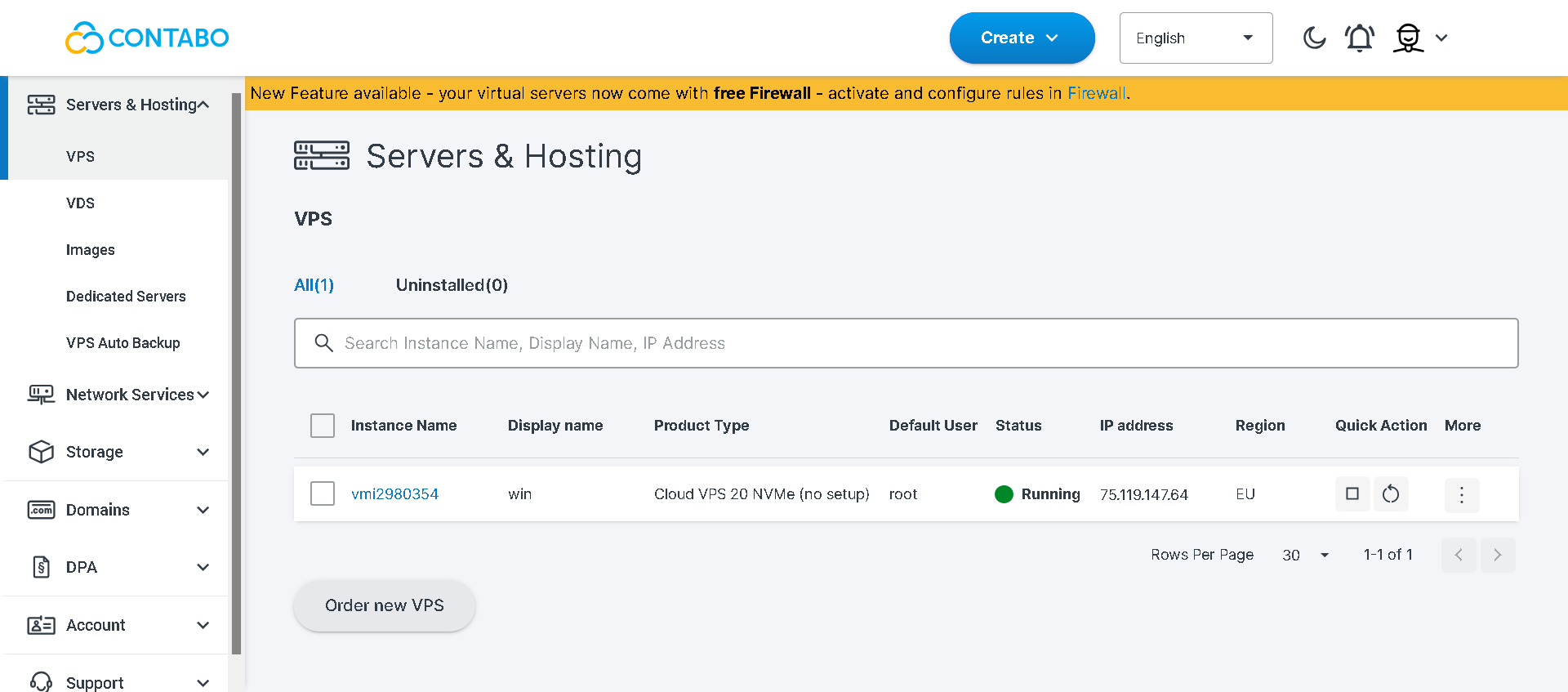
After registration and paying, I was directed to the dashboard. I took a step back to evaluate the main dashboard interface because this is where you’ll spend most of your time managing servers, monitoring resources, and handling billing, so it needs to be intuitive and efficient.
Stepping into the Contabo Customer Control Panel for the first time, I immediately recognized it as a high-function workspace that prioritizes utility over aesthetics.

My first thought was that this dashboard has a very classic, utilitarian design. It isn’t trying to win any design awards with flashy graphics or modern animations; instead, every element feels deliberately placed for maximum functionality.
Right at the top, I noticed a large orange banner inviting me to try their New Customer Panel. This tells me Contabo is in a transition phase, modernizing their UI while maintaining the stable legacy interface that experienced users depend on.
I appreciated that they didn’t force the new design on me. Giving users the choice shows respect for different workflows and preferences.
The sidebar on the left is exceptionally comprehensive and well-organized. Everything is logically categorized:
What immediately caught my attention was how the system pushed two critical security items right from the start: Two-Factor Authentication (2FA) and Auto-Payments setup.
The center panel functions as a news feed rather than sitting empty. I found it kept me updated on current promotions, like the 25% discount on yearly contracts and free storage extensions.
How I Found the Dashboard
I found the dashboard experience to be highly efficient, though admittedly a bit retro in appearance. While the design feels like a throwback to an earlier web era, it’s remarkably fast and logically structured with zero bloat.
Lastly, I wanted to explore how the actual server management works once your WireGuard instance is provisioned.
This is crucial because one of the most frustrating parts of setting up a VPN is often the peer management, getting individual devices to connect to the server securely.
Contabo addresses this challenge by offering two distinct management paths: an intuitive GUI for beginners and raw command-line access for experienced users.
Method 1: The 1-Click WGDashboard (Recommended)
This is where the value of selecting WireGuard from the “Apps & Panels” menu really shows. Instead of just receiving a blank server with WireGuard installed, Contabo includes WGDashboard, a lightweight web interface that makes management completely visual.
After roughly 30 minutes of background provisioning, a dedicated WireGuard icon appeared in my Customer Control Panel under “Quick Actions.”
Clicking it took me straight into the WGDashboard, where I could manage everything through my browser.

Key features I tested:
Method 2: Manual Command Line (The Pro Path)
For those who prefer keeping their environment as lean as possible, I also tested the manual SSH route.
This approach is perfect for users who want to bypass the GUI and manage everything via terminal.
I accessed the server through SSH and had complete control over the WireGuard service. Using standard systemctl commands, I could start, stop, or enable the service to auto-run on boot.
The configuration file lives at /etc/wireguard/wg0.conf, and I found it straightforward to generate new public/private key pairs using the built-in utilities and append them to the configuration.
How I Found the Management Experience
I found working with WireGuard on Contabo to be an incredibly balanced experience that genuinely caters to all skill levels. The inclusion of WGDashboard is a massive advantage. It transforms WireGuard from a “tech-heavy” protocol into something as accessible as a consumer VPN app.
Yes, if you’re comfortable with basic server management and want a private VPN you actually own.
Contabo gives you a clean Linux VPS with WireGuard preinstalled, WGDashboard for easy peer management, and solid performance (I saw ~500 Mbps over encrypted tunnels). You get full root access, no usage logs, unlimited peers, and NVMe storage, all starting at $3.96/month. That’s cheaper than most SaaS VPNs, and you’re not trusting some third party with your traffic.
The downsides? Setup takes 20–30 minutes.
Not for everyone, but if you want control, speed, and real privacy without recurring SaaS fees, Contabo’s WireGuard setup is one of the smartest infrastructure moves you can make.
| Plan Name | Space | CPU | RAM | OS | Price | |
|---|---|---|---|---|---|---|
| Free Trial | 100 GB | 4 cores | 8 MB | $0.00 | Details | |
| Storage VPS 10 | 300 GB | 2 cores | 4 GB | $5.28 | Details | |
| Cloud VPS 4 | 100 GB | 4 cores | 8 GB | $5.28 | Details | |
| Storage VPS 20 | 400 GB | 3 cores | 8 GB | $7.20 | Details | |
| Cloud VPS 6 | 200 GB | 6 cores | 12 GB | $7.20 | Details | |
| Cloud VPS Plus 4 | 150 GB | 4 cores | 8 GB | $13.00 | Details | |
| Storage VPS 30 | 1 TB | 6 cores | 18 GB | $13.44 | Details | |
| Cloud VPS 8 | 300 GB | 8 cores | 24 GB | $13.44 | Details | |
| Cloud VPS Plus 6 | 300 GB | 6 cores | 12 GB | $18.40 | Details | |
| Storage VPS 40 | 1.2 TB | 8 cores | 30 GB | $24.00 | Details | |
| Cloud VPS 12 | 400 GB | 12 cores | 48 GB | $24.00 | Details | |
| Cloud VPS Plus 8 | 450 GB | 8 cores | 24 GB | $33.60 | Details | |
| Storage VPS 50 | 1.4 TB | 14 cores | 50 GB | $35.60 | Details | |
| Cloud VPS 16 | 500 GB | 16 cores | 64 GB | $35.60 | Details | |
| Cloud VPS 18 | 600 GB | 18 cores | 96 GB | $47.04 | Details | |
| Cloud VPS Plus 12 | 600 GB | 12 cores | 48 GB | $56.80 | Details | |
| CLOUD VDS S | 180 GB | 6 x 2.8GHz | 24 GB | $59.00 | Details | |
| CLOUD VDS M | 240 GB | 8 x 2.8GHz | 32 GB | $74.50 | Details | |
| Cloud VPS Plus 16 | 750 GB | 16 cores | 64 GB | $76.00 | Details | |
| Cloud VPS Plus 18 | 900 GB | 18 cores | 96 GB | $95.20 | Details | |
| CLOUD VDS L | 360 GB | 12 x 2.8GHz | 48 GB | $104.50 | Details | |
| CLOUD VDS XL | 480 GB | 16 x 2.8GHz | 64 GB | $142.00 | Details | |
| CLOUD VDS XXL | 720 GB | 24 x 2.8GHz | 96 GB | $209.00 | Details |
| Description | Expert Review |
|---|---|
| Scalable virtual private servers with robust performance and flexibility. | Read VPS Review |
| Affordable, high-performance servers with full customization and control. | Read Dedicated Server Review |
| Reliable Windows VPS hosting with customizable environments and excellent scalability... | Read Windows VPS Review |
| Read VDS Review | |
| Read GPU Hosting Review | |
| Read n8n Hosting Review | |
| Read Nextcloud Hosting Review | |
| Read OpenClaw Review | |
| Read RDP Hosting Review |


Contabo WireGuard hosting starts at $3.96/month for the Cloud VPS 10 plan with a 12-month commitment. Plans scale up to $66.56/month for the high-performance Cloud VDS L, with all tiers including free WireGuard pre-installation and WGDashboard access.
No, Contabo does not offer a free trial or money-back guarantee for its WireGuard hosting. However, you can start with a monthly contract before committing to longer terms, and their 12-month plans offer significant discounts over monthly pricing.
The complete setup process takes approximately 30 minutes. Your VPS is typically provisioned within a few minutes, and the automated WireGuard installation with WGDashboard completes in the background during the remaining time.
Yes, you can add unlimited peers (users) to your Contabo WireGuard server. The platform supports multiple simultaneous connections, with the number of concurrent users depending on your chosen plan’s resources and your bandwidth requirements.
Contabo offers WireGuard hosting across 9 regions with 11 global data center locations, including options in Europe, North America, Asia, and Australia. You can select your preferred region during setup based on latency and privacy needs.

Answer a few simple questions and find the perfect solution for you!
Start Hosting Search