Contabo has been in the VPS market since 2003, and their positioning has always been straightforward: more resources for less money than most competitors.
What is new is their push into self-hosted AI infrastructure with OpenClaw, and after running full benchmarks on the Cloud VPS 20 SSD, I can say the underlying hardware earns it.
For developers who want an affordable way to run a private, always-on AI agent without giving up control of the server environment, Contabo OpenClaw Hosting is well worth a close look.
Ready to run your own AI agent on reliable infrastructure? Contabo’s OpenClaw hosting starts at €3.60 per month on a 12-month term, with OpenClaw pre-installed and ready to configure. Get Started with Contabo OpenClaw
To evaluate Contabo fairly and consistently, I applied our structured hosting review methodology, which guides how we assess every provider we test. You can read the full framework on our rating methodology page.
Here is how Contabo’s OpenClaw hosting performed across each category:
| Category | Score | Explanation |
|---|---|---|
| Prices | 9.2/10 | Plans are competitively priced with resources mapped directly to OpenClaw use cases. The 14-day refund window is shorter than some competitors’ but covers the essentials. |
| Features | 8.8/10 | Free one-click OpenClaw install, NVMe storage, free Firewall, VNC access, and private networking are all solid inclusions. Auto Backup requires a paid add-on rather than being included by default. |
| Performance | 9.2/10 | Memory throughput of 17,710 MiB/sec, CPU standard deviation of 0.00 across six threads, and a clean 5-minute stress test with zero failures. Strong results across every benchmark. |
| Ease of Use | 9.0/10 | The ordering flow and one-click install are genuinely smooth. The SSH tunnel requirement for the Control UI adds friction that a panel-integrated access path would eliminate. |
| Support | 9.5/10 | 14-minute ticket response with a technically honest answer that acknowledged infrastructure limitations. |
| Overall | 9.1/10 | Strong infrastructure, honest support, and the most accessible OpenClaw deployment experience I have tested. The shared VPS environment and SSH-only Control UI access are the two areas with room to improve. |
Before getting into the specific plans suited for OpenClaw, it is worth understanding what Contabo offers as a platform. They are not a single-product provider. Their catalog covers a wide range of hosting types:
For most OpenClaw workloads, the Cloud VPS range is where you will start. That said, I would point performance-sensitive users toward Cloud VDS, which gives you dedicated hardware resources without the shared-host limitations I came across when testing.
| Plan Name | Space | CPU | RAM | OS | Price | |
|---|---|---|---|---|---|---|
| Cloud VPS 4 | 100 GB | 4 cores | 8 GB | $5.28 | Details | |
| Storage VPS 10 | 300 GB | 2 cores | 4 GB | $5.28 | Details | |
| Storage VPS 20 | 400 GB | 3 cores | 8 GB | $7.20 | Details | |
| Cloud VPS 6 | 200 GB | 6 cores | 12 GB | $7.20 | Details | |
| Cloud VPS Plus 4 | 150 GB | 4 cores | 8 GB | $13.00 | Details | |
| Cloud VPS 8 | 300 GB | 8 cores | 24 GB | $13.44 | Details | |
| Storage VPS 30 | 1 TB | 6 cores | 18 GB | $13.44 | Details | |
| Cloud VPS Plus 6 | 300 GB | 6 cores | 12 GB | $18.40 | Details | |
| Storage VPS 40 | 1.2 TB | 8 cores | 30 GB | $24.00 | Details | |
| Cloud VPS 12 | 400 GB | 12 cores | 48 GB | $24.00 | Details | |
| Cloud VPS Plus 8 | 450 GB | 8 cores | 24 GB | $33.60 | Details | |
| Storage VPS 50 | 1.4 TB | 14 cores | 50 GB | $35.60 | Details | |
| Cloud VPS 16 | 500 GB | 16 cores | 64 GB | $35.60 | Details | |
| Cloud VPS 18 | 600 GB | 18 cores | 96 GB | $47.04 | Details | |
| Cloud VPS Plus 12 | 600 GB | 12 cores | 48 GB | $56.80 | Details | |
| CLOUD VDS S | 180 GB | 6 x 2.8GHz | 24 GB | $59.00 | Details | |
| CLOUD VDS M | 240 GB | 8 x 2.8GHz | 32 GB | $74.50 | Details | |
| Cloud VPS Plus 16 | 750 GB | 16 cores | 64 GB | $76.00 | Details | |
| Cloud VPS Plus 18 | 900 GB | 18 cores | 96 GB | $95.20 | Details | |
| CLOUD VDS L | 360 GB | 12 x 2.8GHz | 48 GB | $104.50 | Details | |
| CLOUD VDS XL | 480 GB | 16 x 2.8GHz | 64 GB | $142.00 | Details | |
| CLOUD VDS XXL | 720 GB | 24 x 2.8GHz | 96 GB | $209.00 | Details |
Free trial and refunds
Contabo does not offer a free trial. What they do provide is a 14-day refund window from the start of your contract. You are also covered in a few other specific situations:
Outside of those scenarios, refunds are generally not available, so it is worth being deliberate about the billing cycle you choose at signup. All refunds are returned to the original payment method.
Payment methods
Contabo accepts the following:
Credit Cards and PayPal both support automated recurring payments, which I personally find convenient for avoiding accidental service interruptions.
Accepted currencies are EUR, USD, and GBP. One thing worth flagging upfront: Contabo does not accept cryptocurrency payments.
Check the pricing widget above to see the current rates across all Cloud VPS plans recommended for OpenClaw.
To get a real picture of how Contabo’s infrastructure holds up under the kind of workload OpenClaw actually places on a server, I ran a full benchmark suite on the Cloud VPS 20 SSD plan.
This is the same plan I ran OpenClaw on throughout my testing, so the numbers here reflect the actual environment the agent was running in, not a hypothetical configuration.
Here is exactly what I was working with:
| Benchmark | Result |
| CPU Events per Second | 3,431.24 |
| CPU Average Latency | 1.75ms |
| CPU Thread Standard Deviation | 0.00 |
| Memory Transfer Speed | 17,710.99 MiB/sec |
| Memory Average Latency | 0.06ms |
| Sequential Write Speed | 524.04 MiB/sec |
| Random Read Throughput | 27.45 MiB/s |
| Random Write Throughput | 18.30 MiB/s |
| Disk Average Latency | 0.15ms |
| Network Download | 299.04 Mbps |
| Network Upload | 295.55 Mbps |
| Network Idle Latency | 0.26ms |
| Packet Loss | 0.0% |
| Stress Test Result | 8/8 stressors passed, 0 failures |
I ran the sysbench CPU benchmark using 6 threads and a prime number limit of 20,000, simulating the kind of sustained computational work OpenClaw handles when processing AI inference requests, executing automation pipelines, and managing concurrent task queues.
The results:

The number that stood out most to me was the standard deviation of 0.00 across all six threads. Every core finished within virtually identical time windows throughout the entire test.
For OpenClaw, that matters because the agent does not batch its work into predictable single-threaded jobs. It handles multiple concurrent operations, and CPU allocation that favors some threads over others would show up as unpredictable response delays.
That consistency across all six cores tells me the resources allocated to this VPS are genuinely available and stable.
I used sysbench to test memory throughput across 10GB of data in 1MB blocks.
This simulates the kind of in-memory operations OpenClaw performs constantly: holding conversation context across sessions, buffering skill outputs, and passing data between the gateway and agent components.
The results:

Nearly 17.7 GB per second is the standout result of the entire benchmark suite. At this throughput level, OpenClaw’s memory operations are essentially never the bottleneck.
Whether the agent is managing a single user session or handling multiple simultaneous channel integrations, the RAM throughput here gives it more headroom than most OpenClaw deployments will ever need. The 0.06ms average latency reinforces that.
OpenClaw writes continuously to disk: session history, logs, configuration updates, and skill data all land on the filesystem in real time.
I paid closest attention to this test for that reason.
Sequential write speed during file preparation:

Random read/write test results:

The sequential write speed of 524 MiB/sec is strong for a shared VPS environment. The random I/O figures are what matter most for OpenClaw specifically, since the agent does not write large sequential files but rather many small, frequent writes across session and log data.
An average latency of 0.15ms and a 95th percentile of 0.68ms under synchronous I/O with fsync enabled means disk is not going to become a chokepoint even under heavy agent activity.
OpenClaw’s core function depends on the network. Every message the agent receives from Telegram, WhatsApp, or Discord is an inbound network request.
Every AI inference call to Anthropic or OpenAI is an outbound one. Network latency directly affects how quickly the agent responds after you send it a message.
I ran the Ookla Speedtest CLI against the nearest available server:

Zero packet loss and symmetrical download and upload speeds just under 300 Mbps is a clean result. The idle latency of 0.26ms is exceptionally low, and for an agent making dozens of outbound API calls per session, that baseline latency matters.
The download jitter of 37.35ms is worth noting. It is not unusual for a shared network environment and is unlikely to affect typical OpenClaw workloads, but if you are building time-sensitive automations, it is worth running your own speedtest after provisioning to establish a baseline.
The stress test is the most relevant benchmark for OpenClaw specifically, because the agent runs continuously rather than in short bursts.
I ran stress-ng across all 6 CPU cores and 2 VM stressors simultaneously for a full 5 minutes, simulating what happens when the agent is handling multiple concurrent tasks, active sessions, and background automation jobs at the same time.
The results:

Every stressor passed. No throttling, no crashes, no degradation across the full five minutes.
The VM bogo ops figure of 73,070.61 is particularly strong and confirms the memory subsystem held up alongside the CPU stressors without either component dragging the other down.
For an always-on AI agent, this stability profile is what actually matters. A server that performs well in a 10-second benchmark but degrades under sustained load would be a poor choice for OpenClaw. The Cloud VPS 20 SSD showed no sign of that.
The Cloud VPS 20 SSD delivered strong results across every test I ran. Here is the quick summary:
For running OpenClaw, these results mean the infrastructure is not going to be the limiting factor in your agent’s performance.
Response times, task execution speed, and session handling will all be governed by the AI model you connect to and the complexity of the workflows you build, not by the server underneath.
One thing worth carrying forward from the support section: the Cloud VPS 20 SSD runs in a shared virtualized environment. Under normal conditions, the benchmark results above reflect what you will experience.
If extreme neighboring VPS activity is a concern for your workload, the Cloud VDS tier gives you dedicated hardware with no sharing between instances.
To get a real feel for how Contabo handles the OpenClaw experience, I tested the full setup from start to finish across both installation paths.
I wanted to know whether this was genuinely accessible to a developer who has not used Contabo before, or whether it was a product that requires a lot of manual problem-solving before you see any results.
I also wanted to understand how the control panel holds up once OpenClaw is running, and whether the two interfaces for interacting with the agent are practical for daily use.
Here is what I found.
Contabo gives you two ways to get OpenClaw onto a server.
I went through both, and they feel quite different in terms of effort and what you need to think about.
I navigated to the Contabo homepage and hovered over the VPS menu. OpenClaw is listed at the top of the Apps and Panels column, marked as new.

The dedicated OpenClaw page maps plans directly to OpenClaw use cases instead of showing you a generic pricing table and leaving you to guess what spec you need.
The four plans I found are designed around how intensively you plan to use the agent.

I went with Cloud VPS 20 at €5.60 per month on a 12-month term.
Clicking Get Started opened a modal rather than redirecting me to a separate configuration page, which kept the flow tight. The modal asked two things: where I wanted the server to run, and what password I wanted to set.

The region picker showed me latency figures in real time based on my location, with the EU option free and the UK option at €1.45 extra per month.
I appreciated seeing actual millisecond figures rather than just region names. I selected the EU location at 189ms.
The password field is the same credential I would use for SSH access to the server, so this is not a throwaway step. The form validates before letting you proceed, and the cost is visible at the bottom of the modal throughout.
There were no surprise totals appearing at checkout, which I found refreshing.
For new customers, a personal data and payment step comes before the order confirms.

Contabo accepts Visa, Mastercard, American Express, and PayPal. Returning customers skip this entirely. After payment, I received a confirmation email with the server IP and a reminder about my password.
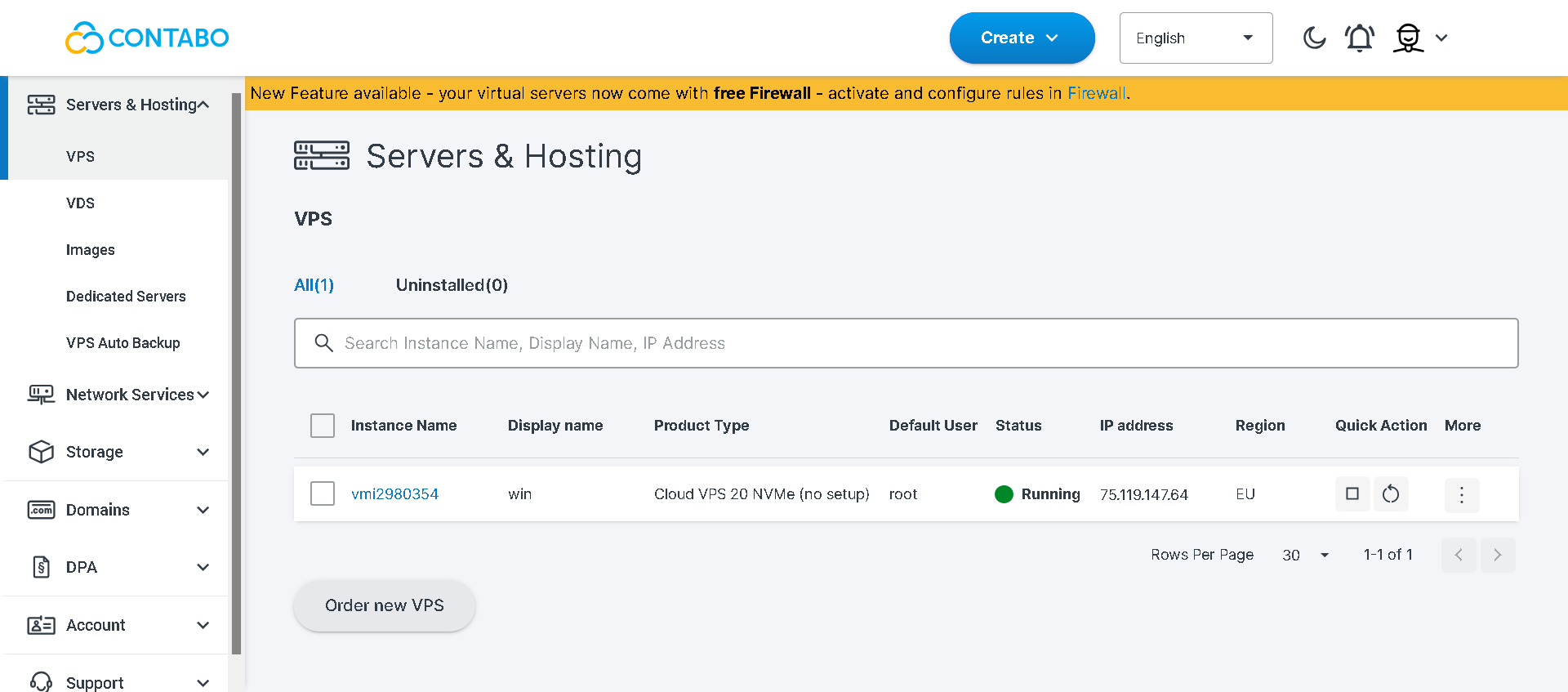
OpenClaw then installs in the background. In the customer panel at new.contabo.com, I watched the server status move from Installing to Running. It completed faster than the stated maximum of 30 minutes in my experience.
Overall, I found the registration process one of the cleaner ones I have gone through for a VPS product. There are no unnecessary steps, no upsells appearing at the last moment, and the cost is visible throughout rather than revealed at checkout.
I also tested adding OpenClaw to a VPS I already had on Contabo. This path took roughly five minutes from clicking Install to the server being back online with OpenClaw ready, which impressed me.
But there is something important you need to know before you start.
From the VPS list in the customer panel, I clicked the three-dot menu next to the server I wanted to use. The dropdown gives you several options. I selected Reinstall.

The reinstallation modal opened with a yellow warning banner across the top: all data on the VPS will be deleted.
Before you even get to select OpenClaw, Contabo shows a separate warning screen spelling out exactly what that means:
I backed up everything on the server before proceeding. That step is not optional. If you skip it and click Install, the data is gone.
After reading the warning, I switched to the Application Installation tab in the modal, selected OpenClaw from the dropdown, set an admin password, and clicked Install.

The server status changed to Installing immediately. About two minutes later it was back to Running.

I clicked into the server detail view and confirmed the Applications section showed OpenClaw listed, with a link to the official documentation and the initial username set to root.

Two minutes is fast, and the reinstall path is genuinely efficient for anyone who has a spare Contabo VPS and is comfortable with the data wipe.
What I appreciated most about this path is that for an existing Contabo customer who wants to repurpose a server for an AI agent workload, this is a low-effort path that delivers a ready-to-configure OpenClaw instance quickly.
The Application Installation tab is clean, the OpenClaw option is easy to find, and the two-minute turnaround means you are not sitting around waiting for something to happen.
Both paths converge at the same point: connecting via SSH to configure OpenClaw.
The agent does not expose a public web interface by default, which means this step is unavoidable. It is also the one point in the process that assumes some technical comfort.
I connected with:
ssh root@MY_SERVER_IP
The connection was immediate. After entering my admin password, the terminal session opened and the OpenClaw onboarding wizard started automatically.

The first screen I encountered was a security warning. It recommends reading the full security documentation before enabling tools or exposing the agent to the internet.
I confirmed I understood and moved on.
The onboarding then walked me through four decisions:


Onboarding completed, the gateway service initialized, and OpenClaw confirmed it was running. From SSH connection to a live agent took under 10 minutes.
Once OpenClaw was running, I tested both interaction interfaces.
Running openclaw tui from the SSH session launches a text-based interface in the terminal.

I typed messages and the agent responded using the model I had configured. The experience was clean and fast.

No lag in the interface itself, and for developers who are already working in the terminal, this is a practical daily-use option. I found it the faster of the two for quick tasks and direct commands.
The browser-based Control UI runs on localhost port 18789. Because it is bound to localhost by default rather than exposed publicly, accessing it requires creating an SSH tunnel first:
ssh -N -L 18789:127.0.0.1:18789 root@MY_SERVER_IP
With the tunnel open, I ran openclaw dashboard in a second terminal session. This generated a tokenized link that I pasted into my browser.

The Control UI opened: a visual interface with a chat panel, skill toggles, settings, and an activity monitor. I found it noticeably more comfortable for configuration work and reviewing activity logs than the terminal UI.

The tradeoff is the extra step of creating the SSH tunnel each time. Close it, and the Control UI becomes inaccessible until you start it again.
I actually think this is the right default behavior. An agent with filesystem access and the ability to execute shell commands should not be reachable publicly without deliberate action on your part.
Contabo has put genuine thought into making OpenClaw accessible.
The things that work well are worth calling out clearly:
The SSH-based configuration is the one point that demands technical comfort. I think that is largely appropriate for what OpenClaw is. A self-hosted AI agent with filesystem access and the ability to execute shell commands should not be configured through a point-and-click wizard.
For developers and technically confident users, the full path from a fresh order to an interactive, running agent is achievable in under 30 minutes.
That said, one thing I would like to see Contabo add is a way to access the OpenClaw Control UI directly through the customer panel without needing to set up an SSH tunnel every time.
Hostinger, which also offers OpenClaw hosting, lets you deploy and access the agent interface through their hPanel dashboard, with the gateway token visible in the environment variables section and the dashboard reachable at a direct URL. You paste the token once, and you are in, no tunnel required.
Contabo’s SSH tunnel approach is more secure by default, and I understand why that design decision was made. But for a product positioned at developers who may be managing multiple projects across multiple servers, a panel-integrated access path would meaningfully reduce friction without compromising the underlying security model.
It is the one area where the experience feels like it was built for a technical purist rather than a productive developer.
For a product like OpenClaw, support quality matters more than it does for standard web hosting. You are running an AI agent with system-level access to your server, and when something goes wrong, you need answers that are technically accurate, not generic responses that send you in circles.
I tested Contabo’s support firsthand to see how they hold up under a real infrastructure question.
Contabo provides three support channels:
I focused my test on the ticketing system since that is the channel where technical depth shows itself most clearly.
From the left sidebar in the customer control panel, I clicked Support and then Contact Us.

The support page displays your existing tickets in a clean table with columns for Ticket ID, title, subscription, status, creation date, and last modified date.
Two buttons sit below the list: Create new Support Ticket for complex technical issues requiring investigation, and Chat with us for quick questions.
I clicked Create new Support Ticket. A modal slid open on the right side of the screen with a clean form asking me to select a topic, a subtopic, the relevant subscription, and the details of my question.
I selected Technical and Configuration as the topic, Other as the subtopic, and linked the ticket to my Cloud VPS 20 instance.
I submitted this question at 5:04 PM on March 27, 2026:
“I want to understand how resource isolation works between VPS instances on the same physical host. Specifically, if a neighboring VPS experiences a heavy CPU or memory spike, will that affect the performance of my OpenClaw workloads? And does Contabo offer any plan tier where CPU resources are fully dedicated rather than shared?”

This is a question I genuinely needed answered. OpenClaw runs continuously, and if a noisy neighbor on the same physical host can degrade the agent’s response times or cause it to drop tasks, that is a real operational concern for anyone running it on a VPS.
Ekaterina from the General Support team replied at 5:18 PM on the same day, 14 minutes after I submitted the ticket.
The response was direct and honest. She confirmed that Contabo VPS plans run in a shared virtualized environment where multiple VPS instances share the same physical host, including CPU cores and RAM.

She acknowledged that while access to CPU and memory is guaranteed, the nature of virtualization means a small amount of latency from neighboring VPS activity can occasionally occur.
What I appreciated was that she did not try to minimize this. Her exact framing was that for most applications the impact is little to none, but for performance-sensitive services a standard VPS might not deliver the best experience.
She then pointed clearly toward two alternatives: Virtual Dedicated Servers, where each VDS has its own dedicated hardware resources with no sharing between instances, and Dedicated Servers, where the entire physical machine is yours with no virtualization overhead at all.
That is the kind of answer that requires actual product knowledge. It would have been easy to say “our VPS resources are guaranteed” and leave it at that.
Instead, Ekaterina gave me an honest assessment of the limitation, explained the underlying reason for it, and told me exactly which product tier would solve the problem if it mattered for my workload.
Response time: 14 minutes on a Friday afternoon. That is fast for a technical infrastructure question that required a substantive answer rather than a link to a knowledge base article.
Technical accuracy: The response was accurate and matched what I know about shared virtualization. There was no deflection, no vague reassurance, and no attempt to avoid the limitation I was asking about.
Honesty: This is where Contabo’s support stood out most. When a provider’s sales pitch is built around affordable shared VPS, it takes confidence in the product to tell a customer that a VPS might not be the right tool for performance-sensitive workloads and to recommend a more expensive tier. That kind of honesty builds more trust than a polished non-answer.
Ticket interface: The support panel in the customer control panel is clean and well-organized.
The ticket experience was genuinely solid. A 14-minute response time, a technically accurate answer, and an honest acknowledgment of a real infrastructure limitation rather than a deflection.
For the kind of technical questions that come up when running OpenClaw on a VPS, that quality of response matters. I left the interaction with a clearer understanding of the product and a specific path forward if I needed more isolated resources.
Yes. After running full benchmarks, testing both installation paths, and putting the support team to the test with a real technical question, I recommend Contabo for running OpenClaw.
What stands out most is how deliberately Contabo has thought about the OpenClaw experience. The dedicated hosting page, the use-case-mapped plans, and the free one-click installation remove the friction that normally comes with self-hosted AI agent deployments.
The infrastructure behind it is strong: 17.7 GB/sec memory throughput, zero stress test failures, and honest support that tells you the truth about shared virtualization rather than glossing over it.
The SSH tunnel requirement for the Control UI and the lack of a free trial are worth knowing upfront. But for developers who want a private, always-on AI agent on reliable infrastructure at a genuinely competitive price, Contabo is a strong choice.
Get Started with Contabo OpenClaw| Plan Name | Space | CPU | RAM | OS | Price | |
|---|---|---|---|---|---|---|
| Free Trial | 100 GB | 4 cores | 8 MB | $0.00 | Details | |
| Storage VPS 10 | 300 GB | 2 cores | 4 GB | $5.28 | Details | |
| Cloud VPS 4 | 100 GB | 4 cores | 8 GB | $5.28 | Details | |
| Storage VPS 20 | 400 GB | 3 cores | 8 GB | $7.20 | Details | |
| Cloud VPS 6 | 200 GB | 6 cores | 12 GB | $7.20 | Details | |
| Cloud VPS Plus 4 | 150 GB | 4 cores | 8 GB | $13.00 | Details | |
| Storage VPS 30 | 1 TB | 6 cores | 18 GB | $13.44 | Details | |
| Cloud VPS 8 | 300 GB | 8 cores | 24 GB | $13.44 | Details | |
| Cloud VPS Plus 6 | 300 GB | 6 cores | 12 GB | $18.40 | Details | |
| Storage VPS 40 | 1.2 TB | 8 cores | 30 GB | $24.00 | Details | |
| Cloud VPS 12 | 400 GB | 12 cores | 48 GB | $24.00 | Details | |
| Cloud VPS Plus 8 | 450 GB | 8 cores | 24 GB | $33.60 | Details | |
| Storage VPS 50 | 1.4 TB | 14 cores | 50 GB | $35.60 | Details | |
| Cloud VPS 16 | 500 GB | 16 cores | 64 GB | $35.60 | Details | |
| Cloud VPS 18 | 600 GB | 18 cores | 96 GB | $47.04 | Details | |
| Cloud VPS Plus 12 | 600 GB | 12 cores | 48 GB | $56.80 | Details | |
| CLOUD VDS S | 180 GB | 6 x 2.8GHz | 24 GB | $59.00 | Details | |
| CLOUD VDS M | 240 GB | 8 x 2.8GHz | 32 GB | $74.50 | Details | |
| Cloud VPS Plus 16 | 750 GB | 16 cores | 64 GB | $76.00 | Details | |
| Cloud VPS Plus 18 | 900 GB | 18 cores | 96 GB | $95.20 | Details | |
| CLOUD VDS L | 360 GB | 12 x 2.8GHz | 48 GB | $104.50 | Details | |
| CLOUD VDS XL | 480 GB | 16 x 2.8GHz | 64 GB | $142.00 | Details | |
| CLOUD VDS XXL | 720 GB | 24 x 2.8GHz | 96 GB | $209.00 | Details |
| Description | Expert Review |
|---|---|
| Scalable virtual private servers with robust performance and flexibility. | Read VPS Review |
| Affordable, high-performance servers with full customization and control. | Read Dedicated Server Review |
| Reliable Windows VPS hosting with customizable environments and excellent scalability... | Read Windows VPS Review |
| Read VDS Review | |
| Read GPU Hosting Review | |
| Read n8n Hosting Review | |
| Read WireGuard Hosting Review | |
| Read Nextcloud Hosting Review | |
| Read RDP Hosting Review |


Contabo’s Cloud VPS 10 with 4 vCPU cores and 8GB RAM meets OpenClaw’s minimum requirements and works well for personal use. For heavier multi-platform usage, the Cloud VPS 20 with 6 cores and 12GB RAM is the better starting point.
No. Contabo does not offer a free trial. They do provide a 14-day refund window on new contracts, which gives you enough time to test the infrastructure before committing long term.
Yes. From the customer control panel, you can reinstall any existing VPS with OpenClaw using the Application Installation tab. Be aware that the reinstall process permanently wipes all existing data on the server.
OpenClaw supports Anthropic, OpenAI, Gemini, and several other providers. You configure your preferred provider and enter your API key during the onboarding wizard after installation. API usage costs are billed directly by the provider and are separate from your Contabo VPS cost.

Answer a few simple questions and find the perfect solution for you!
Start Hosting Search