


I’ve tried plenty of no-code tools before, but Base44 stood out because it doesn’t just focus on the frontend. Base44 automatically sets up the backend, handles hosting, and even offers a library of integrations with services like Stripe, Slack, and OpenAI.
On paper, it looked like a tool built for speed and flexibility, and I wanted to see if that promise held up.
In this review, I’ll walk you through my hands-on test of Base44, showing you how I signed up, built my first app, and customized it. By the end, you’ll know exactly where Base44 shines and where it falls short.

What Is Base44?
Base44 is an AI-powered app builder that lets you create fully functional applications just by describing your idea in plain English. You don’t need to know how to code.
Simply tell Base44 what you want, and the platform automatically generates the app, complete with pages, features, and backend systems.
Base44 is designed as an all-in-one AI-native builder. That means the heavy lifting is handled behind the scenes: databases, user authentication, role-based permissions, and hosting are all built in. When you’re done, your app is ready to publish instantly without extra setup.
Who Is It For?
Base44 is for:
- Entrepreneurs and startups trying to launch quickly without burning money on a development team.
- Developers who are trying to save time on boilerplate tasks, spin up an internal tool, or validate a client idea fast.
- Small Business Owners looking to create simple apps such as booking portals, dashboards, or customer portals.
- Hobbyists and Learners searching for ways to experiment with ideas, learn how apps are structured, and share projects without dealing with servers or databases.
Pros and Cons
- Build functional apps fast with plain prompts.
- Automatic backend setup for authentication, database, and hosting
- Publish instantly with a live URL.
- Strong catalog of integrations with popular tools and APIs.
- Backend functions and code editing require paid plans
- Free tier offers limited flexibility
- Large apps may face performance constraints
What Makes Base44 Different: Key Features
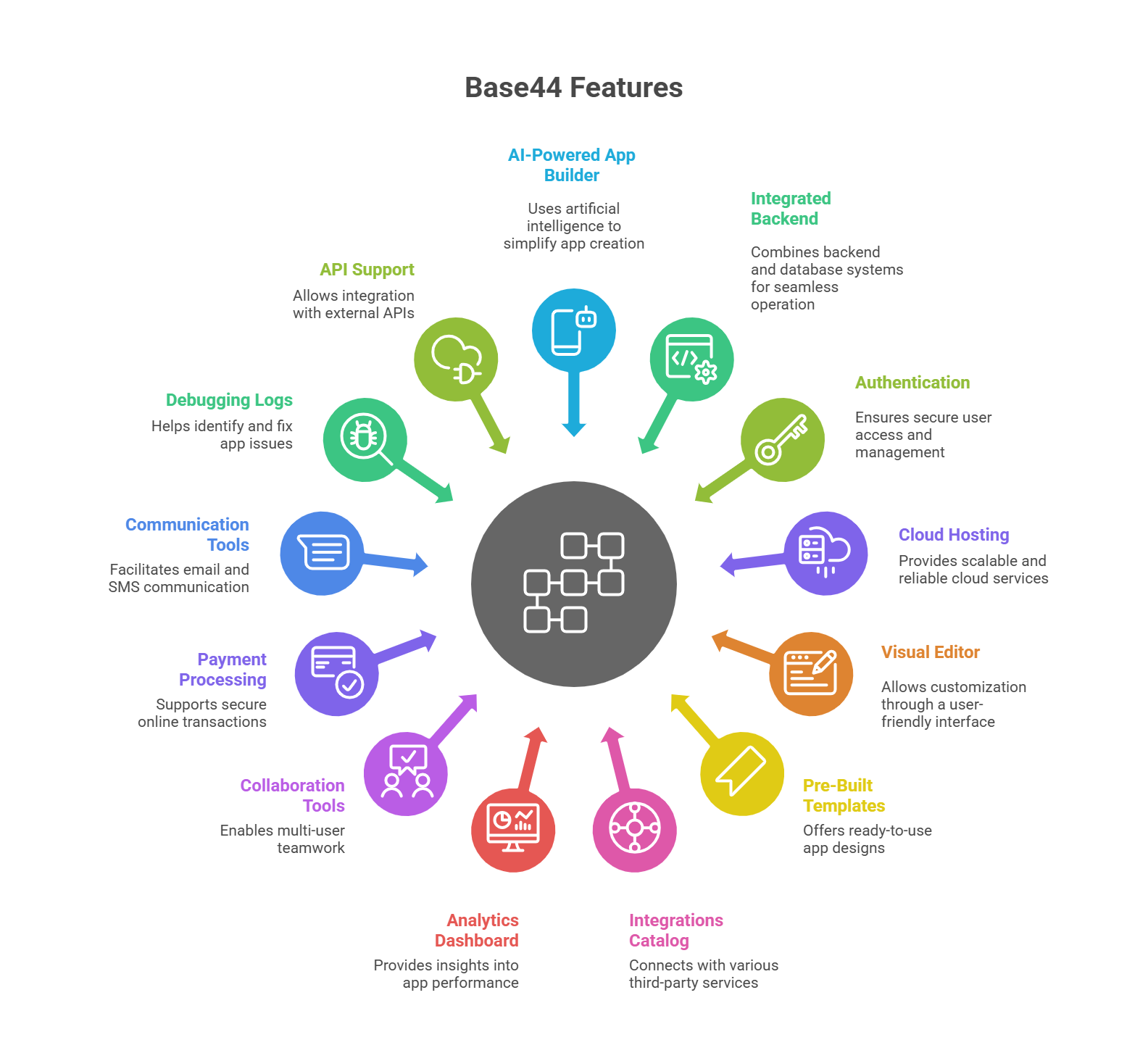
- AI-powered app builder
- Integrated backend and database system
- Authentication and user management
- Cloud hosting and storage
- Visual editor for customization
- Pre-built app templates
- Wide integrations catalog
- Built-in analytics dashboard
- Multi-user collaboration
- Payment processing support
- Email and SMS tools
- Debugging and troubleshooting logs
- API and backend functions support
My Hands-On Experience with Base44
When it comes to tools like Base44, I believe the real test isn’t just what the website promises but what happens when you actually use it. That’s why I wanted to see, step by step, how easy it really is to go from the homepage to app generation.
Did the process feel smooth or clunky? Was I impressed right away or left second-guessing?
Here’s exactly what I experienced.
Getting Started: Signing Up and First Impressions
I started by heading over to the Base44 homepage, which immediately gave off a clean and modern feel. The first thing that caught my eye was the big headline: “Let’s make your dream a reality. Right now.”
Right underneath was a text box asking me what I wanted to build, with suggestions like “Reporting Dashboard” and “Networking App.”

I could have jumped right in by typing a prompt into the box on the homepage, but I wanted to go through the full signup process first. So instead of starting there, I went to the top right corner of the screen and clicked the bright green Start Building button.
That took me straight to the login and signup screen, where I could either use my Google account or create an account with email and password.

I noticed I could sign up with Google or just use email and password. I decided to go with email. The form was straightforward, and when I typed in my password, Base44 provided real-time feedback on its strength. A nice touch.
After that, I had to verify my email. Base44 sent me a six-digit code. The email came instantly. Once I entered the code, my account was verified, and I was redirected back to the login page. No credit card was required for signup, which I appreciated.
Logging in for the first time brought me to the dashboard. The layout was simple but full of possibilities: a big input field asking me to describe the app I wanted to create, a top menu with options like Apps, Integrations, and Templates, and a section showing different app categories (CRM, Personal Finance, Education, and more).

Building My First App with Base44 AI: A Step-by-Step Guide
Once I landed on the main dashboard, I was prompted by the question – “What would you build today?”
The goal was to know whether the building process was easy, intuitive, and straightforward to use.
So, I typed in this detailed request:
“Build a Client Project Management App designed for freelancers and small teams to organize work and track progress. The app should include:
– User authentication (sign up, log in, and roles: admin, team member, client)
– A dashboard that shows the number of active projects, tasks due today, overdue tasks, and upcoming deadlines
– Notifications for approaching deadlines or new comments
– A simple reports page where users can see time spent per project and budget vs actual cost
– Make the interface clean and professional with easy navigation between the dashboard, projects, and reports
– Ensure backend handles secure data storage and role-based permissions, with built-in hosting so the app is ready to use immediately.”
Before I hit the orange arrow to submit my prompt, I noticed two interesting options right below the input box.
The first was a small + sign, which let me add a file to my app request. For example, if I wanted Base44 AI to generate an app around an existing CSV dataset, I could upload the file right here. That way, the AI wouldn’t just rely on my written description. It could also pull directly from my data.

The second option was Styling Instructions, and this is where things got fun. Clicking it opened up a library of preset design languages I could apply to my app.
Instead of just generating a plain, default look, I could tell Base44 how I wanted the interface to feel. A few examples:
- Neo-Brutalism: bold colors, harsh shadows, thick borders, and a raw, expressive style — the kind of “unfinished but intentional” look you see in Gumroad or Stripe Press.
- Neumorphism: soft, tactile UI where buttons and cards look like they’re being pressed into the screen, with subtle shadows and minimal color palettes.
- Glassmorphism: frosted glass effects, transparency, and blurred layers for a sleek, modern interface similar to what Apple uses in macOS or iOS.
Each option came with a short description, key features, and examples of companies that use it. I liked how Base44 gave me control over the aesthetic direction right from the start.

With my prompt ready and the option to style my app, I clicked the orange arrow button to begin the build.
The screen instantly shifted to a loading state with the message “Creating Your App”. At the same time, a log panel appeared on the left, almost like a live transcript of what the AI was doing.

First, Base44 AI outlined a full plan for my app:
- Key Features: Dashboard, Projects, Tasks, File Management, Team Communication, Reports, and Settings.
- Design Language: Clean white space, deep navy and emerald accents, premium typography, smooth animations, and mobile-first design.
- App Organization: Five main pages (Dashboard, Projects, Project Details, Reports, Settings) with modular components.
Then the build began. Line by line, I watched as the log marked off steps. From:
- Creating user entities
- Setting up project and task models
- Building the layout
- Rendering dashboard cards
- Wiring up reports,
- Inserting demo project records.
Every major component came with a green checkmark once complete.
Rounding Up the App Development Process
Around the four-minute mark, Base44 AI hit a snag. An error popped up in red about a missing dependency in the Projects page and an undefined icon. This was the moment I thought the build might break down.
But to my surprise, the AI tried fixing it automatically. Within seconds, it rewrote the code, added the missing import, and re-ran the process. The errors cleared, and the build continued without me lifting a finger.

Finally, my app loaded. It had even given the project a name: ProjectFlow. On the left, a sidebar showed the main sections: Dashboard, Projects, Reports, and Settings.
- Dashboard: Greeted me by name, showed key stats (active projects, tasks due, overdue items, deadlines) plus recent activity and quick actions like new project, file upload, messaging, and time logging.
- Projects Page: Displayed project cards with details like client, budget, status, and progress. The sample data included a website redesign and a mobile app build.
- Reports Page: Showed total data for projects, budget, hours, and revenue, with a “Time by Project” section ready for logged entries.
- Settings Page: Allowed profile updates, hourly rate setup, team invites, and account actions, with my ADMIN role clearly indicated.

What surprised me most was that Base44 AI also gave me access to a backend dashboard for the app. From there, I could view and manage:
- Users (roles, emails, profile details).
- Data Models (User, Project, Task, Comment, File, TimeEntry).
- Analytics (unique users, top pages visited, usage charts).
- Domains (with a built-in domain ready to publish, or the option to add my own).
- Security (scan for vulnerabilities, check data access).
- Code View (a file tree showing the generated files).
- API Explorer (with working API calls for reading and updating data in both JavaScript and Python).

This gave the app a professional feel. It was an actual environment I could tweak, monitor, and expand.
First impressions of the build? Despite the small hiccup with errors, Base44 corrected itself and delivered a polished, working app in under six minutes. From dashboard design to backend setup, it covered every layer I asked for in the prompt. Honestly, I didn’t expect it to generate something this complete.
It left me with the sense that Base44 can deliver a production-ready starting point that you could actually use.
You can attach files to your prompt (like a CSV dataset). This allows Base44 to generate your app based on real data, not just written descriptions, especially useful for dashboards, reporting tools, or apps built around imported information.
How It Handles Errors and Flexibility in Edits
When I set out to build my first app on Base44, I wanted to see how the platform behaves when things don’t go perfectly.
Any serious app builder should expect errors, revisions, and design tweaks along the way.
During the final stages of creating my ProjectFlow app, Base44 hit a snag. Remember the error at the four-minute mark? A red error box appeared in the activity log. The message was clear and technical:
“Some errors were detected. base44 will try to fix them automatically. Error in file pages/Projects: React Hook useEffect has a missing dependency: ‘filterProjects’. Either include it or remove the dependency array. … ‘FolderOpen’ is not defined.”

Normally, that kind of error would stop a non-coder in their tracks. But I didn’t have to lift a finger. Base44 AI automatically attempted a fix. The log is updated in real time:
- “Fix Projects page errors”
- “Editing Projects page”
- “Fixed the React hooks dependency issue by converting filterProjects to useCallback and added the missing FolderOpen import.”
Within seconds, the app reloaded, the error was gone, and I was looking at a working preview. That kind of automated recovery is reassuring, especially if you’re not technical.
Beyond fixing errors, Base44 gives you several ways to refine and edit your app:
- Iterative prompts: You can refine the app through chat. You can ask it to add a client invoice, switch to dark mode, or move UI elements, and Base44 executes it automatically.
- Styling control: The AI executes design instructions impressively. When I asked for a clean, premium design with deep navy, emerald accents, and mobile-first responsiveness, it produced results that match my prompt.
- Direct code access (paid plans): Upgrading lets you edit the underlying JavaScript and Python for deeper customization.
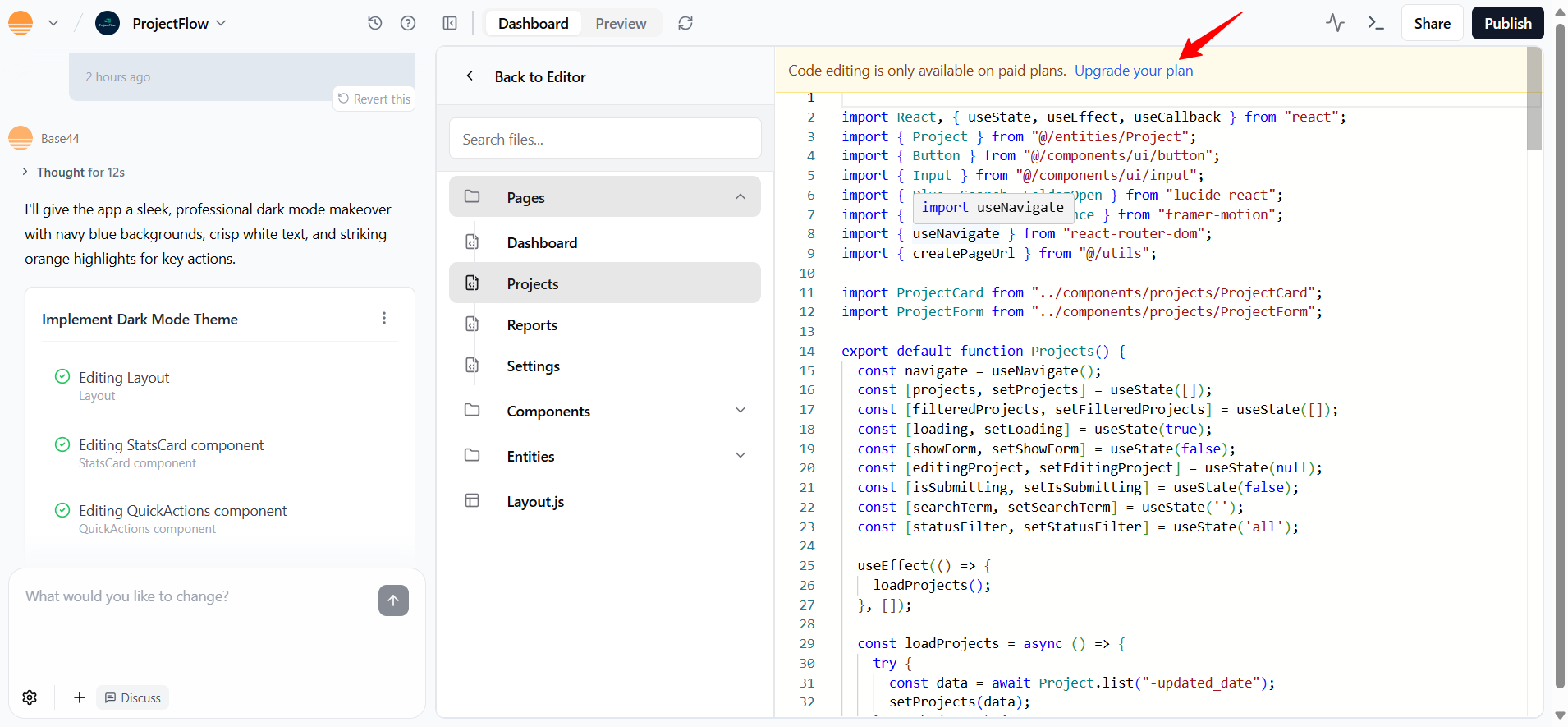
- Activity monitor: Even on the free plan, you can view backend logs. You can see requests, response times, and status codes, which is great for debugging and visibility.
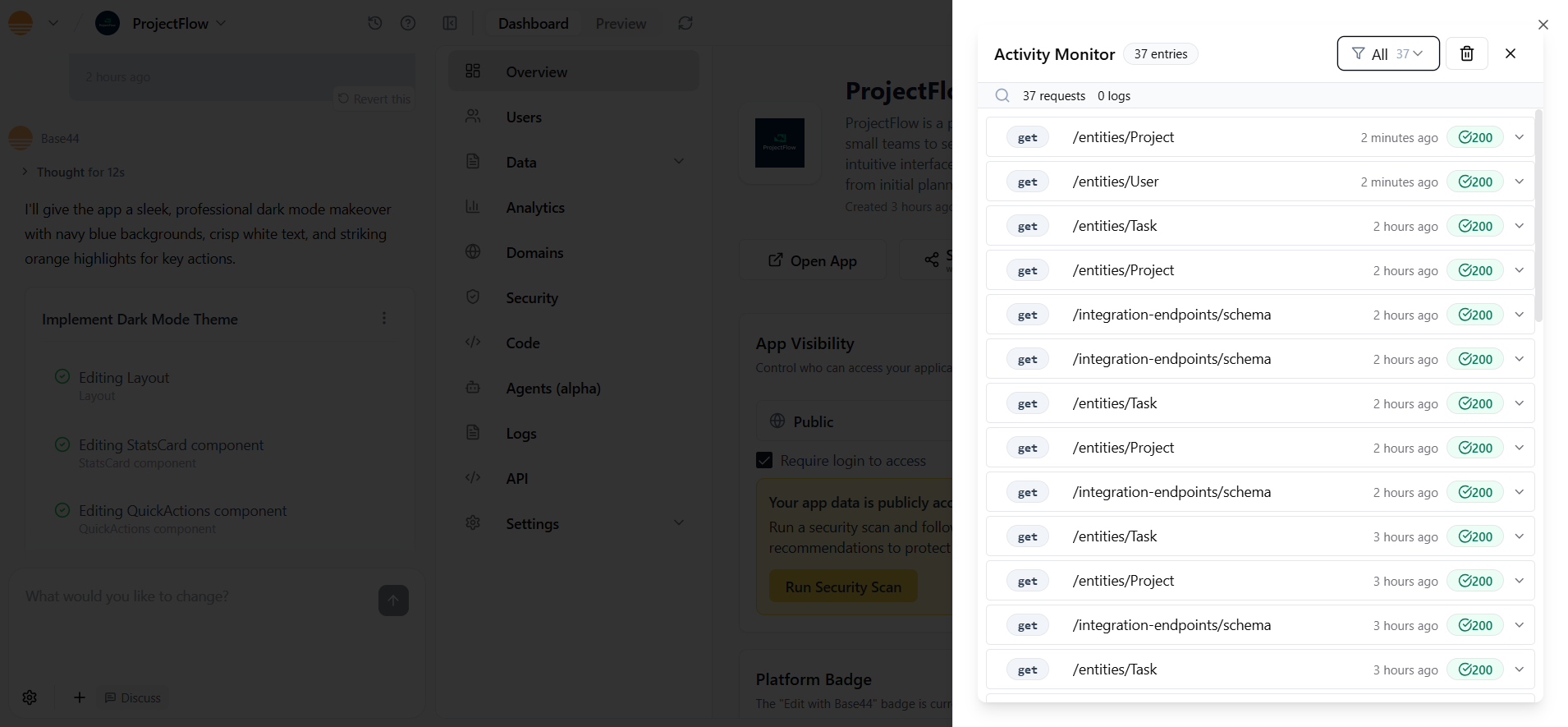


While free users are limited compared to those on paid plans, the platform still gives you meaningful control without writing code.
Customizing the Design and Layout
What if you want to change something on your app after the AI has built it? I wanted to test how much control I really had over the look and feel of my app, and whether the process felt natural or frustrating.
My first experiment was to switch the ProjectFlow app into dark mode. I opened the AI chat and typed a simple request:
Base44 processed the request and, after a short wait, applied the change globally. The results were clear:
- The light background became a deep navy blue, giving the app a professional, dark theme.
- All text was flipped to white, making it readable against the new background.
- Buttons, highlights, and icons gained orange accents, which popped nicely against the darker tones.

What impressed me: The styling was applied consistently across the dashboard and navigation. I didn’t have to dig through menus or toggle endless options. One prompt handled it all.
Base44 makes it easy to go further with customization:
- Styling presets: From the start, you can apply design systems like Neo-Brutalism or Glassmorphism in the workspace page, or paste them into chat later.
- Global vs. Local Changes: You can tell the AI to apply edits across the entire app or just to one page. For example, “Make the login page background white, but keep everything else dark mode.”
- Visual Edit Tool: Located under the AI chat, you can click on the elements in your app preview to adjust colors, margins, text, or even add Tailwind classes. For more control, upload an inspiration image and ask the AI to borrow fonts, colors, or button styles from it.
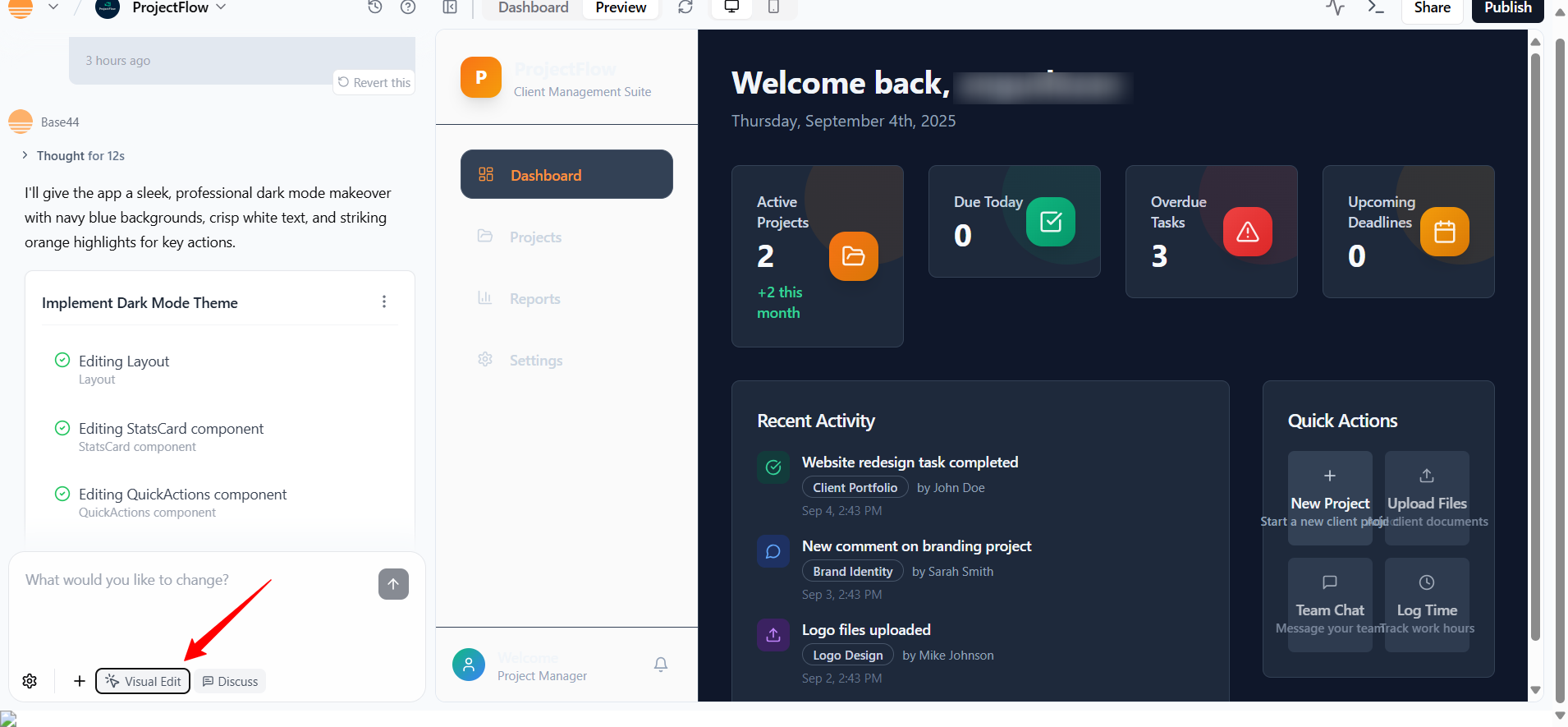
- Fonts, Icons, Layouts: You can prompt the AI to import a font, replace Lucide icons, redesign UI components, or toggle between light/dark mode.
- Advanced Customization: Paid users can edit code, while free users receive backend tools such as data, Analytics, and version history for rollbacks.

Publishing the App and Adding Integrations
What stood out immediately is how much Base44 simplifies the backend. Normally, hooking up databases, APIs, or payment systems would involve hours of configuration.
Here, I could browse an Integrations Catalog that already covered the essentials:
- Workflow & Project Management: monday.com, Trello (via Zapier).
- Communication: Slack and X (Twitter).
- Payments: Stripe and other custom payment providers.
- Email & Messaging: Resend for transactional emails, Twilio for SMS.
- AI/Voice Tools: OpenAI, Eleven Labs for text-to-speech.
- Data & Analytics: Explorium, BrightData.
- Social & Content: Giphy, Zapier bridges to Google Sheets, Gmail, Airtable, WhatsApp, Shopify, and more.

If what I needed wasn’t on the list, Base44 also supports backend functions (JavaScript-based, running in a secure environment). These let you connect to any external API, whether it’s your CRM, WhatsApp Business account, or a proprietary service.
Activating backend functions is straightforward. I simply opened Base44, selected my app, clicked into the Dashboard → Settings → App Settings, scrolled down to the Backend Functions section, and hit Activate. From there, I could start adding server-side functionality, like connecting to Stripe for payments or Slack for notifications, all without needing to manage external infrastructure.

There’s also an Authentication section that let me configure login options beyond basic email and password. Google, Microsoft, and Facebook logins are supported out of the box, and there’s even an early-preview option for Single Sign-On (SSO) if you need enterprise-level access control.

One of the most refreshing parts of Base44 was publishing. Honestly, there was almost nothing to it. Once I was satisfied, I just clicked the Publish button at the top right of the dashboard.

Base44 showed me a clean confirmation screen:
- At the top, my ProjectFlow logo and the message “This will be the first public version of your app. Publishing will make your app accessible to users at the public link.”
- Under Available Domains, the platform gave me a ready-to-use link:
project-flow-83a99788.base44.app - Below that, it noted “No custom domains configured,” but there was a Manage option if I wanted to connect or buy one.
- I also saw a Public access section with a warning: “Your app data is publicly accessible. Run a security scan and follow the recommendations to protect it.” There was a Run Security Scan button right there to tighten things up before going live.
- Finally, a big Publish App button to push everything live.

In short, publishing wasn’t a technical process at all. With one click, my app was online, accessible through a Base44 domain, and ready to share.
Hosting is fully built in, with scaling handled automatically. I didn’t have to touch servers, worry about infrastructure, or configure analytics. It was all taken care of.
For domains, Base44 gave me three choices:
- Stick with the default Base44 subdomain.
- Connect a custom domain I already own (manual setup).
Pricing & Plans
Base44 starts with a free plan that lets you explore all core features. Plus, the free tier isn’t time-limited.
Instead, you’re capped at 25 message credits per month and 500 integration credits. This makes it more of a “freemium” model than a traditional trial.
Base44 Website Builder Plans
- Free plan: Build unlimited apps, test authentication, use integrations, and explore analytics. But you’re restricted by credits, and there’s no custom domain or advanced editing.
- Paid plans: Unlock more credits, advanced tools, custom domains, GitHub integration, and eventually direct code editing and premium support at higher tiers.
Base44 hasn’t published a formal refund policy, so it’s safest to assume upgrades are billed monthly or annually with standard SaaS terms. Payment is typically handled via credit/debit card.
Alternatives to Base44
While Base44 is impressive as an AI-driven app builder, it’s not the only option. A long-standing alternative in the no-code space is Bubble, which also lets you build web apps without writing code but takes a more manual, drag-and-drop approach.
Base44 vs Bubble Overview
| Feature | Base44 | Bubble |
|---|---|---|
| App creation | AI prompt-based | Visual drag-and-drop editor |
| Backend setup | Automatic with hosting included | Manual workflows and plugins |
| Styling | Natural language prompts, styling presets | Visual editor with CSS control |
| Integrations | Built-in catalog + backend functions | Plugin marketplace + API connector |
| Pricing | Free plan, paid from $16/mo | Free plan, paid from $29/mo |
| Ease of use | Very beginner-friendly | Steeper learning curve |
Base44 vs Bubble: What’s your Top Pick?
If you’re a beginner, freelancer, or small team that wants to go from idea to working prototype in minutes, Base44 is a better fit. The AI handles the backend automatically, so you don’t need technical knowledge to get started. It’s especially useful if you want to test concepts quickly without worrying about infrastructure.
On the other hand, Bubble is more suited for users who want deep customization and full visual control. It has a steeper learning curve but gives you more flexibility in workflows, database logic, and design elements. If you’re building a complex SaaS product and don’t mind investing time into learning the tool, Bubble might be the stronger long-term choice.
Final Verdict on Base44 AI
After testing Base44 hands-on, I can say it’s one of the easiest ways to go from an idea to a working app. If you’re a freelancer, entrepreneur, or small team that wants to validate concepts quickly without hiring developers, this tool makes a lot of sense.
The AI takes care of the backend, hosting, and even styling, which lets you stay focused on the actual app idea.
That said, the free plan is limited, and more advanced features like backend functions or direct code edits require a paid upgrade. Still, if your priority is speed and simplicity, Base44 delivers.

