


Learning how to make a mobile-friendly website is crucial to improving traffic on your site. In addition, it creates a smooth experience for anyone who visits your site.
This guide explains the steps to ensure your website is appealing to mobile users. By the end, you will be able to enhance your SEO and drive sales.
Creating a mobile friendly website is much easier when you start with a builder that delivers responsive design and performance tools by default. The options in the table below offer mobile ready templates, intuitive editors and features that help your site look great on any device. Explore our curated list of recommended website builders here to find the best fit for building a smooth mobile experience.
Top Site Builders for Fast, Mobile-Optimized Websites
| Provider | User Rating | Recommended For | |
|---|---|---|---|
 | 4.6 | Beginners | Visit Hostinger |
 | 4.4 | Pricing | Visit IONOS |
 | 4.2 | Design | Visit Squarespace |
Why Your Business Needs a Mobile-Friendly Website Today
Before teaching you how to make a mobile-friendly website, let’s see why you need one.
The Dominance of Mobile Devices in Global Traffic
Mobile phones contribute over 64% of all internet traffic. Google requires developing a site for mobile devices through mobile-first indexing. This means your mobile version is the main tool Google uses for indexing and ranking.
Google’s algorithm uses a positive mobile experience as a direct ranking factor. A site with a poor experience will only waste your search engine optimization efforts.

Also, there is a problem when people leave your site due to slow loading times and confusing navigation. An increase in the bounce rate will ultimately lower your ranking in search results.
How to Make a Mobile-Friendly Website: A 7-Step Guide
Now that you know you need a mobile website, it’s time to create one.
1. Choose a Responsive Layout for Any Mobile Screen
A responsive layout makes your site adapt to any device. This approach makes your content and design look good on different screen sizes.
Google recommends this as a standard for mobile design to create a seamless experience. Plus, it makes your SEO basics easier.

Responsive vs. Adaptive Mobile Design
Let’s point out their differences to help you choose the right one:
- Responsive design: This approach creates only one website. But this site automatically adjusts to fit every user’s screen. The design is better for search engines and easier to manage.
- Adaptive design: This approach shows customized versions of the site to specific devices. It allows you to control how your site appears on a given screen. Nevertheless, it involves handling many versions at once.
Most businesses often create a responsive design due to its low maintenance. You should only choose adaptive design if you have specific needs.
How to Use the Viewport Meta Tag
You must ensure your responsive website shows the right dimensions on mobile screens. To do this, you must add the viewport meta tag to the head section of your HTML. This one line of code makes mobile browsers adjust the dimensions of your webpage.
Code: <meta name=”viewport” content=”width=device-width, initial-scale=1.0″>

Namecheap
2. Optimize Website Speed for Impatient Mobile Users
Page speed is a critical factor for ranking high. It is also vital for retaining mobile visitors on your site. Your content above the fold should load within a second.
The Impact of Load Time on Conversions
Your website speed has a direct impact on your income. A site that loads in 1 second has three times more conversions. This means you must speed up your site to earn more money.
Essential Speed Optimization Strategies
Do the following to have a quick website:
- Use browser caching: This saves part of your site on a user’s device. It will reduce your website’s loading time when they come back later on.
- Optimize images & code: Reduce file size by minifying CSS, HTML, and JavaScript.
- Reduce redirects: Reduce the number of redirects so users don’t have to wait.
- Use a CDN: A Content Delivery Network deploys a server that is nearer to the user to host your site.
- Host videos externally: Improve your server speed by embedding large videos from other platforms.

3. Compress Images for a Faster Mobile-Friendly Site
Mobile sites take a lot of time to load because of large image files. This makes it necessary to make image sizes smaller. Use percentages for image dimensions to ensure they adjust.
Recommended Image Formats (WebP, AVIF)
Use image formats like WebP, JPEG 2000, and AVIF on your site. These formats are more compressed and smaller.
You should convert images before uploads to ensure the best results. However, modern website builders, like Wix, can automatically change uploaded images to WebP. This makes everything easier for you.

Take Advantage of Lazy Loading and Compression Tools
Lazy Loading prevents images from loading until the user scrolls down to them. This helps to improve first page loading speed.
You can use compression tools to reduce images before uploading them. Free tools like Kraken can downsize files by 70% or more without compromising quality. Combining this with lazy loading enhances the performance of your site.
4. Select a Readable Font Size and Style
Mobile users get frustrated with pinching and zooming small text. This can drive them away faster than you realize.

You should balance the contrast between your text and background. You must also use the best fonts for websites for better viewing.
What is the Ideal Font Size for Mobile?
Mobile designs should have a font size of 16px to 18px. These font sizes will make it easier to read the body text without zooming.
Headlines will range between 24px to 32px. In addition, subheadings will be between 18px to 24px to show a clear visual hierarchy. This ranking helps users to scan the content displayed quickly.
Best Font Styles for Readability
Custom fonts can reduce loading times. But choosing simple and legible fonts can prevent this.
Sans-serif fonts are the most easy-to-read on a mobile screen. This means using Arial, Helvetica, and Open Sans for the body text. Their clean lines look legible even on smaller displays.
You should not use script or decorative fonts that will be difficult to read on mobile screens. Instead, use them for logos or design elements needing extra aesthetics.
5. Design Thumb-Friendly Buttons and CTAs

A mobile-friendly site must have large buttons. This makes it easier for users to tap with their thumb without accidentally touching other elements.
Optimal Button Size and Spacing
The tap target size of buttons should be 44×44 pixels or 48×48 pixels. This ensures even users with larger fingers can conveniently tap.
Make sure there is enough padding and space around buttons and links. This prevents users from mistakenly tapping the wrong elements.
Beyond this, write a call to action and make it catch the audience’s attention immediately. Use high-contrast colors to make the CTA stand out.
Strategic Placement for Easy Tapping
The “thumb zone” is where thumbs naturally rest and move. This location is the middle and bottom areas of the mobile device. Place key buttons and CTAs within this place for easy access.
Don’t place important clickable elements in the top corners. Also, you should try using a bottom tab bar for main navigation. This makes it easy to reach important options at all times.
6. Simplify Your Mobile Version’s Navigation
Simplify navigation to remove clusters. Add only the critical functions and links in menus.
In addition, break large texts using short paragraphs, bullet points, and white space. This makes it easier to scan relevant content on mobile screens. Most importantly, ensure your site works with portrait and landscape orientations.
The Role of the Hamburger Menu

The hamburger menu has three horizontal lines used for hiding the main menu. It has become a standard across Android and iOS devices.
It is a good way to save space while making it easy to access your full navigation. This lets you keep a longer menu while making the screen look neat. Always put the hamburger menu at the upper-right or upper-left corner.
Why You Must Space Out Your Links
Mobile users can mistakenly tap the wrong hyperlink when they are too close to each other.
Create enough spacing between each link in your text and navigation lists. A minimum of 8-10px of padding around each link is enough. Confirm all the links are working with a broken link checker.

7. Regularly Test Your Mobile-Friendly Website
Making your website mobile-friendly involves constant testing. One should test their site following a major change or update to make sure that everything works properly.
Automated Testing with Google’s Tools
Use Google’s Mobile-Friendly Test to check whether each page responds. Use Google PageSpeed Insights to check how your site performs. This gives you ideas to improve your site for mobile and desktop views.

Get a complete report on your performance and SEO using the Lighthouse tool within Chrome DevTools. This tool integrates into your browser, making it easier to test.
The Importance of Testing on Real Mobile Devices
Testing on real mobile devices allows you to see a sample of your site. Test on iOS and Android phones to find problems that affect its flow.
Adjust the size of your browser window on a desktop computer. This will help you see the way your web design adjusts to different screen widths.
Choosing the Basics for Your Mobile Website
You must get the basics right to understand how to make a mobile-friendly website.
Start with an Easy-to-Use Website Builder
You will surely get a mobile-friendly design with a modern website builder. These platforms offer responsive templates that automatically adapt to any device width. You don’t even need to know coding to create a website.

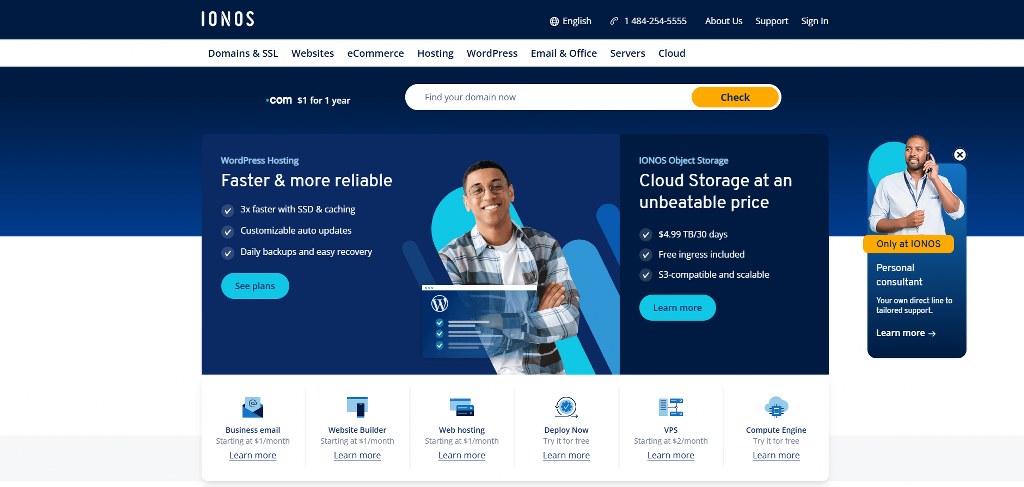
- Website builders: Platforms like Hostinger and IONOS are good starting points for most users. They provide built-in mobile editors to create a perfect site.
- E-commerce platforms: Use platforms like Shopify to build an online store. They provide the tools to ensure users can buy items on mobile phones.
- WordPress: WordPress offers many themes for extra adjustments. However, they need more technical skills. You should be able to choose the right option by understanding the CMS vs website builder differences.

The Role of Hosting in Website Performance
Your hosting provider affects your website ranking. Poor hosting makes your website slow and unreliable. It is especially harmful for mobile users with weaker connections. This makes it important to choose the best web hosting.
Key Tools for Making Your Website Mobile Friendly
The table below highlights the tools for creating a mobile-responsive site:
| Tool | Purpose | Free? | Notes |
| Google’s Mobile-Friendly Test | Checks mobile usability per page | Yes | Analyzes viewport, text size, taps; provides issues list. |
| Google’s PageSpeed Insights | Measures load speed, suggests improvements | Yes | Mobile/desktop scores; focuses on Core Web Vitals. |
| BrowserStack SpeedLab | Tests loading time for mobile/desktop | Free report | Run twice (mobile/desktop); displays scores. |
| Kraken | Image compression | Yes (basic) | Reduces file size without quality loss; web interface. |
| Chrome DevTools | Device simulation, inspect elements | Yes | Toggle device toolbar; test screen sizes/browsers. |
| Lighthouse | Audits performance, accessibility, SEO | Yes | Mobile-friendly test; integrated in Chrome DevTools. |
Conclusion
Learning how to make a mobile-friendly website is essential for surviving in the digital world. This approach is the key to better rankings, conversions, and long-term growth. Combining this with the best website testing tools will guarantee your success.

Next Steps: What Now?
Follow these steps to create a mobile-friendly website:
- Choose a good hosting provider.
- Select a responsive design.
- Improve your website speed.
- Compress images to ensure faster loading.
- Select easy-to-read font sizes.
- Ensure users can tap buttons and CTAs with their thumbs.
- Create an easy-to-access site menu.
- Keep testing your site to improve.
Further Reading & Useful Resources
Here are more resources for you:
- Icons in Web Design: Use icons to improve user experience on your site.
- Chrome Extension For Developers: Discover the best extensions for web development.
- Hire a Web Developer: Hire the right person to create your website for you.
- SEO Website Structure: Target a site structure that gives higher rankings.
- Updating Your Website: Update your site for better performance.
- Multilingual Websites: Create a mobile website in different languages.


