Verpex positions its VPS hosting around dedicated Xeon vCPU cores, NVMe storage, and a choice between managed and unmanaged configurations, which is a stronger starting point than many providers at this price level.
After deploying a live server, connecting via SSH, and running benchmarks across five categories, I found results worth paying close attention to. The CPU hit 1,596 events per second, and the stress test ran the full five minutes with zero failures.
Read on for my full breakdown.
To ensure fairness and consistency across all our hosting reviews, we use a standard rating methodology. Each category receives a score out of 10. You can read more about our evaluation framework on our rating methodology page.
Here’s how Verpex VPS hosting performed across each category:
| Category | Score | Why This Score |
|---|---|---|
| Prices | 9.1/10 | Competitive entry pricing for dedicated resources and NVMe storage. The 7-day money-back window is shorter than most. Renewal rates increase after the first term, so locking in annual billing at signup reduces long-term cost. |
| Features | 9.0/10 | Dedicated CPU cores, NVMe storage, full root access, free SSL, DDoS protection, and 8 data center locations are strong inclusions. Managed and unmanaged options give genuine flexibility depending on your technical level. |
| Performance | 9.4/10 | CPU hit 1,596 events per second with a consistent average latency of 0.63ms. Memory throughput reached 6,237 MiB/sec. Disk read speed came in at 94.98 MiB/s, and the stress test completed 300 seconds with zero failures across all four CPU cores |
| Ease of Use | 9.6/10 | Signup is straightforward and self-contained on a single configuration page. The client area is clearly organized with services, billing, and support accessible from the left sidebar. Server details are immediately visible from the management page. |
| Support | 9.0/10 | 24/7 availability. Live chat connected instantly, and the agent gave an accurate, detailed answer within 3 minutes, covering resource isolation before pivoting to upselling. The support ticket response came back in an hour |
| Overall | 9.4/10 | Strong benchmark performance across CPU, memory, and disk, with a clean signup flow and a logically organized client area. A reliable VPS option for developers and agencies who want dedicated resources without paying managed pricing. |
Verpex structures its Linux VPS plans across four tiers: Linux Server-D4, Linux Server-D8, Linux Server-D16, and Linux Server-D32.
With each plan, you get an upgrade on the number of dedicated CPU cores, RAM, and NVMe storage, making the progression between tiers straightforward.
| Plan Name | Space | CPU | RAM | OS | Price | |
|---|---|---|---|---|---|---|
| Unmanaged Linux Server-D4 | 80 GB | 2 cores | 4 GB | $10.00 | Details | |
| Unmanaged Windows Server-D4 | 80 GB | 2 cores | 4 GB | $18.00 | Details | |
| Unmanaged Linux Server-D8 | 160 GB | 4 cores | 8 GB | $20.00 | Details | |
| Unmanaged Windows Server-D8 | 160 GB | 4 cores | 8 GB | $30.00 | Details | |
| Unmanaged Linux Server-D16 | 320 GB | 8 cores | 16 GB | $40.00 | Details | |
| Unmanaged Windows Server-D16 | 320 GB | 8 cores | 16 GB | $53.40 | Details | |
| Unmanaged Linux Server-D32 | 640 GB | 16 cores | 32 GB | $55.00 | Details |
The entry-level Linux Server-D4 suits growing sites and developers testing applications or lightweight workloads, making their first move off shared hosting. At the same time, D8 is a practical mid-range option for small WooCommerce stores running multiple applications on the same server.
The higher tiers handle higher traffic volumes with more headroom and are built for resource-intensive applications and agency environments that manage demanding client projects at scale.
All VPS plans come with a 7-day money-back guarantee. This is a shorter window than Verpex’s shared hosting plans, so I would recommend running benchmarks and testing your specific workload within the first few days rather than leaving it to the end of the trial period.
Verpex accepts major credit and debit cards, as well as PayPal. As you subscribe, keep in mind that the renewal rates increase after the first term. Locking in annual billing at signup gives you the most favorable long-term rate.
I wanted to then test how the Verpex Linux Server-D8 performs under real-world conditions. I connected it via SSH and ran five categories of benchmark tests.
Below are the exact server details I was working with:
Test Server Configuration:
I ran tests covering CPU processing power, memory throughput, disk I/O speeds, and system stability under sustained stress load.
Benchmark Results
| Benchmark | Result |
|---|---|
| CPU Events per Second | 1,596.96 |
| CPU Average Latency | 0.63ms |
| Memory Transfer Speed | 6,237.56 MiB/sec |
| Memory Operations per Second | 6,387,261 |
| Disk Read Speed | 94.98 MiB/s |
| Disk Write Speed | 63.32 MiB/s |
| Disk Average Latency | 0.04ms |
| Stress Test Bogo ops/s | 6,710.98 |
The sysbench CPU benchmark calculates prime numbers up to 20,000 to measure raw processing power. This simulates CPU-intensive workloads such as processing WooCommerce transactions or executing background jobs like scheduled imports and cron tasks.
Results:

The result of 1,596 events per second is a strong figure for a VPS at this price point. What stands out beyond the raw number is the consistency. The 95th percentile latency sat at just 0.65ms, barely above the 0.63ms average, which suggests the CPU maintained a steady pace throughout the test rather than spiking and recovering.
A server that performs consistently is more predictable under real workloads than one that scores high on average but fluctuates widely. If you’re running WordPress with heavy plugins or handling concurrent users, this level of CPU performance handles it comfortably.
The sysbench memory benchmark tests how quickly the server’s RAM can read and write data during bulk data transfers on a live server.
Results:

The near-zero average latency of 0.00ms indicates that most memory operations were faster than the sysbench resolution, with the highest observed spike reaching only 0.23ms throughout the test.
A throughput of 6,237 MiB/sec reflects excellent memory performance in a virtualized setup. It suggests that the hypervisor layer adds negligible overhead between the guest OS and physical RAM.
I then ran a sysbench file I/O benchmark test, which simulates real-world application behavior in which data is accessed unpredictably, such as when a web server handles simultaneous requests.
Results:

At 6,078 read operations per second and 4,052 write operations per second, the system can sustain continuous disk activity without noticeable congestion or request queuing.
The average latency of 0.04ms is the most practical indicator here, showing that individual I/O requests are being completed almost immediately at the system level. In real-world usage, this translates to faster database query execution and more efficient page rendering for dynamic applications.
The measured read throughput of 94.98 MiB/s and write throughput of 63.32 MiB/s also indicate solid performance. This level of throughput suggests the storage system is handling non-sequential access efficiently.
With NVMe-based storage, such as that used in Verpex VPS environments, the architecture bypasses bottlenecks and communicates more directly with the CPU, which improves responsiveness under mixed workloads.
The fsync performance of 12,972 operations per second further reinforces this consistency. Values above the 10,000 mark typically suggest a storage layer that maintains strong durability guarantees while still allowing high write throughput. This result is particularly important for transactional workloads since there are no delays.
I then ran stress-ng across all 4 CPU cores for a full 300 seconds, pushing the server to its limit. This benchmark shows what happens to your site when all your CPUs are utilized during a traffic spike.
Results:

The server maintained 100% utilization across all four CPU cores for the full five-minute stress period, with no failures or performance instability observed throughout the test. This kind of outcome indicates reliable behavior under pressure.
A system that records zero errors under sustained maximum load is generally well-positioned to handle real-world traffic surges without sudden throttling or instability.
The 6,710 bogo operations per second suggests steady processing capability rather than transient performance boosts. This consistency indicates that performance is not dependent on temporary burst mechanisms that degrade once exhausted.
Verpex’s Linux Server-D8 delivered strong results across every benchmark I ran. The CPU scored 1,596 events per second with consistent sub-millisecond latency throughout. Memory throughput reached 6,237 MiB/sec with operations completing faster than sysbench could clock. Disk read speeds hit 94.98 MiB/s on a random mixed workload.
In real-world usage, the server can manage multiple concurrent users smoothly without noticeable performance drops, while keeping workloads responsive even under sustained demand. It maintains stable behavior under continuous pressure, with no visible degradation over time.
I then wanted to test their support channels. This step revealed their technical knowledge and response speed.
I started with the live chat.
I could access the live chat button in the bottom-right corner of any page on their website.

A prompt appeared asking me to fill in my details, my name, email, support pin, and select a department.

I typed in this question:
“Hello. I’m considering running a WooCommerce store on Verpex. I’d like to understand, even with dedicated vCPUs, is there any chance of performance fluctuation due to other tenants on the same server?”
Orbi from the Sales team joined the conversation instantly.

His response was clear and technically accurate, which he gave confidently without hedging.

What followed was a sales-led portion of the conversation. Orbi offered pricing details for both managed and unmanaged VPS plans unprompted, which is useful to know if you are asking a technical question and prefer a straight answer without a product pitch.

When I clarified that I would be managing the server myself, he adjusted immediately and presented the unmanaged plan options instead. The pivot was smooth, and the information remained accurate throughout.

The entire conversation lasted 3 minutes.
My Assessment:
I then submitted a ticket through the client area. To get started, I navigated to the “Manage Support Tickets” button.

I was redirected to a page where I could open a new ticket.

Here, I filled in the subject, picked the “Support” department, and submitted my question:

“Hello. I am evaluating Verpex VPS for a production environment and want to understand the storage configuration in more detail. Can you confirm whether the NVMe storage on the Linux Server-D8 plan is locally attached to the physical host, or whether it runs over a network-attached storage layer? I want to understand the latency implications for a database-heavy application.”
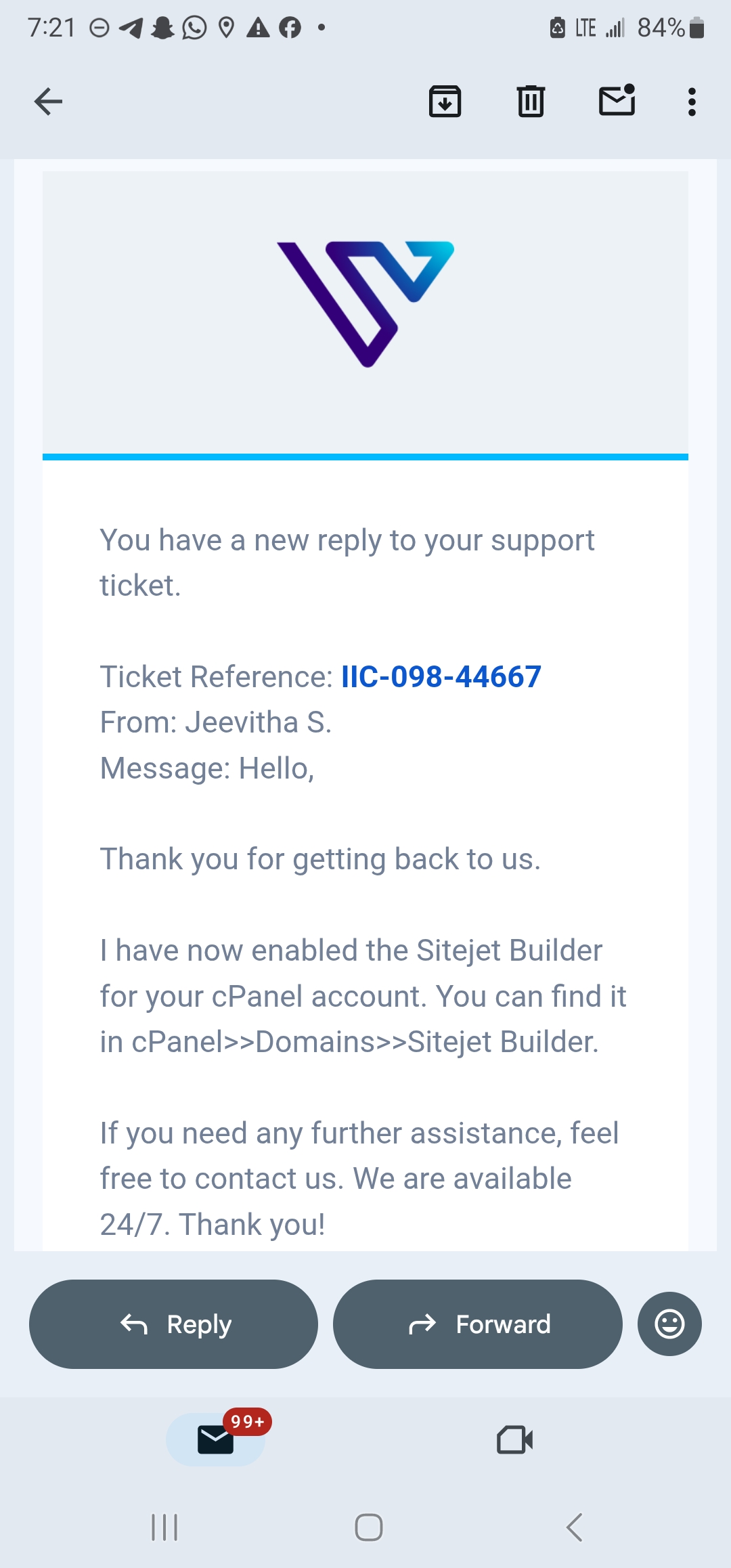
Kishore N., a customer care representative, responded to my question an hour later.

My Assessment:
Across both live chat and ticket support, I got a consistent picture of how Verpex handles customer queries in practice.
The live chat experience was almost immediate, with an agent joining instantly and the full exchange concluding in about 3 minutes. The response to my VPS resource question was technically accurate. However, the conversation also leaned toward plan recommendations, making it slightly more sales-guided than purely technical.
The ticketing system provided a more detailed and infrastructure-focused response.
I also decided to evaluate Verpex’s ease of use. Here, I focused on the
As soon as I opened the Verpex homepage, I could see the clear menus at the top. I navigated to the “Hosting and Servers” tab and selected VPS Hosting.

I scrolled down to the pricing plans. Verpex lists core features against each plan to help you make a choice. I selected VPS-D8, which gives me access to 4 dedicated vCPUs and 160GB of NVMe storage.

The configuration page that followed kept everything in one place. From a single scrollable screen, I could select my billing term and an operating system.

There’s also an option to add a cPanel license if needed, select additional resources, and pick a server location of your choice.

My billing summary on the left side of the page updated in real time as I made each selection. The total cost was visible at every step, so I didn’t need to proceed to checkout to find out what I owed.

I added a hostname, reviewed my summary, added it to my basket, and completed checkout.
Once my account was active, I logged in to the client area. One thing I noted is how the Verpex dashboard was organized and clearly labeled. From the left-side menu, I could navigate to:

From the main homepage, you can scroll down to view the support tickets, products, and services.
The layout is clean, and nothing is buried. For a first-time VPS user, the structure is approachable without stripping away useful information.
I also tested how Verpex VPS hosting management works. From the dashboard, I navigated to the “Products & Services” section to open the “Hosting & Servers” tab.

I could see a list of all my servers. I selected my VPS hosting plan to view the configuration details.

Immediately, I could see the server name and IP address.

Scrolling down revealed the billing details and status of my account.

This section is where you access your SSH credentials and server controls without needing to raise a support ticket for basic management tasks.
You could reinstall your server, reboot, or even shut it down.

Verpex’s signup and management experience is straightforward from start to finish. The single-page configuration flow at checkout removes the multi-step processes.
The client area follows a logical structure that keeps services, billing, and support accessible without requiring users to dig through multiple menus. However, the resource monitoring section is not readily available to users who want to view usage in real time.
The Verpex Linux Server-D8 does not leave much to criticize in terms of raw performance. The CPU scored 1,596 events per second with consistent sub-millisecond latency throughout, memory throughput reached 6,237 MiB/sec, and the server completed a full five-minute stress test with zero failures across all four cores.
That combination of speed and stability is what separates a reliable production server from one that looks good on a short benchmark and drops off under sustained load.
Verpex VPS hosting is a strong fit for developers, growing ecommerce stores, and agencies that need dedicated CPU resources and fast NVMe storage without paying for a managed service. The unmanaged Linux plans give you full root access and complete control, which suits anyone comfortable in a terminal environment.
I would not recommend it for users who need a longer trial window to evaluate the server. The 7-day money-back guarantee is short, and testing a VPS properly takes time. Anyone migrating a production environment should run benchmarks and load tests in the first few days rather than leaving evaluation to the end of the window.
| Plan Name | Space | CPU | RAM | OS | Price | |
|---|---|---|---|---|---|---|
| Free Trial | - | $0.00 | Details | |||
| Unmanaged Linux Server-D4 | 80 GB | 2 cores | 4 GB | $10.00 | Details | |
| Unmanaged Windows Server-D4 | 80 GB | 2 cores | 4 GB | $18.00 | Details | |
| Unmanaged Linux Server-D8 | 160 GB | 4 cores | 8 GB | $20.00 | Details | |
| Unmanaged Windows Server-D8 | 160 GB | 4 cores | 8 GB | $30.00 | Details | |
| Unmanaged Linux Server-D16 | 320 GB | 8 cores | 16 GB | $40.00 | Details | |
| Unmanaged Windows Server-D16 | 320 GB | 8 cores | 16 GB | $53.40 | Details | |
| Unmanaged Linux Server-D32 | 640 GB | 16 cores | 32 GB | $55.00 | Details |
| Description | Expert Review |
|---|---|
| Read Reseller Hosting Review | |
| Read Wordpress Hosting Review |


Verpex offers both. The Linux VPS plans reviewed here are unmanaged, meaning you are responsible for server configuration, software installation, and ongoing maintenance. Verpex also offers fully managed VPS plans where their team handles the technical administration, which suits business owners who want dedicated resources without managing the server themselves.
Yes. Verpex allows plan upgrades without downtime. You can move from the D4 to D8 or D16 as your resource requirements increase. The upgrade is handled from the client area without migrating your data to a new server.
The unmanaged Linux VPS plans support AlmaLinux and other common Linux distributions. Verpex also offers Windows VPS plans separately for workloads that require a Windows environment, including applications built on ASP.NET or MSSQL.
Backup availability depends on the plan configuration. Verpex includes free daily backups on shared hosting plans, but VPS plans should be verified at signup for specific backup terms. For production environments, configuring your own backup schedule via cPanel or a server-level cron job is recommended.

Answer a few simple questions and find the perfect solution for you!
Start Hosting Search