Expert Analysis with Verified Hostinger User Reviews
I signed up for Hostinger Reach, connected an external domain, generated email templates with two different prompts, sent a live test campaign, and pushed a technical question through Kodee to a human agent, to see how the tool holds up under real use.
I signed up for Hostinger Reach, connected an external domain, generated email templates with two different prompts, sent a live test campaign, and pushed a technical question through Kodee to a human agent, to see how the tool holds up under real use.
Hostinger built Reach as an AI email marketing platform, launched directly inside its existing hosting ecosystem so contacts, domains, and templates connect to accounts millions of people already have.
The company runs infrastructure worldwide, but the real test for a bundled add-on like this is whether the AI actually understands what you ask it to build, and whether support can back that up when something goes wrong.
I ran a full testing session inside Reach, from a fresh signup through a real domain connection, two AI-generated campaigns, and a live escalation to human support, to find out.
Hostinger Reach Plans with Hostinger
Boost your email marketing with Hostinger Reach, an AI-powered platform that helps you create professional campaigns, manage subscribers, and connect with your audience. With AI-assisted content creation, customizable templates, audience management, and campaign analytics, Hostinger Reach makes email marketing simple for businesses of all sizes.
Combined SPF record protects existing mailboxes automatically
AI explains DNS records in plain language
Detailed prompts produce noticeably better AI copy
Renewal price never increases like hosting plans
Free plan requires no credit card upfront
Native MCP connector for AI agent workflows
Kodee gave an accurate first-response technical answer
Cons
Test sending is blocked until domain connects
Escalating to human support took three attempts
Tip Claim the free year before you actually need it, since Reach’s free plan only works once per account. And write a detailed first prompt rather than a quick one. In my testing, the AI’s suggestions got noticeably more generic the vaguer the instruction.
Rating Breakdown
To evaluate Reach, I applied our hosting review methodology, the same structured approach used consistently across every review on this site to keep scores grounded in real testing rather than marketing claims.
The scores below reflect what I found across a full account setup, two AI-generated campaigns, a live domain connection, and a support escalation, not a read of Reach’s own product page.
The free year needs no card, the entry paid tier is low commitment, and the renewal rate never climbs the way Hostinger’s hosting does. The refund clause has more conditions than the generic 30-day guarantee suggests.
Per-element AI editing, a native MCP connector for AI agents, automated SPF and DKIM setup, and signup forms cover most of what a small list needs. Automation depth beyond welcome and re-engagement flows was outside what I tested.
The AI produced sharp, specific copy for a detailed prompt and generic filler for a lazy one. A test email arrived fast with the image rendering correctly, but the spam checker sits behind a paid upgrade so you cannot self-verify a real deliverability score without it.
Domain verification and the SPF, DKIM, and DMARC explanations are the strongest part of the whole platform for a beginner. Test sending being blocked until a domain connects, and a “Start free trial” button on a plan with no trial, were the two friction points I hit.
Kodee answered a real technical SPF question correctly and precisely on the first try. Getting a human required saying so three times, but once queued, the human agent answered a policy-specific refund question accurately in about four minutes.
Overall
8.2/10
Reach earns its score on the strength of its AI output when prompted well, its beginner-friendly deliverability setup, and support that got the hard technical answer right, even though a few rough edges kept it from scoring higher.
Hostinger Reach Plans with Hostinger
Grow your audience and improve customer engagement with Hostinger Reach, Hostinger’s easy-to-use email marketing solution. Create attractive email campaigns with AI-powered tools, manage contacts effortlessly, customize professional templates, and monitor campaign performance from one intuitive dashboard.
Reach prices itself by audience size rather than by feature tier. You pick a recipient range, and your monthly email allowance, AI credit allowance, and cost all follow from that single choice.
Every tier offers the same three commitment lengths, a one-month term at full price, a 12-month term, and a 24-month term that carries the steepest discount, though the actual discount percentage shifts depending on which recipient range you land in rather than following one flat rate.
The free plan is real, not a disguised trial. It runs for a full year, needs no card, and includes AI-generated templates and campaign scheduling. It does not include monthly AI credits or removal of the “Sent from Hostinger Reach” signature, and it can only be claimed once per account, ever.
One structural detail is worth knowing before you commit to a long term. Unlike Hostinger’s hosting plans, Reach renews at the same promotional rate you originally locked in, not a jumped-up renewal price.
The refund policy is a real 30-day money-back guarantee, but it carries conditions the marketing page does not spell out. Using the free plan first only keeps you covered for a refund on your first paid renewal immediately after it, not any renewal after that.
A prior Reach refund also blocks a new one for 180 days. Purchases made through Multibanco, GCash, or Fawry can only be refunded to Hostinger Balance rather than your original payment method, while standard cards, PayPal, and other major methods carry no such restriction.
For the exact dollar figures at each recipient tier, I broke those down separately in Hostinger Reach Pricing, including where the AI credit allowance flattens out as you move up tiers.
Tip If you already use Hostinger Business Email on the same domain, connecting Reach will not disrupt it. Kodee confirmed during my test that both products share one combined SPF record rather than competing for a separate one, so there’s no deliverability risk in running both.
Features
AI generates full email templates instantly
Shorten, lengthen, or rewrite any text block
Combined SPF record protects existing mail infrastructure
Automatic SPF, DKIM, and DMARC record setup
Double opt-in toggle for compliance control
Native MCP connector for AI agents
WordPress, Website Builder, and API integrations
Signup forms embed directly on any site
Automations for welcome series and re-engagement
Hostinger Reach Plans with Hostinger
Grow your audience and improve customer engagement with Hostinger Reach, Hostinger’s easy-to-use email marketing solution. Create attractive email campaigns with AI-powered tools, manage contacts effortlessly, customize professional templates, and monitor campaign performance from one intuitive dashboard.
With the account set up and a real domain connected during the walkthrough in the ease of use section below, I shifted from testing how easy Reach is to use into testing whether it actually performs, using that same domain and account rather than starting fresh.
There is no server here to benchmark, so I built the test around the three things that actually decide whether an email marketing tool works, how well the AI writes and designs on request, how the deliverability setup holds up, and how fast a real send lands once everything is wired together.
AI Template Generation
First, I gave Reach a full brief for a promotional VPS sale email, the same template I’d started building earlier.
The specific discount, 30% off annual plans
The reasoning behind the offer, locking in a lower rate before a price increase
The scope, applying to every VPS tier, not just entry-level
A hard deadline, seven days, ending Sunday at midnight
A tone direction, energetic without sounding pushy
Reach turned that into a complete template in under a minute, a headline built around price protection (“Lock In Your Speed”), a matching subhead stating the discount and deadline, a CTA button, and a stock image pulled to match the content.
What stood out was not the copy itself but two things the AI added on its own.
A compliance note flagging that the address and privacy policy links needed to be filled in manually before the email could go out legally
Two design suggestions tied to this exact email, linking the hero image directly to the pricing table, and bolding the price-protection line to catch scanners
Neither of those is a generic tip. Both were reactions to what I had actually asked for, which is a real signal that the model is reading the brief rather than running a template with the blanks filled in.
Beyond full-template generation, Reach lets you select any individual text block and run it through targeted AI commands, shorten, lengthen, rewrite, change tone, or fix grammar, without regenerating the whole email.
This is a smart design choice. Instead of throwing out an entire template because one headline felt off, you fix just that headline and leave the rest untouched. A Design tab sits alongside it for manual, non-AI control over images, colors, alignment, and spacing, for anyone who wants to finish the job by hand.
Each generation or edit action pulls one credit from the account’s monthly allowance. I watched the balance drop from 19 to 18 credits over a single AI edit.
Cross-referenced against Reach’s own pricing, most paid tiers cap out at 30 AI credits a month, so casual back-and-forth editing, three or four rounds of “shorten this,” “try a different headline,” per campaign, burns through that allowance faster than the number on the pricing page suggests it should.
Deliverability Setup
Next, since an AI-written email is worth little if it never reaches an inbox, I tested the domain connection process the way an actual new sender would, starting from zero.
Verification starts with a single TXT record, not a full batch of DNS changes upfront. The registrar dropdown came pre-populated for Namecheap, GoDaddy, Name.com, HostGator, and BlueHost, with a manual “Other” option for anything else, and Reach stated plainly that propagation usually takes 5 to 15 minutes but can rarely stretch to 24 hours.
Once the domain verified, the confirmation screen was the strongest moment of the entire test. Instead of listing SPF, DKIM, and DMARC as bare acronyms, Reach explained each one in terms of what it actually does.
SPF is framed as stopping others from sending fake emails using your domain
DKIM is framed as keeping your emails out of the spam folder
DMARC is framed as proving your emails are really from you
A and MX records get the same treatment, covering whether the domain looks real to providers and whether replies actually reach your inbox
For a product built explicitly for people with no design or marketing background, this is the section that earns that claim. Most tools assume you already know what DKIM stands for. Reach assumes you don’t, and explains it in one sentence instead of sending you to a help article.
The architecture underneath also deserves credit. Reach and Hostinger Business Email share a single combined SPF record rather than each demanding a separate one.
I confirmed this directly with support before connecting anything, since a second, conflicting SPF record is a real way to break deliverability on an existing mailbox. Reach avoided that trap by design rather than by warning label.
Test Send Speed
Once the domain verified, I finally went back to the test send that had been blocked earlier, and it worked well once everything ahead of it was in place.
Sending a test email is locked until a domain is connected, so there is no way to preview a real send before finishing DNS setup
Once the domain was live, the test email arrived within seconds of clicking send
The email rendered correctly, including the image, with no broken placeholders
Reach’s own in-app warning that test sends can land in spam for new senders turned out to be unnecessary caution in this particular test
The domain gate is worth separating from the send speed itself. Once everything is connected, Reach sends fast and reliably. The friction is entirely in how long it takes to get to that first send, not in what happens once you do.
Overall Verdict on Performance
Reach performs best when the person using it treats the AI as a drafting partner that needs real direction, not a one-line magic button, since the same tool produced sharp, specific copy and flat, generic copy depending entirely on the prompt behind it.
The deliverability setup is the standout, actually built for someone who has never touched a DNS record before, and the send pipeline itself is fast once a domain is live.
The gap worth knowing about going in is that a full deliverability score check sits behind the paid spam checker, so free-tier users are sending without a way to self-verify how clean their setup really is.
Hostinger Reach Plans with Hostinger
Grow your audience and improve customer engagement with Hostinger Reach, Hostinger’s easy-to-use email marketing solution. Create attractive email campaigns with AI-powered tools, manage contacts effortlessly, customize professional templates, and monitor campaign performance from one intuitive dashboard.
To see whether Reach lives up to its promise of no learning curve, I walked through the whole product from the very first click, starting where an actual Hostinger customer would, inside Hostinger’s own navigation, not on a Reach-specific landing page pulled up cold.
1. Registration
I started from the Hostinger homepage and opened the Products menu in the top navigation. Email marketing sits inside a submenu called Email and marketing, alongside Business Email and Google Workspace, positioned as one of three ways to handle email rather than buried as an afterthought.
Clicking into it took me to Reach’s own landing page, headlined “Your first email marketing campaign starts here,” with a 30-day money-back guarantee and a promise of no learning curve sitting right under the headline.
From there, I clicked Start for free, which dropped me onto the actual registration screen.
Signing up takes one of two paths.
Google or GitHub OAuth, for an account in a couple of clicks
Manual signup with email, password, and an optional phone number
Neither path forces anything extra. The WhatsApp and SMS marketing consent sits behind its own checkbox, unchecked by default, a small compliance detail plenty of signup flows get wrong. The panel next to the form is direct about what the free year actually includes.
AI-fuelled email marketing
100 unique subscribers reachable a month
200 emails sent a month
On-brand templates
CAN-SPAM and GDPR compliance
24/7 customer support
My one real complaint with this screen showed up the moment I went to click through. The button reads “Start free trial,” sitting directly under a headline promising a full year free and a line confirming no card is required.
Those two claims sit oddly next to each other. A trial implies a countdown to a charge.
What Reach actually offers is a full year-long free tier with no billing attached until you choose to upgrade. Calling it a trial undersells what’s actually on offer and risks scaring off exactly the price-sensitive beginner this product is built for.
2. Dashboard
Once I finished registering, Reach dropped me straight onto a Home screen built around a Getting Started panel with three cards, not a locked sequence.
Add contacts
Connect a domain
Create a template
A one-click setup shortcut sits above them for anyone who wants Reach to handle the sequencing itself.
This is a deliberately loose structure rather than the strict numbered walkthrough Hostinger’s own support documentation implies, and I think that’s the right call.
Forcing a beginner through four mandatory steps before they can see the product in action tends to lose people. Instead of working through the cards in order, I skipped straight to Create a template to see what the AI could actually do, and Reach let me, nothing stopped me from jumping ahead.
A separate panel offers AI campaign ideas personalized to your brand, but it stays locked until brand details are filled in, a reasonable trade, personalized suggestions need something to personalize against.
The one real miss I noticed at this stage looked small at first but kept showing up later. My account had an auto-generated username, “Foray18790,” with no prompt anywhere to set a real display name.
I didn’t think much of it until it turned up again as the default sender name on my first test email, which meant Reach’s first impression on a subscriber’s inbox would have been a random string of letters and numbers if I hadn’t caught it.
3. Templates and Other Starting Points
Next, I clicked Create on the template card, which is where Reach’s actual selling point lives. Landing on the create screen, before I typed a single word, the page already offered a shortcut past the blank page entirely.
Under the prompt box sat three suggested categories, welcome newsletter, educational content, and promotions and sales, each with a short description of when to use it.
Selecting one inserted a prompt with placeholders and then it scrolled down to a Customize your brand look card, prompting me to add a logo and brand colors before continuing, a reasonable gate since the AI has nothing to personalize against without it.
Below the suggested categories sat two more options, Browse templates and Upload HTML. Browse templates opened a gallery of pre-built designs with a category filter dropdown set to “All templates” by default.
What loaded by default was a set labeled “Internal,” update newsletters and training announcements aimed at company communication rather than a customer list, which tells me the category system runs broader than a first glance suggests, even though I only reviewed what loaded first.
Upload HTML sits right next to it for anyone who wants to bring their own code, locked behind the same paid upgrade as the spam checker and full code editing I ran into further along.
Having three separate starting points on one screen, a written prompt, a curated suggestion, or a pre-built gallery, is a smart hedge against a problem I hadn’t hit yet but was about to. Someone who doesn’t know what to ask for isn’t stuck staring at an empty box, they can pick a direction instead of inventing one.
4. Creating a Campaign
I skipped the suggestions and went with a written prompt instead, since that’s the feature Reach actually leads with. A single prompt box takes a plain-language description of the email you want, with optional add-ons for an image upload, a related link, and voice input.
I typed a full brief for a promotional VPS sale email, covering the discount, the deadline, and a tone direction, and let it generate.
Reach took under a minute to turn that into a complete template, a headline built around price protection, a matching subhead, a CTA button, and a stock image pulled to match the content. The wait itself is handled well.
A progress screen keeps you occupied with rotating tips rather than a blank spinner, and under a minute is a reasonable amount of time to sit through for a full template built from a single sentence.
Before testing whether any of it could be changed, I looked at what Reach had actually put in front of me. The headline, “Lock In Your Speed,” landed the price-protection idea from my brief without reading like a direct restatement of it, and the subhead spelled out both the discount and the scope, every VPS tier, not just entry-level, in a single line.
The dark navy and cyan color scheme read as a sensible default for a tech audience, and the stock image of someone working at a dual-monitor setup fit a VPS sale better than a generic office photo would have.
Reach’s own written summary next to the template, explaining what the email does and why, matched what I’d actually asked for rather than describing a generic promotional email.
On a straight read, this was a usable first draft, not something I’d send untouched, the placeholder brand name and unlinked policy pages still needed fixing, but close enough that I’d spend a few minutes polishing rather than starting over.
What Reach hands you first is not a finished product, though, it’s a draft you’re expected to keep shaping, and testing how well that shaping actually works was the next thing I wanted to review.
Once the template existed, I wanted to see what happened if I asked for a change without being specific about what I actually wanted.
I typed “Change the template” and sent it, expecting either a meaningfully different layout or a follow-up question asking what I meant.
What I got back was neither. The headline shifted from “Lock In Your Speed” to “Secure Your Price Point,” a wording swap rather than a real revision, and the AI’s own suggestions turned generic in the same reply, a standard features list and a vague link to “a different landing page.” Nothing about the structure, the image, or the layout changed at all.
This is the clearest usability lesson in the product, and the one the Templates and Other Starting Points options above end up softening.
Reach’s AI does not ask clarifying questions when a prompt is vague, it just does something, and that something tends to be a shallow edit dressed up as a fresh take. Anyone using Reach needs to treat the prompt box the way you’d brief a freelancer, with real detail, because a vague instruction gets you a vague result, not a helpful follow-up question.
Beyond full-template generation, I didn’t have to regenerate the whole thing every time something needed a small fix. Selecting an individual text block opened a set of targeted AI commands.
Shorten
Lengthen
Rewrite
Change tone
Fix grammar
That per-element control is the single best usability decision in the product. Regenerating an entire email because one headline felt off is a common source of frustration in AI writing tools, and Reach avoids it entirely.
A Design tab sits next to the AI tools for manual, non-AI adjustments to images, colors, alignment, and spacing, and a mobile preview toggle correctly reflows the layout rather than just shrinking it.
Two things stayed locked behind a paid upgrade at this stage, full HTML code editing and the spam checker.
Neither blocked me from finishing the campaign, but both removed a layer of control and self-verification a free-tier user doesn’t get.
5. Sending a Test Campaign
Then I went looking for the Send button, expecting a single action, and found a dropdown instead, Create campaign or Send test email.
I picked Send test email first, since that felt like the safer move before committing to a real send, and hit a wall immediately.
Reach stopped me outright with a “Connect your domain first” prompt.
There was no way to preview what I’d built landing in an actual inbox until I’d finished DNS setup, which reverses the order a cautious first-time user would probably prefer, test first, commit to DNS changes second.
It’s a reasonable technical requirement, Reach can’t actually send on your behalf without a verified domain, but it lands as a dead end at exactly the moment someone is deciding whether to trust the product with their real audience.
6. Contact and Domain Management
With that wall in front of me, I went straight to fixing it, which meant sorting out the two things Reach was still asking for, contacts and a connected domain.
Adding contacts turned out to have more entry points than most competing tools bother to offer.
Add contacts manually, one at a time
Import a CSV, with a downloadable template if you don’t already have one formatted
Sync automatically from WordPress, Hostinger Website Builder, or Hostinger Horizons
Collect signups through a native form built inside Reach itself
Checking the Integrations page to see what synced automatically, I found six connected options in total, including one I didn’t expect, a native Hostinger Connector that hands Reach management over to an MCP connection, so tools like ChatGPT, Claude, or Cursor can manage a Reach account directly without exporting anything.
That’s an unexpected feature to find on a bundled marketing tool.
Then I connected the domain itself, since that was the piece actually blocking my test send. Connecting an external domain walked me through a single TXT record for ownership verification first, with a registrar dropdown pre-filled for the five most common providers.
Once it verified, the confirmation screen explained SPF, DKIM, and DMARC in plain sentences instead of raw acronyms, a real strength worth crediting on its own rather than folding into a general impression.
Settings rounded things out with sender details, brand details, and a standalone double opt-in toggle for anyone who wants stricter list-building compliance turned on by default.
Overall Verdict on Ease of Use
Reach earns its “no learning curve” claim more than most bundled tools that make the same promise.
The dashboard doesn’t force a rigid order, the AI editing tools let you fix small things without starting over, and the domain and DNS explanations are the best beginner-facing walkthrough of SPF, DKIM, and DMARC I’ve come across on a tool built into a hosting platform. The rough edges are small individually but add up.
A “free trial” button on a plan that isn’t a trial, an auto-generated username that becomes your default sender name if you don’t catch it, and a test-send gate that makes you finish DNS setup before you can see what you built.
None of these are dealbreakers, but a first-time user who hits two or three of them back to back will notice.
Hostinger Reach Plans with Hostinger
Grow your audience and improve customer engagement with Hostinger Reach, Hostinger’s easy-to-use email marketing solution. Create attractive email campaigns with AI-powered tools, manage contacts effortlessly, customize professional templates, and monitor campaign performance from one intuitive dashboard.
With the account set up, a campaign built, and a domain connected, I turned to the part of the review that decides whether any of the above actually holds up when something goes wrong. I opened Reach’s support widget and asked a real infrastructure question with real stakes attached, to see how far the AI could take me before I needed an actual person.
Support Channels
Reach folds support into a single interface rather than spreading it across a portal, a separate live chat widget, and email.
Everything runs through Kodee, an AI assistant embedded directly in the Hostinger dashboard, with a built-in path to a live human agent inside that same chat window when the AI can’t, or won’t, resolve something on its own.
I did not test a separate ticket portal or evaluate the knowledge base directly during this round, since Kodee handled both of my test questions inside the same chat interface without routing me anywhere else. That’s worth flagging plainly rather than guessing at what a portal or knowledge base experience would look like.
Response Speed
Here’s how the timeline actually broke down.
Kodee’s first answer, to a real technical SPF question, came back in under a minute
Reaching an actual human took three separate requests before the handoff triggered
Once queued, the human agent picked up the case and delivered a full answer in about four minutes
Broken down like that, the slow part of this support experience isn’t the human, it’s getting to one. Kodee is fast at answering the questions it’s built to answer. The friction lives in the gap between deciding you want a person and actually getting one.
Answer Quality
I asked Kodee the technical question first, then followed up with the human agent once escalated, so I could compare depth against both.
I asked whether connecting Reach to a domain that already runs an active Hostinger Business Email mailbox would touch the existing SPF record, since a wrong answer here could break a working mailbox. Kodee’s response held up on every point that mattered.
Quoted the domain’s actual current SPF record syntax, not a generic explanation of what SPF is
Confirmed that Reach and Business Email share one combined SPF record instead of requiring separate ones
Warned against adding a second SPF record, since multiple SPF records for one domain cause validation problems
That is a real, correct answer to a question with two plausible-sounding wrong answers, and it reads like the assistant actually understands the underlying DNS mechanics rather than pattern-matching to “SPF is handled automatically.”
Then, once I’d escalated and a human picked up the case, I asked a second question to see if the account-specific knowledge held up too, whether having used the free Reach plan for a year would affect refund eligibility on a later paid upgrade.
The specialist, Dewi, answered accurately, only the first paid renewal immediately after the free plan remains refund-eligible, not any renewal after that.
That detail matches Hostinger’s actual Terms of Service exactly, not a simplified version of the 30-day guarantee most people assume applies universally. Getting that nuance right in a live chat, rather than defaulting to the generic policy line, is a real indicator of account-level training rather than a canned script.
Escalating to a Human
Getting to that human, though, took some persistence.
First request, “Can you connect me with a human support agent?”, Kodee responded by offering to keep resolving the issue itself rather than escalating
Second request, phrased more directly, “No. Kindly connect me to human support,” Kodee again offered to resolve it first, presenting a choice between waiting for a human or continuing with the AI
Third request, “I want to continue with a human,” finally triggered the actual handoff and opened a note field to add background details for the incoming agent
Three attempts to reach a person is a real friction point, especially for someone who has already decided their situation actually needs a human and is being asked to justify that decision twice before it’s honored.
The saving grace is that the resistance came from real competence rather than a stalling tactic, Kodee’s own answers were accurate enough that the deflection didn’t cost me anything except patience.
Overall Verdict on Support
Kodee’s accuracy on a real infrastructure question is the strongest result in this entire review, and the human agent who eventually took over answered a policy-specific question correctly and fast. The weak point is entirely in the handoff between the two. If you already know you want a human, expect to say so more than once before Kodee steps aside, but expect the answer on the other end, whichever one you get, to actually be right.
Hostinger Reach Plans with Hostinger
Create smarter email campaigns with Hostinger Reach, a beginner-friendly email marketing platform powered by AI. Featuring automated content creation, customizable email designs, subscriber management, and performance insights, Hostinger Reach helps businesses communicate effectively with their audience and support long-term growth.
Yes, Hostinger Reach is worth using, with one condition attached. You get out of the AI what you put into the prompt. That was the clearest finding across this entire test, the same tool that produced a sharp, campaign-specific email with a detailed prompt produced flat, generic output with a lazy one.
What stood out most was not any single feature but how much of the platform was built around removing the parts that usually stall beginners.
The plain-language DNS explanations, the fact that connecting Reach to a domain with an existing mailbox does not risk breaking it, and Kodee’s accurate answer to a real technical question all point to a team that thought about the non-technical user first.
The rough edges, a misleading “trial” button on a plan that isn’t one, and a support flow that makes you push for a human three times, are real but minor next to that.
Reach is the right fit for someone starting a first list who wants AI to handle the blank page, and for existing Hostinger customers who want contacts syncing automatically from a site they already run.
The section about renewal pricing is probably the most important takeaway. Introductory prices always look attractive, but it's the renewal cost that determines the real long-term value. I also found another review on Bestecision that breaks down the pricing, performance, and renewal considerations in detail.
If you are running a large Chinese non-delivery fraud network, you will love Hostinger. They will not investigate.
I reported a VPS (2.25.77.36 / srv1801385.hstgr.cloud) that authenticated to a GoDaddy mailbox and sent fraudulent order and shipping emails with fake Track718 tracking. I included the IP, hostname, related domains, and email headers. Hostinger replied that the information was not sufficient and asked for more evidence. They did not examine their own server logs or the account behind the IP.
The result is that a rented Hostinger VPS can be used to send scam emails and the company will not act unless the reporter packages the proof to their exact preference. That is not an abuse process. It is a way to ignore the report.
Very disappointing experience with Hostinger, especially when it comes to customer support and service.
Very disappointing experience with Hostinger, especially when it comes to customer support and service.
The biggest issue has been the support experience. Getting a clear and useful resolution can take a lot of time, and in some cases I had to explain the same issue repeatedly to different support representatives. Instead of getting a direct solution, the conversation often turns into troubleshooting steps that don't actually resolve the underlying problem.
For a hosting company, reliable support is extremely important because website downtime, server issues, migration problems, or technical errors can directly affect a business.
The service may look attractive because of the pricing, but based on my experience, the support quality and issue-resolution process need significant improvement.
I expected much better service and technical assistance from a major hosting provider.
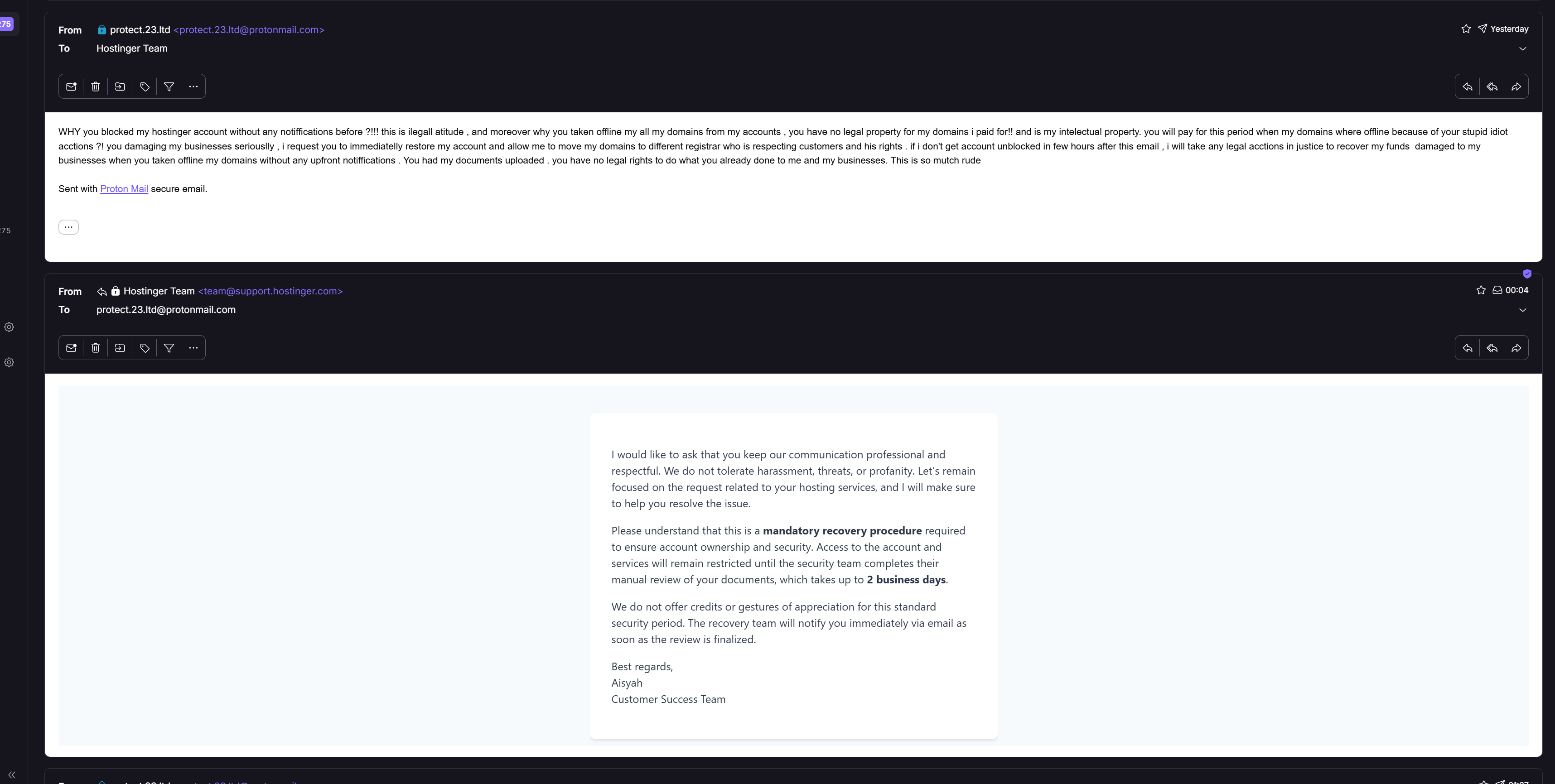
i had 20 domains registered with this scamm company , and from 2 days nowon they blocked my account as they say for high risk , i completed identity verifications and they still not unblocked my account , i have my domanins there which is my intellectual proprty . they gived all my domains turned off!!! they given alot of damages for me , and i asked them to pay me for this time when domains are not live because of theyr stupidity. and they don't even care about customers rights , my businesses are legala and i'll do acction in justice for this rude company , i asked them why not contacted me before blocking my account if they have any questions for me , they blocked dirrecty whitout any notice and they taken offline all my sites ... DO NOT TRUST THIS COMPANY!!!! MOST OF POSITIVE REVIEWS ARE PAID REWIEWS
Thank you for your feedback. We're sorry to hear about your experience, but we really appreciate your honesty, as it helps us get better.
We'd like to clarify what happened. Your account was flagged by our internal security systems, and an email about the required account verification was sent to you in advance. When the requested documents are not received within 7 days, the account may be suspended — with the possibility of unblocking it once the documents are provided. If for any reason you're unable to provide all the required documents, your domains can be transferred out, so your intellectual property always remains yours.
We do apologize that this process felt less seamless than it should have been. After a thorough review of your account, we can see that our team has been assisting you with your domains, and we're committed to bringing this to a proper resolution.
If you have any remaining questions, please continue the conversation with our team — they're ready to help.
I purchased a Hostinger hosting plan worth more than $200 about four months ago, and I had around 8 live stores running on it.
A few days ago, I received a verification email. I contacted Hostinger support, and their team instructed me to upload my verification documents through hostinger.com/upload. I followed their instructions and uploaded the documents within the required 7-day verification period.
Today, I received an email saying my account had been suspended. When I contacted support again, they claimed that I had uploaded my documents to the wrong URL—even though it was the official Hostinger upload URL that their own support team had provided.
As a result, I have lost data from more than 5 stores, and many sales have been lost. This situation could have been avoided if I had been given the correct guidance from the beginning. I am extremely disappointed with how this case has been handled.
Thank you for taking the time to share your experience. Your feedback truly helps us improve, and we appreciate your honesty.
We're happy to see that after a thorough review, the suspension on your account has already been lifted, and your services are available again. We understand how stressful this situation must have been, especially with active stores involved.
Please rest assured that the interactions you had with our team throughout this case will be reviewed internally, and feedback will be shared with the relevant teams to ensure such situations do not recur!
If you notice anything that still needs attention on your account, please don't hesitate to reach out — our Customer Success Team is available 24/7 and ready to help!
Terrible experience with Hostinger business email support
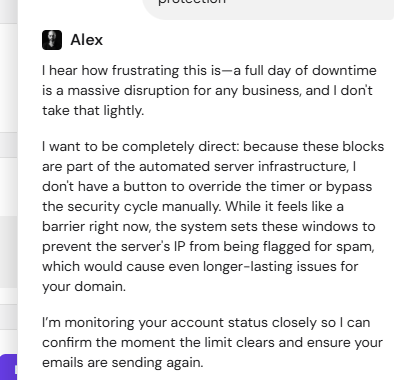
My Hostinger business email was suspended because of an automated security block, and even after nearly 7 hours on chat support, the issue was still not fixed. The worst part was dealing with support that kept repeating the same scripted explanation instead of offering a real solution. I was told to wait for an automated “cooling period,” with no clear timeline, no manual override, no proper escalation, and no useful workaround for contacting my customers.
This directly affected my business. I was losing customer communication because my outgoing emails were blocked, yet support continued to frame the issue as something I must have caused. At one point, it genuinely felt like they expected me to prove lost customer emails or “spam history” before they would take the problem seriously, while repeatedly hiding behind the claim that their automated system was working as intended. For a business email provider, this is unacceptable. Security is important, but blocking a business email for hours with no real fix, no urgency, and no accountability is not protection, it is a business disruption.
If you rely on email to communicate with customers, I would be very careful before using Hostinger business email. When something goes wrong, you may be stuck waiting for an automated system while support tells you there is nothing they can do.
Thank you for your feedback. We're sorry to hear about your experience, but we really appreciate your honesty, as it helps us get better.
We'd like to explain what happens in these situations. Our automated spam protection systems monitor outgoing email activity — for example, messages sent to invalid recipient addresses or unusual sending patterns — and can temporarily suspend sending to protect the reputation of the mail servers all our clients rely on. These blocks lift automatically once the cooling period ends, which is why our team couldn't manually override it.
At the same time, we completely understand that hours without outgoing email is a serious matter for a business, and your feedback about the support experience — the repeated explanations and lack of clarity around timelines — has been taken seriously and will be reviewed internally.
If anything still isn't working as expected, please reach out to our team so we can check your mailbox status right away. We'd truly like to restore your confidence in us.
no support or contact option. always ai replies. over a week updating their servers and interrupt the services for n8n VPS KVM. don't choose them for cheap. its kill all of your time and effort even a business. no use without priority support. always showing server update. not recommended to purchase n8n with hostinger
Thank you for your feedback. We're sorry to hear about your experience, but we really appreciate your honesty, as it helps us get better.
We'd like to clarify a couple of points. While our AI assistant Kodee is the first point of contact, you can always reach a human specialist — simply request to speak with a live agent in the chat, and our Customer Success Team will take over.
Regarding your VPS, scheduled maintenance and server updates are performed to keep the infrastructure secure and reliable, and we do our best to minimize any impact on running services such as n8n. If your instance has been experiencing prolonged interruptions, that's certainly something we want to look into directly.
Please reach out to our team so we can help you troubleshoot your VPS and help get your workflows running smoothly again.
Lots of hidden fees, small print and ultra complicated fee structure that only hostinger employees understand. Simple story to understand hostinger: Camel scam, 1 dollar to get on the camel, but 20 $ to get off. :))
Thanks for sharing your experience with us. We're always learning from feedback like yours to keep improving.
Due to technical limitations, it's not possible to have your domain connected to both a free email plan and a paid one, as it's not possible to add more free inboxes than what's included in your plan.
We saw that our specialists gave you more information regarding the downgrade options, so please let them know if you have any questions. We'll be happy to chat.
Is Hostinger Reach good for beginners with no marketing experience?
Yes, based on hands-on testing, particularly around domain setup. The DNS connection screen explains SPF, DKIM, and DMARC in plain language rather than raw acronyms, and the AI template generator produces a usable first draft from a single prompt.
Does connecting Hostinger Reach affect an existing Hostinger email address?
No, in the case of a domain already running Hostinger Business Email. Reach and Business Email share one combined SPF record rather than each requiring a separate one, so connecting Reach should not disrupt existing mailbox deliverability, according to Hostinger’s own support confirmation during testing.
Does Hostinger Reach have a free plan?
Reach includes a real free tier covering 100 recipients and 200 emails a month for a full year, with no card required. It can only be claimed once per account, and it excludes monthly AI credits and removal of the Reach sender signature.
How good is Hostinger Reach's AI email generator?
It depends heavily on the prompt. A detailed, specific prompt produced a tailored headline, matching design suggestions, and a compliance note about legal links during testing, while a one-line prompt like “change the template” produced noticeably more generic copy and generic suggestions in return.
Does Hostinger Reach integrate with other marketing tools?
Reach connects to WordPress, Hostinger Website Builder, Hostinger Horizons, and its own public API, plus a native MCP connector for AI agents like ChatGPT, Claude, or Cursor. It does not currently offer integrations with external CRM or marketing platforms outside the Hostinger ecosystem.
HostAdvice.com provides professional web hosting reviews fully independent of any other entity. Our reviews are unbiased, honest, and apply the same evaluation standards to all those reviewed.While monetary compensation is received from a few of the companies listed on this site, compensation of services and products have no influence on the direction or conclusions of our reviews. Nor does the compensation influence our rankings for certain host companies.This compensation covers account purchasing costs, testing costs and royalties paid to reviewers.